-
RegEx Knife 2.0.2 Released
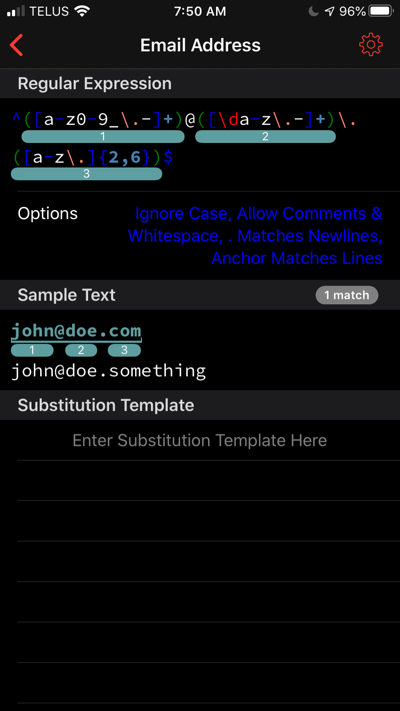
RegEx Knife 2.0.2 is available in the App Store. This releases addresses some bugs, including a couple of crashing issues. It also introduces Dark Mode support.
-
RegEx Knife 2.0.1 Is Coming
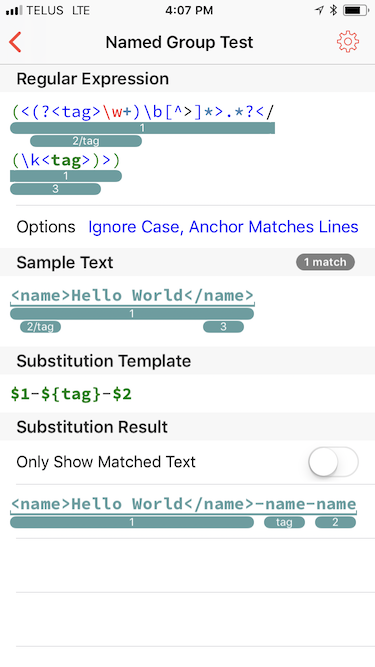
I’m working on the next RegEx Knife 2 maintenance release, version 2.0.1. This release addresses a series of iOS 11 compatibility issues and adds support for named capture groups.
iOS 11’s regular expression engine handles named capture groups in the following ways:
Regex:
(?<name>pattern)Substitutions:
${name}Here’s how named capture groups are displayed in RegEx Knife:
If you are want to help out by testing RegEx Knife, please get in tough with me via email or Twitter.
-
RegEx Knife 2 Available in the App Store
I have updated my RegEx Knife iOS regular expression editing and testing utility so that it works on both the iPhone and the iPad. Check it out on the App Store!
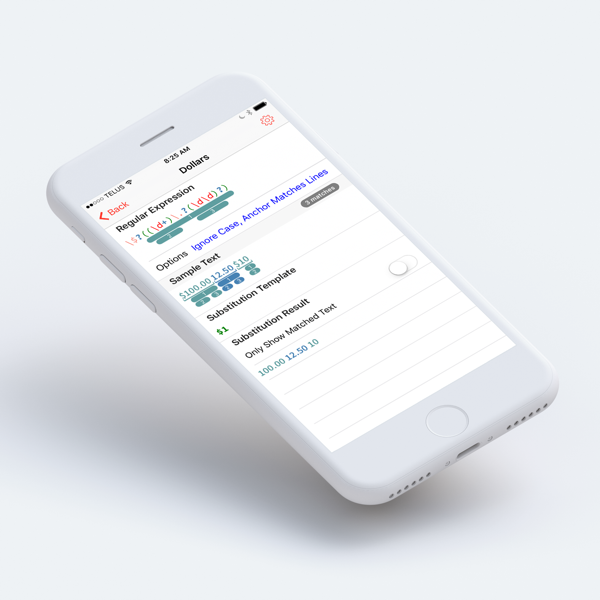
This version of RegEx knife supports iOS 10 niceties like split-screen, hand off and more.
-
RegEx Knife 2.0 Beta Testers Needed
I am wrapping up development of the next version of my RegEx Knife Regular Expression development tool for iOS. The big news for this release is that the UI has changed (no more three-pane split views) and iPhones are finally supported in addition to iPads (the iPad Pro in particular).
If you are interested in helping me test RegEx Knife 2.0, email me and I’ll add you to the beta list. I’ll be using Apple’s TestFlight so you’ll need to have that app installed on your iOS device.
-
The iOS On-Screen Keyboard Is A Problem
I’ve been working on iOS versions of some of my development tools, and I have been struggling to figure out why touch UIs are so poor for this kind of application.
A huge problem is that the bottom half of the screen is a dead zone due to the appearance of the on-screen keyboard. Anything displayed where the on-screen keyboard will appear has to be sacrificial and not critical to the task at hand. For instance, in the case of tools that edit text this means you have to be able to view the text around the insertion point and any important context in roughly half the screen. For programming tools where context is very important this is a big problem. This problem is at its worst when the device is in landscape mode.
As a user, you are forced to keep scrolling around in anticipation of the appearance of the on-screen keyboard so you don’t loose the passage text that interests you.
On the iPad Pro this is a little less of an issue as you have more screen space to work with, especially in portrait mode, but its still a challenge. Obviously, a hardware keyboard is one way to solve this problem, but you cannot count on the user having one at hand all the time.
-
RegEx Knife 1.0.5 Released
RegEx Knife version 1.0.5 is available in the App Store. This version fixes a crashing bug that occurs when working with Regular Expressions containing 10 or more capture groups.
RegEx Knife has had 622 downloads so far (~60/month) - still hardly a rush. Clearly the iPad isn’t the best place to be doing RegEx development, but its handy when you need it.
-
RegEx Knife 1.0.4 Released
RegEx Knife version 1.0.4 is available in the App Store. This version fixes bugs that escaped my notice when developing RegEx Knife 1.0.3. Lets hope I’ve finally sorted everything out.
RegEx Knife has had almost 450 downloads so far - hardly a rush. Clearly, the iPad isn’t the place where one would think of trying to develop Regular Expressions. However, I’ve begun to get a few emails requesting features and reporting bugs which is encouraging.
-
RegEx Knife 1.0.3 Released
RegEx Knife version 1.0.3 is available in the App Store. This version fixes a series of bugs (one quite serious) that escaped my notice when developing RegEx Knife 1.0.2.
See RegEx Knife in the App Store.
It is emberassing to have these kinds of middle-of-the-road bugs remain in a product. This experience has reminded me why I need to recruit more testers for my iOS work, as I have always done for my Mac OS work. Going forward, RegEx Knife will have higher quality.
-
RegEx Knife 1.0.2 Released
RegEx Knife version 1.0.2 is available in the App Store. This version fixes some more iOS 8 compatibility issues and addresses a few bugs that escaped my notice in the 1.0.1 release.
See RegEx Knife in the App Store.
UPDATE: RegEx Knife 1.0.3 Released.
-
RegEx Knife 1.0.1 Released
RegEx Knife version 1.0.1 is available in the App Store. This version fixes some iOS 8 compatibility issues and addresses a few bugs that came to light following the 1.0 release.
UPDATE: RegEx Knife 1.0.2 Released.
-
RegEx Knife 1.0 Released
My first iPad app has hit the App Store!
If you know what a Regular Expression is, then head on over and take a look - its free. Thanks to Bryan Bell for contributing the lovely icon.
RegEx Knife builds upon the Regular Expression tester found in betas of my Affrus 2 product to offer a unique way of visualizing Regular Expression capture groups.
As a 1.0 release it is pretty minimal. There are several things I want to improve as time goes on.
UPDATE: RegEx Knife 1.0.1 Released.
-
RegEx Knife
I just realized that it has been almost a year since I have posted anything here. After such a long silence, I’m ready to show off some of my recent work. This is my first non-trivial iPad application, and I’m quite excited by what I have been able to achieve using Text Kit in iOS7.
RegEx Knife is a port of the Regular Expressions Tester functionality from Affrus 2 to the iPad. This tool allows you to enter regular expressions into a syntax highlighted editor, enter sample text against which the regular expression is matched, and finally, enter a substitution template which is used to transform the sample text.
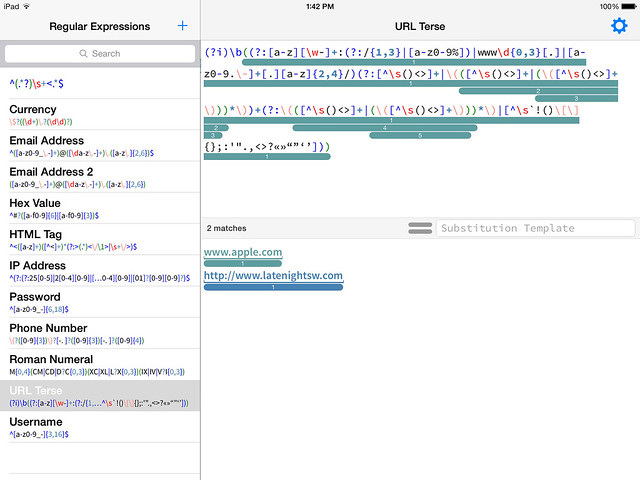
Rounded bars highlight capture groups in the regular expression and the actual text captured in the sample text.
When a substitution string is entered into the Substitution Template field, the sample text area at the bottom of the screen splits into two panes where you can simultaneously see the sample text and the text transformed by the substitution.
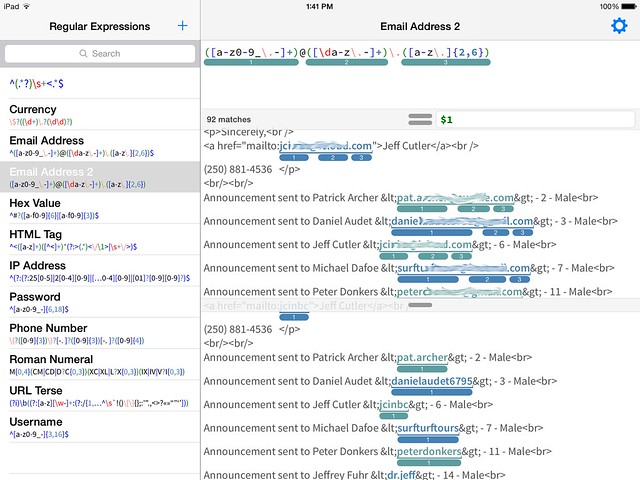
Notice that the capture groups are highlighted in both the sample text and also the transformed text where they indicating which group provided the resulting text.
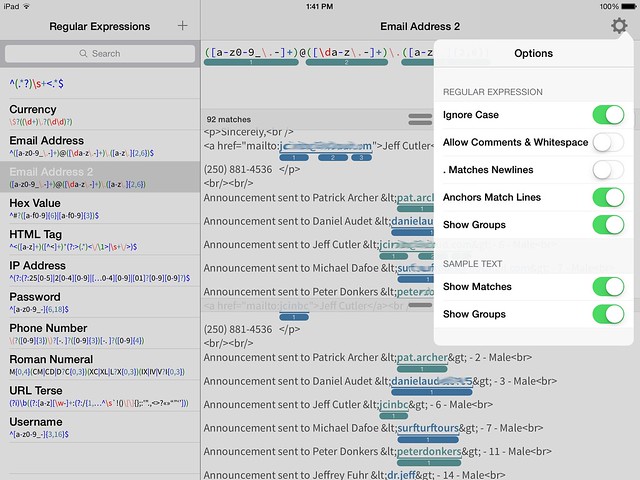
Here are the options you can alter which control how regular expressions are interpreted and how matches and groups are displayed.
subscribe via RSS