-
Snow Leopard vs My Scripting Additions
My various Scripting Additions (XML Tools, XSLT Tools, Property List Tools and List & record Tools) are compiled for 32-bit Intel and PowerPC machines. With the advent of Snow Leopard, AppleScript Script Editor, applets and droplets run as 64-bit processes which causes my Scripting Additions to fail to load on 64-bit hardware.
In order to continue using my Scripting Additions, you need to run the AppleScript Script Editor, applets and droplets in 32-bit mode. This is done by using the Finder’s Get Info panel and then checking the 32-bit Model checkbox.
My scripting additions make heavy use of Carbon which is 32-bit only, so making 64-bit versions may be difficult. I don’t want to say I’ll never make 64-bit versions, but at this stage its not clear to me how to move forward.
UPDATE: This problem and solution also applies to JavaScript OSA.
-
Commnad-line JavaScript OSA?!
A recient thread on the JavaScript OSA mailing list makes me think that there should be a jsosa command-line tool that you can run from the Terminal, bypassing osascript. This would allow for all of the Unix shell goodness and the AppleEvent integration. Ahhh, another item for my to-do list.
-
JavaScript OSA vs Mac OS X 10.4 Script Editor
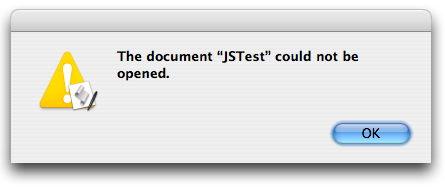
Somewhere along the way, the Mac OS X 10.4 Script Editor stopped being able to open scripts compiled using JavaScript OSA. You can compile and save scripts, but when you try and open then you’ll see this error alert:

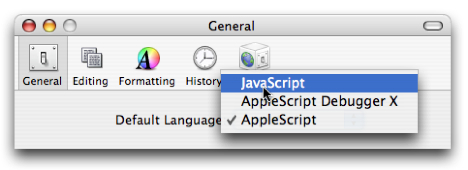
It turns out that the 10.4 Script Editor can only open scripts saved using the “default” scripting system. The “default” scripting system is the one that is assigned to new documents - generally AppleScript.
In order to open JavaScript OSA scripts, you have to change the “default” scripting system to JavaScript OSA. The problem then is that you won’t be able to open your AppleScript scripts - sigh.

NOTE: this problem also effects Script Debugger’s AppleScript Debugging OSA component. If, for some reason, you need to open scripts saved from Script Debugger with Debugging enabled in the Script Editor, you’ll have to use the same trick.
Apple is aware of the issue and working on a fix. However, its not clear when a fix will be released.
subscribe via RSS