-
OSAID Leaks Cause Crashes
As a followup to my Getting Yosemite AppleScript Progress Information post I would like to offer this PSA.
There an AppleScript crashing bug that you may encounter when using the
OSAGetProperty()call.If you fail to call
OSADispose()to release the OSAID values you receive fromOSAGetProperty()you have an OSAID leak. If you begin to see difficult to reproduce crashes that look like this then you have an OSAID leak in your application:#0 0x00007fff97a6a827 in CFRelease () #1 0x00000001054fb6b6 in UASMakeIDTable(unsigned long) () #2 0x00000001054fb81b in UASNewID(TUASScript*) () #3 0x00000001054c0f9d in ASGetPropertyLocal(int, unsigned int, AEDesc const*, unsigned int*) () #4 0x00000001054b7aad in AppleScriptComponent () #5 0x00007fff95704b73 in OSAGetProperty ()I filed a Radar bug with Apple over 10 years ago but the issue appears to have gone unresolved. It seems to me that when the available OSAIDs have been exhausted,
OSAGetProperty()(and all other OSA calls) should return some sort of error instead of crashing.UPDATE
If, like me, you wrap your OSAIDs in an Objective-C object, make sure your autorelease pool(s) drain properly. You’re call to
OSADispose()probably happens when your object is dealloced and that may not happen when you expect. -
Getting Yosemite AppleScript Progress Information
Yosemite (Mac OS X 10.10) introduced 4 new properties scripts can set to report progress information:
progress total steps(an integer)
progress completed steps(an integer)
progress description(text)
progress additional description(text)See the Yosemite AppleScript Release Notes for full details.
What is not explained is how a host application can access this information and display a script’s progress in its own UI. Here’s how you do it.
At intervals the script will call the OSAActiveProc. Within this callback function you can make OSA calls that access the running script’s state. You start by getting a reference to the ‘AppleScript’ object. From there you can read the value of the four progress properties. The following code uses my own OSAID wrapper object (RKOSAID - don’t ask, Script Debugger is 20 year old code). You can use whichever OSA API you are most familiar with.
-- Provisional property ID constants until Apple puts them into a public API #define pASProgressTotalSteps_LNS 'ppgt' #define pASProgressStepsCompleted_LNS 'ppgc' #define pASProgressDescription_LNS 'ppgd' #define pASProgressAdditionalDescription_LNS 'ppga' @interface RKOSAID (AppleScriptProgress) - (NSDictionary*) appleScriptProgress; @end @implementation RKOSAID (AppleScriptProgress) - (NSDictionary*) appleScriptProgress { // Get a reference to the 'AppleScript' object RKOSAID* as = [self propertyForPropertyID:pASTopLevelScript]; // Extract the progress properties RKOSAID* totalSteps = [as propertyForPropertyID:pASProgressTotalSteps_LNS]; RKOSAID* steps = [as propertyForPropertyID:pASProgressStepsCompleted_LNS]; RKOSAID* description = [as propertyForPropertyID:pASProgressDescription_LNS]; RKOSAID* addnlDescription = [as propertyForPropertyID:pASProgressAdditionalDescription_LNS]; // Convert into Cocoa objects and return return @{@"totalSteps": @(totalSteps.descriptor.int32Value), @"steps": @(steps.descriptor.int32Value), @"description" : description.descriptor.stringValue, @"additionalDescription" : addnlDescription.descriptor.stringValue}; } @endNOTE: My -[RKOSAID propertyForPropertyID:] call wraps the OSAGetProperty() call defined in ASDebugging.h.
SEE ALSO: OSAID Leaks Cause Crashes.
-
My First iPhone App
Now that Script Debugger 5 has been released, and most of the fires have been put out, I am turning my attention to new projects. As part of this I have been doing a lot of reading and experimenting with Android and iOS development. I realize I’m late to the party with iOS/Android development, but Mac OS work has kept my busy.
I finally decided to get my feet out of the mud and build something useful. I chose as my first significant iPhone app a client for the Victoria Virtual Tennis Club. This is a PHP/MySQL based web site which I developed to help this organization host Tennis matches in the Victoria B.C. area.
Like most desktop developers moving to mobile, I’m struggling to keep things simple on iOS and adopt the UI idioms users have come to expect and understand. I’m sure I’ll find ways to simply this app after I’ve had time to play with it.
This is a standard master-detail app which lists a calendar of upcoming VVTC events:

Taping on an event in the master screen takes you to a detail screen where you can see event details, a list of participants and then sign up for the event if you want to.

Behind the scenes, this involved adding a simple REST service to the VVTC web site to get the current calendar information, and to request signup. This data is returned as a JSON structure.
I decided to avoid the various iOS REST frameworks I found, and simply roll my own since I only have two URLs (get calendar, request signup). This decision may haunt me in the future, but for now things are working and I can understand what’s going on. The new NSJSONSerialization class worked flawlessly with the data returned by PHP’s json_encode function. Dealing with dates was a bit of an issue, but I finally settled on the ISO 6801 date format and that problem was solved.
Going forward, I want to add a Month view that mimics Apple’s Calendar application using the Kal project as an alternative to the list view I currently have.
I want to give full credit to the following resources that made this whole exercise possible within the 2 days I gave myself:
-
Matt Neuburg’s new “Programming iOS 5” book. This book explained lots of things for me, but most importantly it allowed me to adopt ARC along with a lot of Objective-C 2 features in my iPhone app. After many years of doing manual memory management in Script Debugger, it took a lot to let go of the rains and trust this to the compiler. This exercise has kind of spoiled me for dealing with my old code.
I read the first edition of Matt’s book cover-to-cover a few years ago and that gave me my basic understanding of the iOS SDK. A lot has changed over the years, and the new version of the book was great at reacquainting me with the iOS SDK.
-
Erica Sadun’s “The iOS Developer’s Cookbook”. Lifting pieces of Erica’s code out of her examples saved me a bunch of time.
-
The QuickDialog project. I used this to build all the detail views in my app and it saved me a mountain of time.
-
There are many web sites offing directories of reusable iOS (and Mac OS) UI components, but I recently found Cocoa Controls. This site led me to stumble upon QuickDialog and a number of other useful things.
UPDATE: I am missing Cocoa Bindings under iOS. I know that iOS provides Key Value Observing, but Bindings are missing. How are others dealing with this omission?
-
-
TimePicker Cocoa View
UPDATE - 12-October-2013: I have moved the code for this project to GitHub.
This project is an attempt to implement David Cristian’s Hour Picker UI design (which I found via UI Parade) as a Cocoa View. Here is how David’s UI mockup appears:

When I first saw this UI design I found it visually compelling, and it really seems like a nice solution to the problem of allowing the user to quickly pick periods of time in 1/2 hour increments. When I began turning it into a functional UI a number of issues concerning how users interact with the UI begin to surface:
- This mockup shows only 6 hours. The UI needs to scroll in order to show the full 24-hour day.
- I chose only to implement click and drag to select time ranges. I imagine that shift-clicking might be desirable. I didn’t attempt to handle keyboard input.
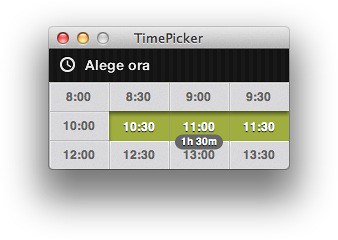
- At first I though the 1/2 hour grid was self evident. However, when I began using the UI, I decided I needed duration feedback while dragging to know exactly how long the selected period is.
Here’s how my implementation looks while the user is dragging the mouse:
There are limitations to this UI:
- Time can only be selected in 1/2 hour increments.
- Time can only be selected within a single 24-hour day.
- Auto-scrolling while dragging is problematic. It may be that auto-scrolling needs to slow down, or more rows need to be made visible in the scroll view.
Requirements
The project requires Xcode 4.2, and the Mac OS X 10.7 SDK.

-
AppleScriptObjC Explored 2.0
Shane Stanley has just released version 2 of AppleScriptObjC Explored, his book documenting Apple’s AppleScriptObjC (the successor to AppleScript Studio).
Shane’s book has become the most comprehensive documentation for AppleScriptObjC available. If you are attempting to use AppleScriptObjC to put a User Interface around your AppleScript code, this is a resource you must look into.
-
NSBrowser, NSTreeController, bindings, and displaying images
After much searching in Google, I found that there was no obvious solution to displaying images along with text in an NSBrowser when you are using NSTreeController and bindings to populate the browser.
Part of the problem is that you cannot easily use an NSBrowser delegate if you are also using bindings and an NSTreeController to drive the browser (at least on Mac OS X 10.6). For instance, you are prevented from using the
-[NSBrowser browser:willDisplayCell:atRow:row column:column]delegate method to customize the cell presentation as you might do in an NSTableView or NSOutlineView.I worked around this problem using a custome cell approach. When you bind the Browser’s Content Values binding to the NSTreeController, NSTreeController calls the browser cell’s setObjectValue: method. If you subclass NSBrowserCell and override setObjectValue:, you can assign the cell’s text and image. Here’s my NSBrowserCell subclass:
@interface MyBrowserCell : NSBrowserCell { }

- (void) setObjectValue:(id) value;

@end

@implementation MyBrowserCell

- (void) setObjectValue:(id) value {
    if ([value isKindOfClass:[NSDictionary class]]) {
        [self setStringValue:[value valueForKey:@"name"]];
        [self setImage:[value valueForKey:@"image"]];
    }
    else
        [super setObjectValue:value];
}

@end
Next, you need to configure the NSBrowser to use this cell. The simplest way to accomplish this is with NSBrowser’s setCellClass: method:
[browserView setCellClass:[MyBrowserCell class]];Finally, you need to make your bindings model return a value that’s appropriate for MyBrowserCell. Here’s my nodel’s value getter method which is bound to the NSBrowser Content Values binding:
- (id) browserValue {
    return [NSDictionary dictionaryWithObjectsAndKeys:
                            [self browserName], @"name",
                            [self browserImage], @"image",
                            nil];
}
Note that you’ll need to make sure that will/didChangeValueForKey messages are sent for browserValue when browserName or browserImage change.
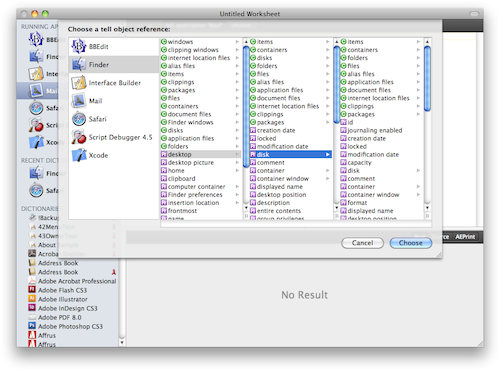
Here’s the result in my application:

-
SourceListView II
Some time ago I published sample code illustrating how to implement a Source List view that mimicked the Source List displays found in iTunes and the Finder. I was surprised to discover how widely my sample code was linked to by others.
With the release of Leopard, Apple has added the ability to build Source List displays directly into NSTableView/NSOutlineView. I have updated my sample code to take advantage of the changes Apple has made. This reduces the amount of work I have to do and allows the sample code to adopt any cosmetic changes Apple may introduce in the future.
Download SourceListII Sample Code

I hope you find this code useful.
-
iChat Theatre Sample Code
iChat Theatre Demo (1MB)
Leopard introduced something called iChat Theatre which allows applications to share content with other users via iChat. Apple’s Keynote is the poster child for this in that it allows you to show a presentation to another user via iChat.
Leopard provides an amazingly simply API for integrating this capability into a Cocoa application. My iChat Theatre Demo project shows how to integrate iChat Theatre into a Cocoa application by sharing an NSImageView.
To use the demo, do the following:
- launch the iChatDemo application
- in iChat, begin a Video Chat with another user
- click the + button in the bottom margin of the Video chat button, and select the Share a File option from the popup menu
- in the resulting Open File panel, select the iChatDemo application file
At this point, iChat should begin showing the images displayed by iChatDemo in its window
An alternate usage is to simply drag the iChatDemo application file’s icon into the Video iChat window, but this produces a subtly different presentation in iChat.
-
OmniInspector with Resizable Tabs
In my recent OmniInspector Sample Code blog entry I present a sample application illustrating how to use the OmniInspector framework.
One limitation of the OmniInspector framework is that tabbed inspector windows cannot be resized. If you want a resizable inspector, you have to use a “standard” inspector.
Most of the inspectors in my applications need to be resizable, so I hacked the OmniInspector sources to allow resizable inspectors in tabbed OmniInspector windows (you have to love Open Source code). Here are my modifications in case you need this capability in your application:
OmniInspector with Resizable Tabs 164Kb
All of my modifications to the sources are preceded by a //MALL comment.
-
QuickTime Skimmer View
After receiving my copy of iLife ‘08 I began playing with iMovie ‘08. Despite the controversy surrounding iMovie 08 vs iMovie HD, I find the skimming UI Apple has introduced quite good.
I have an internal project that could use this style of movie selection and previewing so I decided to create my own implementation using Cocoa and QTKit. Here’s what I came up with:
 (Click Image To Play Demo Movie)
I’ve been able to implement these features:
- skimming
- selection
- playback
- dragging
- thumbnail scaling
- timeline scaling
IMPORTANT: this code only seems to perform well with movies encoded using the Apple Intermediate codec. LNSQTSkimmerView relies on QTMovie’s frameImageAtTime: method to display thumbnail frames. This method can become very slow for movies encoded in other formats (i.e. H.264).
iMovie ‘08 uses the Apple Intermediate codec and also pre-generates thumbnails for its skimming view. Pre-generating thumbnails may allow my code to operate well with any QuickTime movie.
####Missing Bits
There are a couple of things in iMovie 08’s skimming view that I’ve not yet implemented:
- embossed frames around thumbnails.
- audio scrubbing as you skim over a movie
- displaying multiple movie clips on one skimmer view
####Acknowledgments
This code uses the NSBezierPath+PXRoundedRectangleAdditions Objective-C category from Andy Matuschak’s Pixen project.
####LICENSE
MIT License for LNSQTSkimmerView Copyright (c) 2007 Mark Alldritt All Rights Reserved
Permission is hereby granted, free of charge, to any person obtaining a copy of this software and associated documentation files (the “Software”), to deal in the Software without restriction, including without limitation the rights to use, copy, modify, merge, publish, distribute, sublicense, and/or sell copies of the Software, and to permit persons to whom the Software is furnished to do so, subject to the following conditions:
The above copyright notice and this permission notice shall be included in all copies or substantial portions of the Software.
THE SOFTWARE IS PROVIDED “AS IS”, WITHOUT WARRANTY OF ANY KIND, EXPRESS OR IMPLIED, INCLUDING BUT NOT LIMITED TO THE WARRANTIES OF MERCHANTABILITY, FITNESS FOR A PARTICULAR PURPOSE AND NONINFRINGEMENT. IN NO EVENT SHALL THE AUTHORS OR COPYRIGHT HOLDERS BE LIABLE FOR ANY CLAIM, DAMAGES OR OTHER LIABILITY, WHETHER IN AN ACTION OF CONTRACT, TORT OR OTHERWISE, ARISING FROM, OUT OF OR IN CONNECTION WITH THE SOFTWARE OR THE USE OR OTHER DEALINGS IN THE SOFTWARE.
-
Cocoa Scripting: Properties with Multiple Data Types
The SDEF (Scripting Definition) XML dictionary format allows you to define properties that have multiple data types. This allows applications to support the as parameter to the AppleScript Get command. However, Cocoa Scripting does not fully support the notion of properties with multiple data types. This article describes how to implement multiple data type support using Cocoa Scripting.
####Why Do This?
Before I get into the code, let me briefly describe why you might want to do this in your application. Simply put, the value of certain properties may be expressed in difference data types. For example, you might have a selection property. Lets say that by default, the selection property returns the selected text in your application. However, you may also want to allow the user to ask for a reference to the location of the selected text:
get selection --> "Hello World"
get selection as string --> "Hello World"
get selection as reference --> word 2 thru 3 of document 1
When the scripter tries to alter the selection, they may do it in two ways:
set selection to "Goodbye" --> Replace the selected text with "Goodbye"
set selection to word 1 of document 1 --> select the first word
CAUTION: please use multiple data types correctly. The value returned for each data type should represent the same value, but in different ways. Correct use of multiple types avoids the need to have multiple versions of a given property in your dictionary, each returning the same value expressed in a different way.
####The SDEF
Here’s a snippet from an SDEF defining a selection property that supports two data types: text and specifier.
####Supporting Set Operations (Easy)
Cocoa Scripting facilitates Set operations for properties with multiple types. It will convert the incoming AppleEvent data to an instance of NSString for a text value or an instance of NSScriptObjectSpecifier if the value is an object reference (specifier). Here’s how you might implement the setAESelection: accessor:
- (void) setAESelection:(id) value
{
  if ([value isKindOfClass:[NSString class]])
  {
	// replace the selected text with the incoming value
  }
  else if ([value isKindOfClass:[NSScriptObjectSpecifier class]])
  {
  	// change the selection to the range of text specified in the
  	// incoming object specifier
  }
}
####Supporting Get-As Operations (A Little Harder)
Here is where Cocoa Scripting leaves you to your own devices. The problem is that the desired data type is not passed to the accessor function. You have to get this from the current AppleEvent yourself. I use this function:
DescType FSRequestedTypeForCurrentEvent()
{
  NSAppleEventDescriptor* event = [[NSAppleEventManager sharedAppleEventManager] currentAppleEvent];
  NSAppleEventDescriptor* requestedType = [event descriptorForKeyword:keyAERequestedType];

  if (requestedType)
	return [requestedType typeCodeValue];
  else
	return typeBest;
}
Then, the Accessor can be written like this:
- (id) AESelection { switch (FSRequestedTypeForCurrentEvent()) { case typeBest: // the default if no 'as' parameter specified case typeText: case typeUnicodeText: // return an NSString instance containing the selected string break; case typeObjectSpecifier: // return an NSScriptObjectSpecifier instance describing the // location of the selection break; default: // unsupported type [[NSScriptCommand currentCommand] setScriptErrorNumber: errAEWrongDataType]; return nil; } }NOTE: I generally have AppleEvent specific accessors for use with Cocoa Scripting that in turn use my bindings compatible accessors. This is because Cocoa Scripting needs to support things like multiple data types, and reports errors in a different way.
-
SourceListView
UPDATE: I have released an updated version of this sample that takes advantage of improvements Apple made in Leopard (Mac OS X 10.5).
I’ve been looking for a SourceList outline view for FaceSpan that I can use under Mac OS X 10.4. A bunch of Googling revealed parts of the puzzle, but nothing that pulled all the pieces together. So I decided to produce my own SourceList view using the pieces I found.
I used iPhoto ‘08, iTunes 7, Numbers ‘08 and Mail as models. Here are the elements of the SourceList views in these applications that seem to be different from the stock NSTableView/NSOutlineView:
- Light blue background color
- Darker blue or blue gradient selection background
- The selection background color does not honor the system’s selection color preference
- Source Groups are not selectable
- Source Groups are drawn All Caps, Bold, Gray with a white shadow (appear embossed into the background)
- Source Group rows are a little taller than the others
- When inactive, the selection background turns gray, and the text switches from white to black
- The disclosure triangles are smaller than the ones provided by NSOutlineView (I’ve still not figured out how to accomplish this).
Here’s what I came up with:
Gradient Selection background (thank’s to Matt Gemmell’s iTableView):

Flat Selection background:

Matt Gemmell’s license seems reasonable, so I’m releasing the SourceList code under his license.
-
Faster iLifeControls
I’m working on a project that uses Sean Patrick O’Brien’s iLifeControls. My application is a QuickTime editing tool, and I quickly ran into performance problems that I traced to the NFIFrame class within iLifeControls. Here is an updated version of NFIFrame that consumes ~50% less CPU time doing a window refresh.
NOTE: My changes are enclosed in #ifdef FASTER blocks.
NFIFrame.h
//
//  NFIFrame.h
//  iLife Window
//
//  Created by Sean Patrick O'Brien on 9/15/06.
//  Copyright 2006 Sean Patrick O'Brien. All rights reserved.
//

#import

#import "NSGrayFrame.h"

#define FASTER 1

@class NSGrayFrame;

@interface NFIFrame : NSGrayFrame {
	float mTitleBarHeight;
    float mBottomBarHeight;
    float mMidBarHeight;
    float mMidBarOriginY;

	id mInnerGradient;
	id mOuterGradient;

#if FASTER
	NSImage* mCachedBackground;
#endif
}

+ (NSBezierPath*)_clippingPathForFrame:(NSRect)frame;
+ (float)cornerRadius;

- (void)_drawTitleBar:(NSRect)rect;
- (void)_drawMidBar:(NSRect)rect;
- (void)_drawBottomBar:(NSRect)rect;
- (void)_drawTitle:(NSRect)rect;

- (id)backgroundColor;
- (id)gradientStartColor;
- (id)gradientEndColor;
- (id)gradient2StartColor;
- (id)gradient2EndColor;
- (id)edgeColor;
- (id)bottomEdgeColor;
- (id)topWindowEdgeColor;
- (id)bottomWindowEdgeColor;
- (id)titleColor;

- (float)titleBarHeight;
- (void)setTitleBarHeight:(float)height;
- (float)bottomBarHeight;
- (void)setBottomBarHeight:(float)height;
- (float)midBarHeight;
- (float)midBarOriginY;
- (void)setMidBarHeight:(float)height origin:(float)origin;

@end
NFIFrame.m
//
//  NFIFrame.m
//  CustomWindow
//
//  Created by Sean Patrick O'Brien on 9/15/06.
//  Copyright 2006 Sean Patrick O'Brien. All rights reserved.
//

#import "NFIFrame.h"

#import "CTGradient.h"
#import "EtchedTextCell.h"
#import "NSImage+FrameworkImage.h"

@implementation NFIFrame

- (id)initWithFrame:(struct _NSRect)frame styleMask:(unsigned int)style owner:(id)o
{
	self = [super initWithFrame:frame styleMask:style owner:o];
	mTitleBarHeight = 25.0f;
	mBottomBarHeight = 0;
	mMidBarOriginY = 0;
	mMidBarHeight = 0;

	mInnerGradient = [[CTGradient gradientWithBeginningColor: [self gradientStartColor]
						endingColor:[self gradientEndColor]] retain];
	mOuterGradient = [[CTGradient gradientWithBeginningColor: [self gradient2StartColor]
						endingColor:[self gradient2EndColor]] retain];

	titleCell = [[EtchedTextCell alloc] initTextCell: @""];
	[titleCell setFont:[NSFont fontWithName:@"LucidaGrande" size:13.0]];
	[titleCell setShadowColor:[NSColor whiteColor]];

	return self;
}

#if FASTER
- (void) dealloc
{
	[mCachedBackground release];
	[super dealloc];
}
#endif

- (NSSize)_topCornerSize
{
	return NSMakeSize(0, [self titleBarHeight]);
}

+ (NSBezierPath*)_clippingPathForFrame:(NSRect)aRect
{
	float radius = [self cornerRadius];
	NSBezierPath *path = [NSBezierPath alloc];
	NSPoint topMid = NSMakePoint(NSMidX(aRect), NSMaxY(aRect));
	NSPoint topLeft = NSMakePoint(NSMinX(aRect), NSMaxY(aRect));
	NSPoint topRight = NSMakePoint(NSMaxX(aRect), NSMaxY(aRect));
	NSPoint bottomRight = NSMakePoint(NSMaxX(aRect), NSMinY(aRect));

	[path moveToPoint: topMid];
	[path appendBezierPathWithArcFromPoint: topRight
		toPoint: bottomRight
		radius: radius];
	[path appendBezierPathWithArcFromPoint: bottomRight
		toPoint: aRect.origin
		radius: radius];
	[path appendBezierPathWithArcFromPoint: aRect.origin
		toPoint: topLeft
		radius: radius];
	[path appendBezierPathWithArcFromPoint: topLeft
		toPoint: topRight
		radius: radius];
	[path closePath];

	return path;
}

- (void)_drawTitle:(NSRect)rect
{
	[self _drawTitleStringIn:rect withColor:[self titleColor]];
}

- (void)_drawTitleBar:(NSRect)rect
{
	[[self topWindowEdgeColor] set];
	NSRectFill(rect);
	rect.size.height--;
	[[self bottomEdgeColor] set];
	NSRectFill(rect);
	rect.size.height++;

	NSRect gradientRect = rect;
	gradientRect.origin.y++;
	gradientRect.size.height -= 2;
	[mOuterGradient fillRect: gradientRect angle:-90.0f];
	gradientRect.origin.x++;
	gradientRect.size.width -= 2;
	[mInnerGradient fillRect: gradientRect angle:-90.0f];

	NSImage *topLeft = [NSImage frameworkImageNamed: @"IWWindowCornerTL"];
	NSImage *topRight = [NSImage frameworkImageNamed: @"IWWindowCornerTR"];

	[topLeft compositeToPoint:NSMakePoint(rect.origin.x,
				rect.origin.y + [self titleBarHeight] - [topLeft size].height) operation: NSCompositeSourceOver];
	[topRight compositeToPoint:NSMakePoint(rect.origin.x + rect.size.width-[topRight size].width,
				rect.origin.y + [self titleBarHeight] - [topLeft size].height) operation: NSCompositeSourceOver];

	[self _drawTitle:rect];
}

- (void)_drawMidBar:(NSRect)rect
{
	[[self bottomWindowEdgeColor] set];
	NSRectFill(rect);
	rect.origin.y++;
	rect.size.height--;
	[[self bottomEdgeColor] set];
	NSRectFill(rect);
	rect.size.height -= 2;
	rect.origin.y++;
	[[self edgeColor] set];
	NSRectFill(rect);
	rect.size.height += 3;
	rect.origin.y -= 2;

	NSRect gradientRect = rect;
	gradientRect.origin.y++;
	gradientRect.size.height -= 3;
	[mOuterGradient fillRect: gradientRect angle:-90.0f];
	gradientRect.origin.x++;
	gradientRect.size.width -= 2;
	[mInnerGradient fillRect: gradientRect angle:-90.0f];
}

- (void)_drawBottomBar:(NSRect)rect
{
	[[self bottomWindowEdgeColor] set];
	NSRectFill(rect);
	rect.origin.y++;
	rect.size.height--;
	[[self bottomEdgeColor] set];
	NSRectFill(rect);
	rect.size.height -= 2;
	rect.origin.y++;
	[[self edgeColor] set];
	NSRectFill(rect);
	rect.size.height += 3;
	rect.origin.y -= 2;

	NSRect gradientRect = rect;
	gradientRect.origin.y++;
	gradientRect.size.height -= 3;
	[mOuterGradient fillRect: gradientRect angle:-90.0f];
	gradientRect.origin.x++;
	gradientRect.size.width -= 2;
	[mInnerGradient fillRect: gradientRect angle:-90.0f];

	NSImage *bottomLeft = [NSImage frameworkImageNamed: @"IWWindowCornerBL"];
	NSImage *bottomRight = [NSImage frameworkImageNamed: @"IWWindowCornerBR"];

	[bottomLeft compositeToPoint:NSMakePoint(rect.origin.x, rect.origin.y) operation: NSCompositeSourceOver];
	[bottomRight compositeToPoint:NSMakePoint(rect.origin.x + rect.size.width-[bottomRight size].width, rect.origin.y) operation: NSCompositeSourceOver];
}

- (void)drawRect:(struct _NSRect)_rect
{
	NSRect rect = [self bounds];
#if FASTER
	NSSize size = mCachedBackground ? [mCachedBackground size] : NSZeroSize;

	if (!mCachedBackground || size.width != NSWidth(rect) || size.height != NSHeight(rect))
	{
		[mCachedBackground release];

		mCachedBackground = [[NSImage alloc] initWithSize:rect.size];
		[mCachedBackground lockFocus];
		{
			[[NSColor clearColor] set];
			NSRectFill(_rect);

			NSBezierPath *path = [[self class] _clippingPathForFrame: rect];
			[path addClip];

			[[self backgroundColor] set];

			NSRectFill(rect);

			NSRect titleBarRect = rect;
			titleBarRect.origin.y += rect.size.height - [self titleBarHeight];
			titleBarRect.size.height = [self titleBarHeight];

			NSRect bottomBarRect = rect;
			bottomBarRect.size.height = [self bottomBarHeight];

			NSRect midBarRect = rect;
			midBarRect.origin.y += [self midBarOriginY];
			midBarRect.size.height = [self midBarHeight];

			[self _drawMidBar: midBarRect];
			[self _drawTitleBar: titleBarRect];
			[self _drawBottomBar: bottomBarRect];
		}
		[mCachedBackground unlockFocus];
	}

	[[NSColor clearColor] set];
	NSRectFill(NSUnionRect(rect, _rect));
	[mCachedBackground drawInRect:_rect
						 fromRect:_rect
						operation:NSCompositeSourceOver
						 fraction:1.0];
#else
	[[NSColor clearColor] set];

	NSRectFill(rect);
	NSRectFill(_rect);

	NSBezierPath *path = [[self class] _clippingPathForFrame: rect];
	[path addClip];

	[[self backgroundColor] set];

	NSRectFill(rect);

	NSRect titleBarRect = rect;
	titleBarRect.origin.y += rect.size.height - [self titleBarHeight];
	titleBarRect.size.height = [self titleBarHeight];

	NSRect bottomBarRect = rect;
	bottomBarRect.size.height = [self bottomBarHeight];

	NSRect midBarRect = rect;
	midBarRect.origin.y += [self midBarOriginY];
	midBarRect.size.height = [self midBarHeight];

	[self _drawMidBar: midBarRect];
	[self _drawTitleBar: titleBarRect];
	[self _drawBottomBar: bottomBarRect];
#endif
}

- (void)_drawGrowBoxWithClip:(struct _NSRect)rect
{
	rect.origin.x += 3;
	rect.origin.y += 2;
	NSImage *resize = [NSImage frameworkImageNamed:@"IWWindowResizeControl"];
	[resize compositeToPoint:rect.origin operation: NSCompositeSourceOver];
}

- (float)titleBarHeight
{
	if([self _toolbarIsShown])
		return mTitleBarHeight + [self _distanceFromToolbarBaseToTitlebar];
	return mTitleBarHeight;
}

- (void)setTitleBarHeight:(float)height
{
	mTitleBarHeight = height;
#if FASTER
	[mCachedBackground release];
	mCachedBackground = nil;
#endif
	[self setNeedsDisplay:YES];
}

- (float)bottomBarHeight
{
	return mBottomBarHeight;
}

- (void)setBottomBarHeight:(float)height
{
	mBottomBarHeight = height;
#if FASTER
	[mCachedBackground release];
	mCachedBackground = nil;
#endif
	[self setNeedsDisplay:YES];
}

- (float)midBarHeight
{
	return mMidBarHeight;
}

- (float)midBarOriginY
{
	return mMidBarOriginY;
}

- (void)setMidBarHeight:(float)height origin:(float)origin
{
	mMidBarHeight = height;
	mMidBarOriginY = origin;
#if FASTER
	[mCachedBackground release];
	mCachedBackground = nil;
#endif
	[self setNeedsDisplay:YES];
}

- (NSRect)contentRectForFrameRect:(NSRect)frameRect styleMask:(unsigned int)aStyle
{
    frameRect.size.height -= 25;//[self titleBarHeight];
    return frameRect;
}

- (NSRect)frameRectForContentRect:(NSRect)windowContent styleMask:(unsigned int)aStyle
{
    windowContent.size.height += 25;//[self titleBarHeight];
    return windowContent;
}

- (void)_showToolbarWithAnimation:(BOOL)animate
{
	[super _showToolbarWithAnimation:animate];
	[self setNeedsDisplay:YES];
}

- (id)backgroundColor
{
	return [NSColor colorWithCalibratedWhite: 224/255.0 alpha: 1.0];
}

- (id)gradientStartColor
{
	return [NSColor colorWithCalibratedWhite: 197/255.0 alpha: 1.0];
}

- (id)gradientEndColor
{
	return [NSColor colorWithCalibratedWhite: 150/255.0 alpha: 1.0];
}

- (id)gradient2StartColor
{
	return [NSColor colorWithCalibratedWhite: 179/255.0 alpha: 1.0];
}

- (id)gradient2EndColor
{
	return [NSColor colorWithCalibratedWhite: 139/255.0 alpha: 1.0];
}

- (id)edgeColor
{
	return [NSColor colorWithCalibratedWhite: 226/255.0 alpha: 1.0];
}

- (id)bottomEdgeColor
{
	return [NSColor colorWithCalibratedWhite: 102/255.0 alpha: 1.0];
}

- (id)topWindowEdgeColor
{
	return [NSColor colorWithCalibratedWhite: 222/255.0 alpha: 1.0];
}

- (id)bottomWindowEdgeColor
{
	return [NSColor colorWithCalibratedWhite: 65/255.0 alpha: 1.0];
}

- (id)titleColor
{
	if([[self window] isMainWindow])
		return [NSColor colorWithCalibratedWhite:0 alpha:0.9];
	return [NSColor colorWithCalibratedWhite:0 alpha:0.50];
}

+ (float)cornerRadius
{
	return 5.0;
}

@end
subscribe via RSS