-
MacScripter.net
I’m excited to announce that I have become the new host of the MacScripter.net discussion forum. MacScripter has been a long standing resource for information concerning macOS automation using technologies such as AppleScript, Automator, and JavaScript For Automation.
Ray Barber established the site many many years ago and has grown it to the point where it is today with almost 30,000 members and an archive of 175,000 posts. MacScripter is a core piece of the AppleScript and macOS automation landscape. Links to MacScripter articles appear almost everywhere macOS automation is discussed. This is all a testament to Ray’s vision in creating MacScripter.net and to his support of the site over the years. Ray has decided to step down and I’m really pleased to be able to provide the resources needed to keep MacScripter.net going in the future.
I sense we are at a point where automation of Apple products is seeing a resurgence. The release of Shortcuts in iOS 12 suggests that Apple has become serious about automation on its mobile devices. I feel this change will spur people to look for more opportunities to automate their Macs as well. All of this represents a great opportunity for MacScripter to grow and become relevant to a new audience.
MacScripter will remain more or less as it is. It will continue to be a place to discuss topics related to macOS and iOS automation in a technology and product agnostic environment.
-
MarksLib
My MarksLib AppleScript library, which is featured in some of my Script Debugger tutorial videos, is now part of my AppleScript Libraries repository on GitHub.
MarksLib is a collection of handlers for everyday operations that I find myself using in almost every script I write. There are tools for reading and writing text files, string substitution, converting between strings and arrays and more.
Installation
Enter the following command in the
Terminalapplication to install the latest version of MarksLib on your machine:curl https://raw.githubusercontent.com/alldritt/AppleScriptLibraries/master/MarksLib.applescript | osacompile -o ~/Library/Script\ Libraries/MarksLib.scptUsage
MarksLib provides the following handlers:
readFromFile
The
readFromFile(theFile)handler reads the contents of a text file. ThetheFileparameter can take many forms:- full HFS path (e.g.
readFromFile("Macintosh HD:Users:Mark:Desktop:file.txt")) - full POSIX path (e.g.
readFromFile("/Users/Mark/Desktop/file.txt")) - relative POSIX path (e.g.) (
readFromFile("~/Desktop/file.txt")) - alias (e.g.
readFromFile(alias "Macintosh HD:Users:Mark:Desktop:file.txt")) - file reference (e.g.
readFromFile(file "Macintosh HD:Users:Mark:Desktop:file.txt"))
writeToFile
The
writeToFile(theFile, theData)handler writes the contents of a variable to a text file. ThetheFileparameter can take many forms:- full HFS path (e.g.
readFromFile("Macintosh HD:Users:Mark:Desktop:file.txt")) - full POSIX path (e.g.
readFromFile("/Users/Mark/Desktop/file.txt")) - relative POSIX path (e.g.) (
readFromFile("~/Desktop/file.txt")) - alias (e.g.
readFromFile(alias "Macintosh HD:Users:Mark:Desktop:file.txt")) - file reference (e.g.
readFromFile(file "Macintosh HD:Users:Mark:Desktop:file.txt"))
The
theDataparameter should be a string.replaceText
The
replaceText(theString, fString, rString)handler replaces all occurrences offStringintheStringwithrString.use AppleScript version "2.4" -- Yosemite (10.10) or later use MarksLib : script "MarksLib" version "1.0" MarksLib's replaceText("the quick brown fox jumped over the lazy dog", "the", "xxx") -->"xxx quick brown fox jumped over xxx lazy dog"trim
The
trim(theString)handler trims leading and trailing whitespace from a string. The functional also works on arrays of strings, returning an array of trimmed strings.use AppleScript version "2.4" -- Yosemite (10.10) or later use MarksLib : script "MarksLib" version "1.0" MarksLib's trim(" hello world " & return) -->"hello world" MarksLib's trim({" abc ", "1234 ", " "}) -->{"abc", "1234", ""}split
The
split(theString, theSeparator)handler splits a string into an array of strings.use AppleScript version "2.4" -- Yosemite (10.10) or later use MarksLib : script "MarksLib" version "1.0" MarksLib's split("1, 2, 3, 4", ",") -->{"1", " 2", " 3", " 4"} MarksLib's trim(MarksLib's split("1, 2, 3, 4", ",")) -->{"1", "2", "3", "4"}join
The
|join|(theString, theSeparator)handler joins an array of strings together into a single string.use AppleScript version "2.4" -- Yosemite (10.10) or later use MarksLib : script "MarksLib" version "1.0" MarksLib's join({"hello", "world"}, " ") -->{"hello world"} MarksLib's join(MarksLib's trim(MarksLib's split("1, 2, 3, 4", ",")), "-") -->{"1-2-3-4"}formatForJSON
The
formatForJSON(theValue)handler formats a string so that it is suitable for use as a value in a JSON structure.use AppleScript version "2.4" -- Yosemite (10.10) or later use MarksLib : script "MarksLib" version "1.0" MarksLib's formatForJSON("My name is \"Mark\"") -->"My name is \"Mark\""formatForCSV
The
formatCSVString(theValue)handler formats a string so that is suitable for use as a value in a CSV file.use AppleScript version "2.4" -- Yosemite (10.10) or later use MarksLib : script "MarksLib" version "1.0" MarksLib's formatCSVString("Nothing special") -->"Nothing special" MarksLib's formatCSVString("My name is \"Mark\"") -->"My name is ""Mark""" - full HFS path (e.g.
-
FancyDroplet
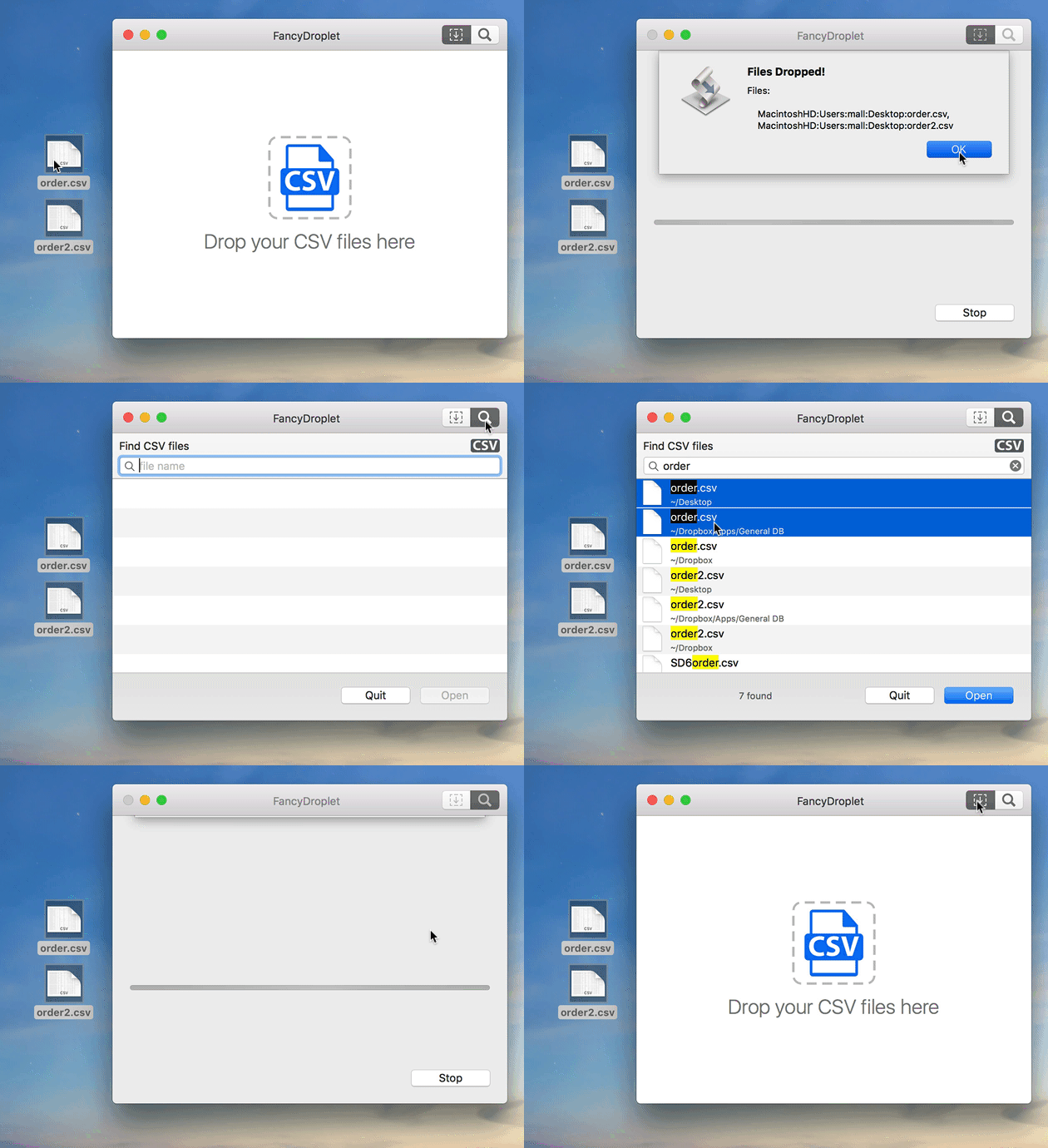
As a side project I am working on an improved AppleScript droplet shell. My goal is to create a better AppleScript droplet experience by providing a better UI for receiving dropped files and offering a way of picking files to process via integrated Spotlight document searching (you’ll recognize this as being based on Script Debugger’s Open Quickly feature). Additionally, I want to give droplet scripts an opportunity to clean up if the user stops or quits the script.
-
Script Debugger 6 Released
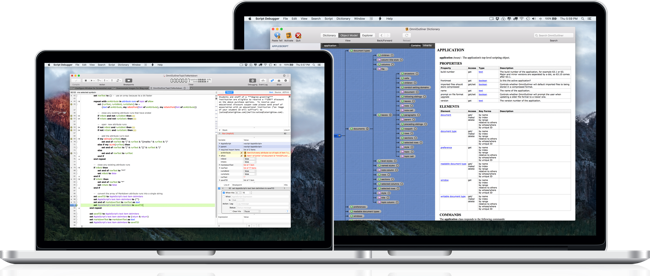
I’m pleased to announce the release of Script Debugger 6. This release introduces over 25 new features and embraces modern AppleScript, including AppleScriptObjC. To sweeten the deal, Script Debugger’s price has been reduced by 50%!
Product Information | Free Trial | Release Notes
For those unfamiliar with Script Debugger, it is an integraded development environment focused on AppleScript. This focus allows us to deliver a suite of tools that makes AppleScript development amazingly productive. Features like the dictionary explorer allow you to look directly into any application’s live scripting interface and step wise debugging with the ability to see the state of all your variables make AppleScript usable in a way you’ve never experienced before. Of course, this is just a taste of the things Script Debugger does.
-
Acorn Is Scriptable!
I oscillate between Acorn and Pixelmator on the Mac - its great to have two competent alternatives to Photoshop. Pixelmator is my current fav on the iPad Pro (there’s nothing like using it’s object removal with the Apple Pencil). However, today Acorn has me on the Mac because it is scriptable. Whipped up this little script to generate images for Script Debugger 6 release notes:
use AppleScript version "2.4" -- Yosemite (10.10) or later
use scripting additions

on downsampleImage(theFile)
	local destFolderHFSPath

	tell application "Finder"
		set destFolderHFSPath to get folder "Web" of desktop as string
	end tell

	tell application "Acorn"
		tell (open theFile)
			local imageName, imageWidth, imageHeight

			set {imageName, imageHeight, imageWidth} to {name, height, width}
			trim

			--	Create 1x down sampled image
			web export width (imageWidth * 0.328) height (imageHeight * 0.328) as PNG in file (destFolderHFSPath & imageName & ".png")
			--	Create 2x down sampled image
			web export width (imageWidth * 0.65) height (imageHeight * 0.65) as PNG in file (destFolderHFSPath & imageName & "@2x.png")

			close saving no
		end tell
	end tell
end downsampleImage

on open theFiles
	repeat with aFile in theFiles
		downsampleImage(contents of aFile)
	end repeat
end open
No fuss, it just worked.
-
Script Debugger 6 Release Notes (6A162)
Here is an updated version of the Script Debugger 6 (build 6A162) release notes. We are very close to completion and this document quite accurately reflects the new features in Script Debugger 6.
DISCLAIMER: Nothing is final until the software ships and there is always the possibility that a feature may have to be removed or altered in the final product.
1. Code Signing
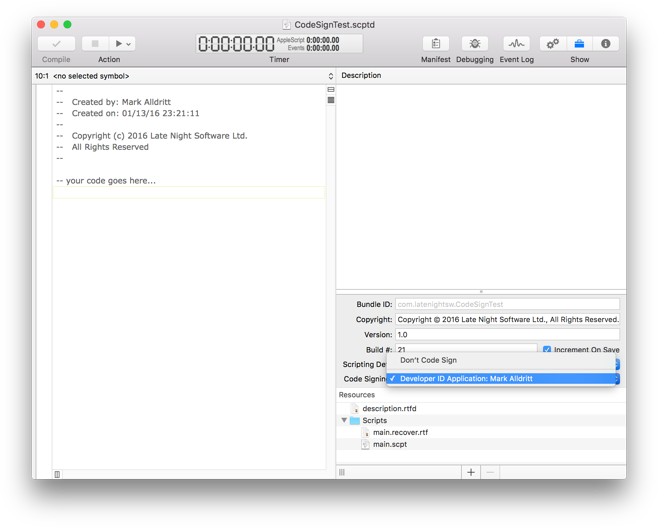
Script Debugger 6 adopts an always-on approach to code signing. Once you enable code signing for a script by selecting a developer ID, Script Debugger signs your script each time you save it. There is no requirement to go through a special Save or Export operation.
2. Improved Bundled Script Resource Editing
The Script Debugger 6 bundled script resource editor has been expanded. You are now able to edit a bundle ID, copyright string, marketing version string and build number. Script Debugger 6 gives you the option of auto-incrementing build numbers each time a script is saved.
Additionally, you are able to identify a Scripting Definition (SDEF) file from your script’s bundle and to select a developer ID to enable always-on code signing for your script.
You are able to specify a default copyright string which is used when creating new bundled scripts and applications. This default copyright string may contain clipping directives which are expanded at the time a new script document is created.
3. Progress Reporting
AppleScript’s progress reporting properties (introduced in Mac OS X 10.10 Yosemite) are fully supported in Script Debugger 6. When a script begins reporting progress information by setting any of AppleScript’s progress reporting properties Script Debugger 6 responds by adding a progress bar display above the script’s source:
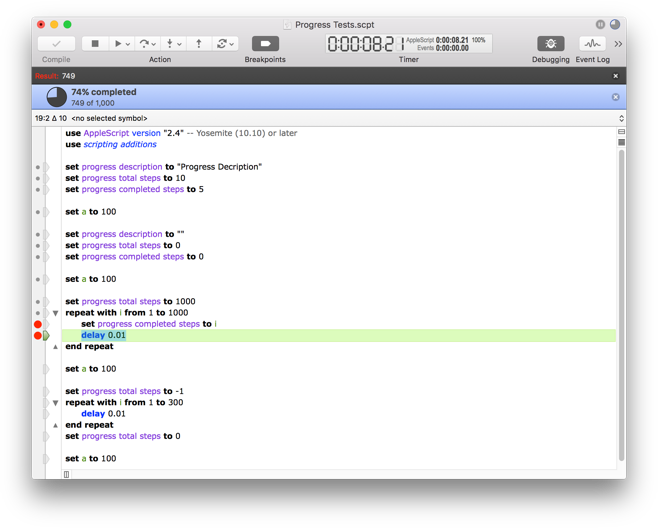
Script Debugger supports both determinate and indeterminate progress reporting.
Note also that progress information is shown in the window title bar and the script’s document tab. You can elect to dismiss the progress display by clicking the ‘x’ button.
4. Open Quickly
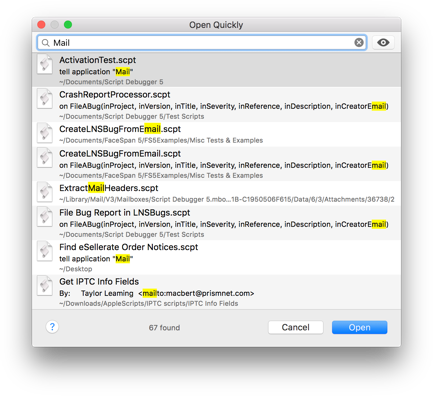
The Open Quickly command, which allows you to easily search for and open scripts containing a particular term in the name or the body of the script, has been heavily revised for Script Debugger 6.
4.1 Improved Search Hit Display
The Open Quickly window highlights the portion of the script’s name, description, Finder comment or script source that matches the search term(s) entered.
4.1 Discontiguous Searching
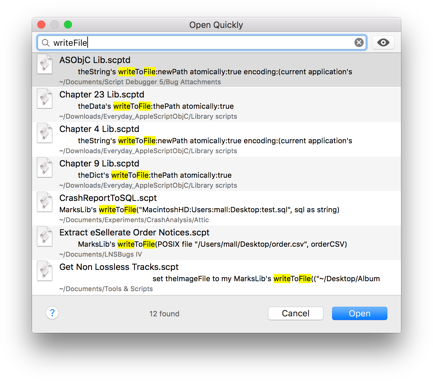
Discontiguous search matches are reported (when a single search term is entered), similar to the way Xcode’s Open Quickly command behaves when looking up identifiers and source file names. When multiple search terms are entered the Open Quickly command looks for each term within the script name, description, finder comment and script source.
For example, if you have a series of scripts containing the same ‘writeToFile’ handler, you can locate these scripts by entering the search terms ‘write’, ‘writeToFile’ or ‘writeFile’.
5. Editor Improvements
5.1 Code Folding
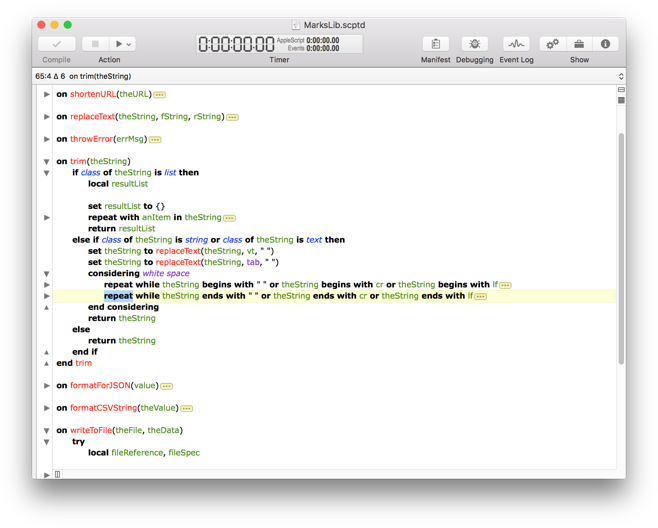
Script Debugger 6 at long last provides code folding where you can collapse block structures and comments within your code to reduce clutter when editing.
5.2 Autocompletion
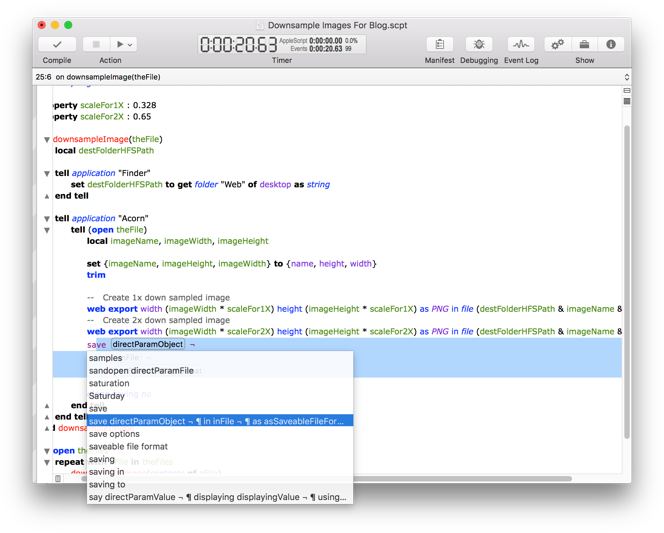
Improved code completion to include all matching user defined identifiers, commands from target applications and AppleScript Objective-C identifiers.
5.3 AppleScript Objective-C Autocompletion
AppleScriptObjC code completion covers the main Cocoa frameworks, and automatically handles insertion of
current application'swhere required. The insertion can be either in-line, or in the form of automatically generated properties, with the ability to refactor between the two forms.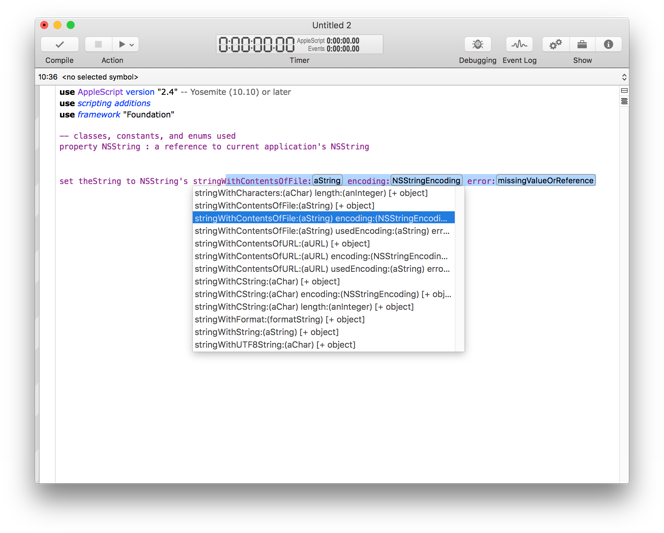
5.4 Automatic “it’s” Correction
If you type “it’s " in code, it will be changed to “its “. This avoids the new “– Grammar Police” comment being inserted by the compiler in 10.11 (El Capitan).
5.5 Terminology Clash Avoidance
When using interleaved syntax for handlers, parameters will be escaped with pipe characters if they clash with defined terminology.
5.6 Identifier Case Changing
Script Debugger 6 performs each script compilation in a new AppleScript compiler instance. This avoids a long standing problem where it was impossible to change the case of a variable, property, handler or script object once the script had been compiled.
5.7 Dash Support
If you have Dash installed, you can turn on support so that option-clicking on a word will look it up in Dash. See … in Preferences.
5.7 Application, Script Library and Framework Picker
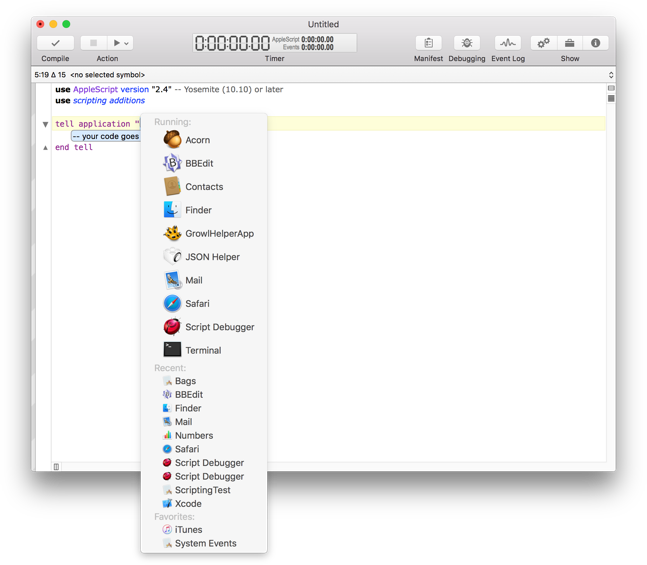
Script Debugger 6 offers new powers for placeholders referring to applications, script libraries and AppleScript Objective-C framework names when existing clippings, text substitutions and command completions. Script Debugger offers a menu of running and favourite applications for application placeholders, a menu of installed script library names for script placeholders and a menu of commonly used framework names for framework placeholders.
6. Debugging Improvements
6.1 Non-Persistent Global Variables
A new Persistent Global Variables command has been added to the Script menu which allows you to determine if the value of global variables and properties persists from one run to the next. Note that when Code Signing is enabled, this setting is forced off to match the behaviour of signed scripts.
6.2 AppleScript Objective-C Value Exploring
Script Debugger’s various explorers now support AppleScript Objective-C object references. Instead of seeing AppleScript Objective-C object references shown as «class ocid» id «data optr00000000F0FB3885FC7F0000», Script Debugger 6 shows you details of the object:
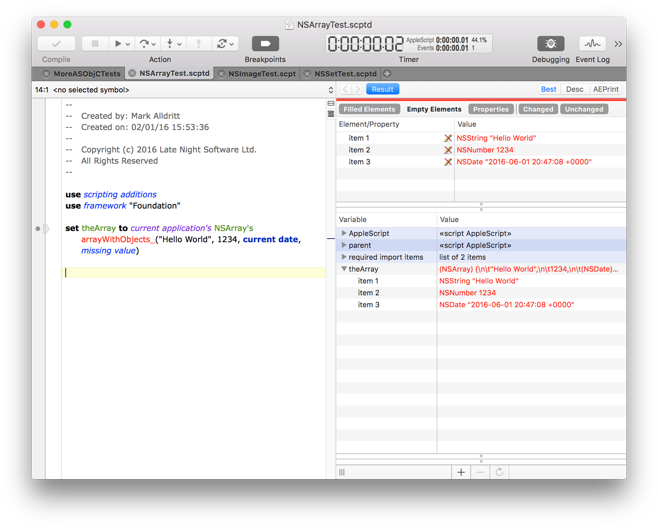
As this screen shot illustrates, you are even able to explore into container objects to examine their contents.
6.3 AppleScript Objective-C Value Viewers
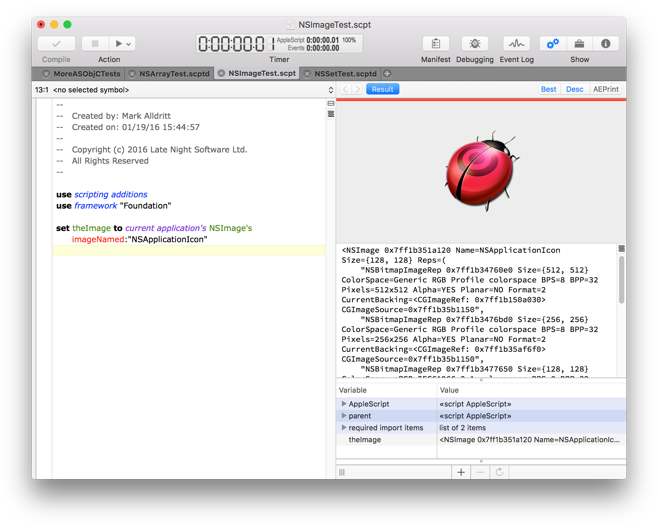
Script Debugger 6’s support for AppleScript Objective-C objects extends to displaying “native” viewers for dates and images.
6.4 Breakpoint Dragging
Breakpoints, which allow you mark specific lines of your script where execution will pause in debugging mode, can now be moved by dragging them within the script’s gutter. Additionally, you can delete a breakpoint by dragging it out of the script’s gutter.
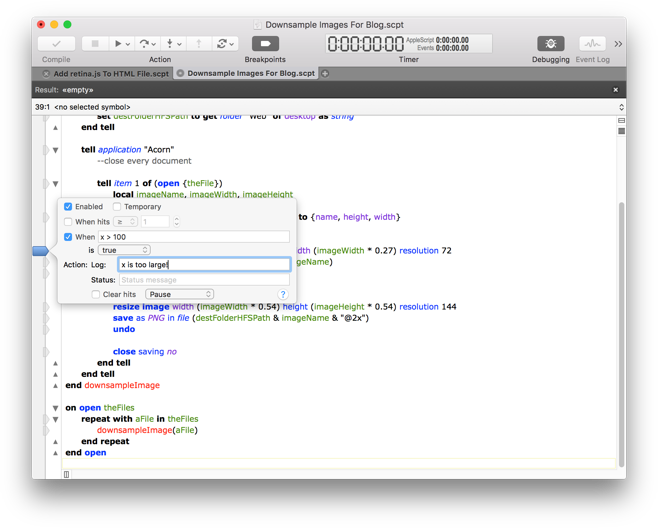
6.5 Popover Breakpoint Editor
Double-clicking on a breakpoint in the script’s gutter allows you to edit a breakpoint in a popover window. You can also summon this popover window using the breakpoint contextual menu or the Edit Breakpoint command in the Script menu.
6.6 Remove All Breakpoints
The Remove All Breakpoints command now confirms with you before removing all your breakpoints to avoid accidental breakpoint removal.
6.7 Remove All Disabled Breakpoints
A new Remove All Disabled Breakpoints command has been added to remove all disabled breakpoints. Like the Remove All Breakpoints command, this new command confirms with you before removing all your disabled breakpoints to avoid accidental breakpoint removal.
6.8 Improved Current Statement Highlighting
Like Script Debugger 5, Script Debugger 6 moves the current text selection to the current statement as you step through code or pause at breakpoints. However, Script Debugger 6 does not select the current statement’s trailing newline. This avoids some visibility problems which occurred for some users with Script Debugger 5 when their current statement highlight color preference was too similar to the system text selection color.
7. AppleEvent Logging Improvements
7.1 Added Close and Clear Buttons
Added a Clear and a Close button to the Event Log bar within the script window.
8. Dictionary Improvements
8.1 Open Application Dictionary
When the PrefChooseAppsUsingChooser expert preference is true, the dictionary chooser presented by Script Debugger when opening dictionaries lists scripting additions and script libraries just as the Script Editor does.
8.2 Better Application Scriptability Detection
Script Debugger 6 improves the way it determines if an application is scriptable. For example, Apple’s Preview application is not recognized as scriptable.
9. Features Removed
9.1 Mac OS X Version Support
Script Debugger 6 supports Mac OS X 10.10 (Yosemite) or later and Mac OS X 10.11 (El Capitan) is recommended.
9.2 Script Debugger Libraries
Script Debugger 5’s library inclusion mechanism is no longer supported in Script Debugger 6. This means that Script Debugger 5’s Libraries pane has been removed along with the
Flatten Scriptcommand found in the Export submenu of the File menu.Script Debugger 6 provides a conversion service that translates Script Debugger 5 references into AppleScript
use scriptstatments. -
Script Debugger 6 Release Notes (6A121)
I’m posting this in-progress document publicly as a bit of an experiment. Given that it has been several years since the release of Script Debugger 5, I hope that the appearance of this information will give people confidence that Script Debugger 6’s release is imminent.
Beta testing of Script Debugger 6 is on going and I will update this post as changes are made to the application.
DISCLAIMER: Nothing is final until the software ships and there is always the possibility that a feature may have to be removed or altered in the final product.
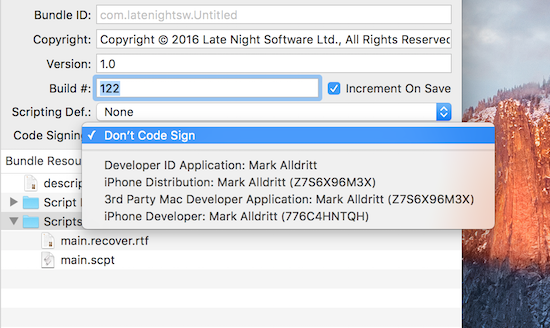
1. Code Signing
Script Debugger 6 adopts an always-on approach to code signing. Once you enable code signing for a script by selecting a developer ID, Script Debugger signs your script each time you save it. There is no requirement to go through a special Save or Export operation.
2. Improved Bundled Script Resource Editing
The Script Debugger 6 bundled script resource editor has been expanded. You are now able to edit a bundle ID, copyright string, marketing version string and build number. Script Debugger 6 gives you the option of auto-incrementing build numbers each time a script is saved.
Additionally, you are able to identify a Scripting Definition (SDEF) file from your script’s bundle and to select a developer ID to enable always-on code signing for your script.
You are able to specify a default copyright string which is used when creating new bundled scripts and applications. This default copyright string may containing clipping directives where are expanded at the time a new script document is created.
3. Progress Reporting
AppleScript’s progress reporting properties (introduced in Mac OS X 10.10 (Yosemite) are fully supported in Script Debugger 6. When a script begins reporting progress information by setting any of AppleScript’s progress reporting properties Script Debugger 6 responds by adding a progress bar display above the script’s source:
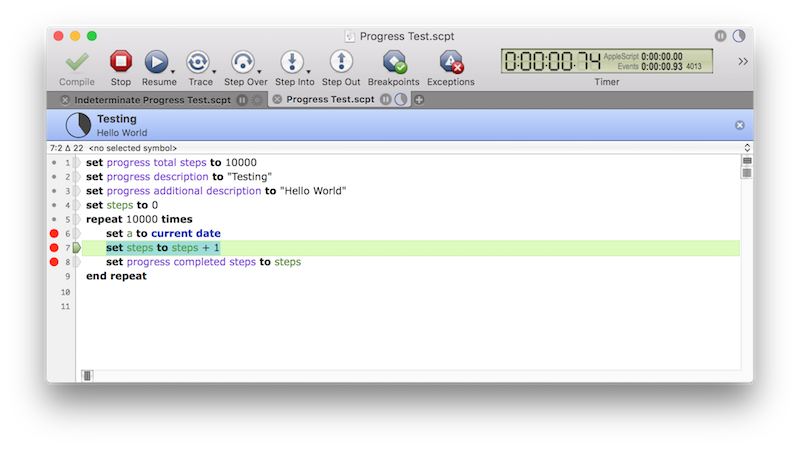
Script Debugger supports both determinate and indeterminate progress reporting.
Note also that progress information is shown in the window title bar and the script’s document tab. You can elect to dismiss the progress display by clicking the ‘x’ button.
4. Open Quickly
The Open Quickly command has been heavily revised for Script Debugger 6.
4.1 Improved Search Hit Display
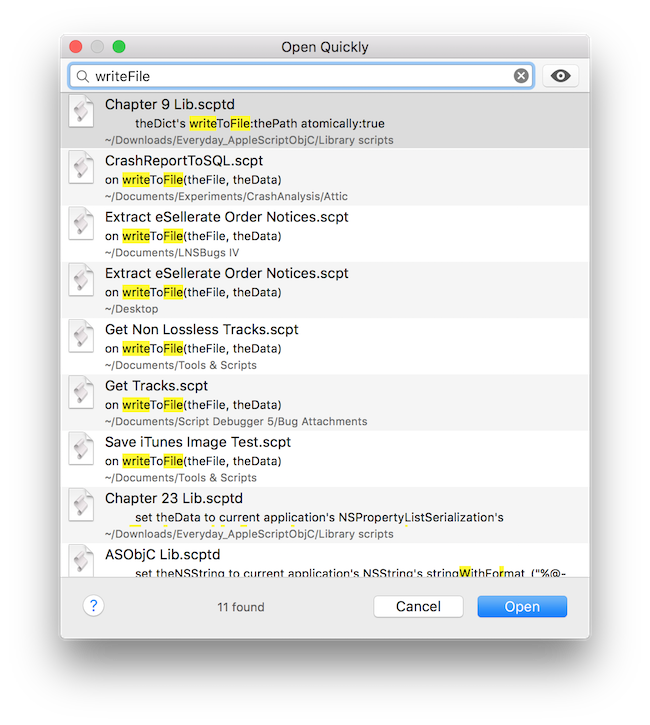
The Open Quickly window highlights the portion of the script’s name, description, Finder comment or script source that matches the search term(s) entered.
4.1 Better Searching
Discontiguous search matches are reported (when a single search term is entered), similar to the way Xcode’s Open Quickly command behaves when looking up identifiers and source file names. When multiple search terms are entered the Open Quickly command looks for each term within the script name, description, finder comment and script source.
For example, if you have a series of scripts containing the same ‘writeToFile’ handler, you can locate these scripts by entering the search terms ‘write’, ‘writeToFile’ or ‘writeFile’.
5. Editor Improvements
5.1 Code Folding
While not yet fully complete, Script Debugger 6 at long last provides code folding where you can collapse block structures and comments within your code to reduce clutter when editing.
5.2 Autocompletion
Improved code completion to include all matching user defined identifiers. Additional improvements to autocompletion are planned to better support AppleScript Objective-C development.
5.3 Identifier Case Changing
Script Debugger 6 performs each script compilation in a new AppleScript compiler instance. This avoids a long standing problem where it was impossible to change the case of a variable, property, handler or script object once the script had been compiled.
5.4 Automatic “it’s” Correction
If you type “it’s " in code, it will be changed to “its “. This avoids the new “– Grammar Police” comment being inserted by the compiler in 10.11 (El Capitan).
5.5 Terminology Class Avoidance
When using interleaved syntax for handlers, parameters will be escaped with pipe characters if they clash with defined terminology.
5.6 Dash Support
If you have Dash installed, you can turn on support so that option-clicking on a word will look it up in Dash. See … in Preferences.
5.7 Application, Script Library and Framework Picker
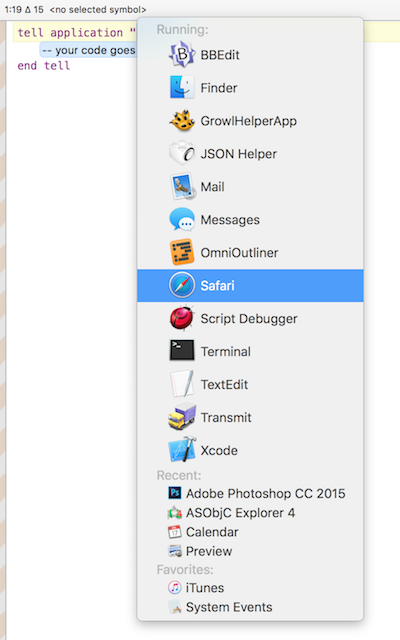
Script Debugger 6 offers new powers for placeholders referring to applications, script libraries and AppleScript Objective-C framework names when existing clippings, text substitutions and command completions. Script Debugger offers a menu of running and favourite applications for application placeholders, a menu of installed script library names for script placeholders and a menu of commonly used framework names for framework placeholders.
5.8 …more coming
6. Debugging Improvements
6.1 Non-Persistent Global Variables
A new Persistent Global Variables command has been added to the Script menu which allows you to determine if the value of global variables and properties persists from one run to the next. Note that when Code Signing is enabled, this setting is forced off to match the behaviour of signed scripts.
6.2 AppleScript Objective-C Value Exploring
Script Debugger’s various explorers now support AppleScript Objective-C object references. Instead of seeing AppleScript Objective-C object references shown as «class ocid» id «data optr00000000F0FB3885FC7F0000», Script Debugger 6 shows you details of the object:
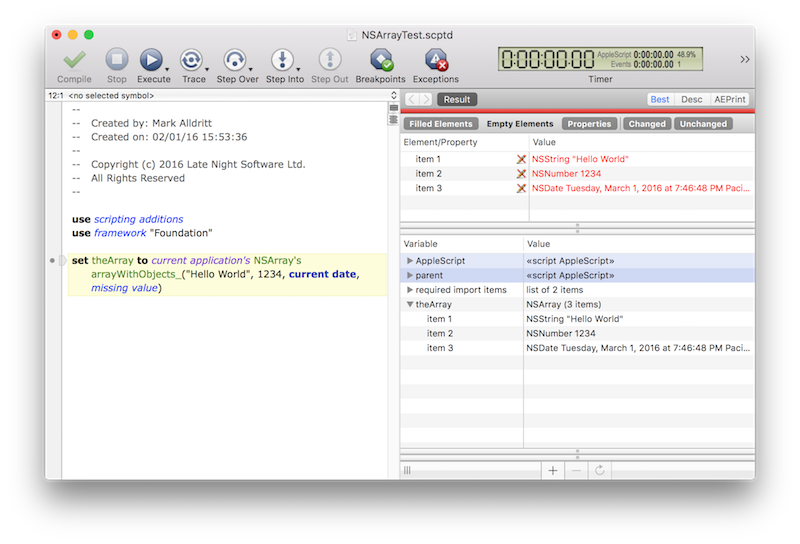
As this screen shot illustrates, you are even able to explore into container objects to examine their contents.
6.3 AppleScript Objective-C Value Viewers
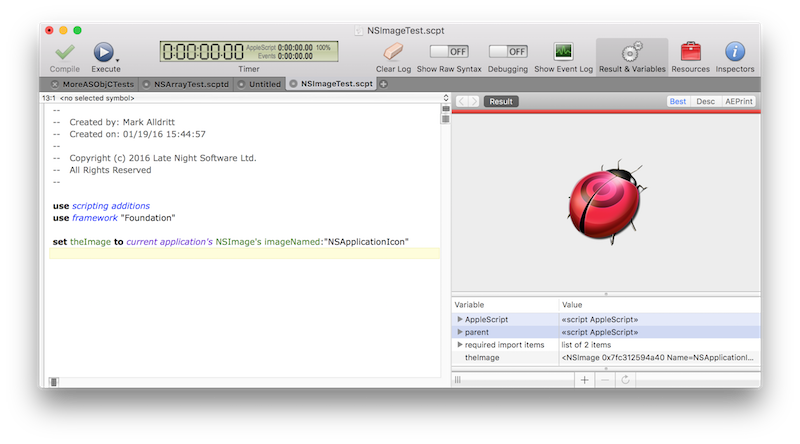
Script Debugger 6’s support for AppleScript Objective-C objects extends to displaying “native” viewers for dates and images.
6.4 Breakpoint Dragging
You can move breakpoints by dragging them within the script’s gutter. Additionally, you can delete a breakpoint by dragging it out of the script’s gutter.
6.5 Popover Breakpoint Editor
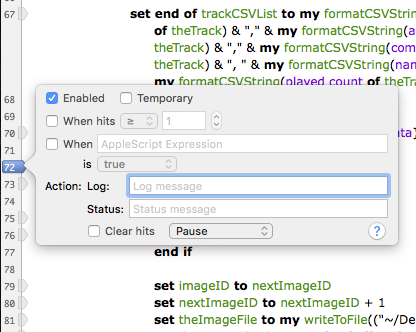
Double-clicking on a breakpoint in the script’s gutter allows you to edit a breakpoint in a popover window. You can also summon this popover window using the breakpoint contextual menu or the Edit Breakpoint command in the Script menu.
6.6 Remove All Breakpoints
The Remove All Breakpoints command now confirms with you before removing all your breakpoints to avoid accidental breakpoint removal.
6.7 Remove All Disabled Breakpoints
A new Remove All Disabled Breakpoints command has been added to remove all disabled breakpoints. Like the Remove All Breakpoints command, this new command confirms with you before removing all your disabled breakpoints to avoid accidental breakpoint removal.
6.8 Improved Current Statement Highlighting
Like Script Debugger 5, Script Debugger 6 moves the current text selection to the current statement as you step through code or pause at breakpoints. However, Script Debugger 6 does not select the current statement’s trailing newline. This avoids some visibility problems which occurred for some users with Script Debugger 5 when their current statement highlight color preference was too similar to the system text selection color.
7. AppleEvent Logging Improvements
7.1 Added Close and Clear Buttons
Added a Clear and a Close button to the Event Log bar within the script window.
8. Dictionary Improvements
8.1 Open Application Dictionary
When the PrefChooseAppsUsingChooser expert preference is true, the dictionary chooser presented by Script Debugger when opening dictionaries lists scripting additions and script libraries just as the Script Editor does.
8.2 Better Application Scriptability Detection
Script Debugger 6 improves the way it determines if an application is scriptable. For example, Apple’s Preview application is not recognized as scriptable.
-
Re: What if JavaScript had persistent globals?
In a recent piece on his blog Dave Winer imagines what might have been had his ideas for persistent global variables in his Frontier development environment been copied into JavaScript. I find this a fascinating thought. It could have radically changed the way the local web app development evolved.
For me, Frontier’s Object Database was the most compelling of all the things in Frontier. I never really go into the language or the outliner parts of his work, but the Object Database was clearly a good idea. So much so that I’ve been trying to figure out ways of incorporating it into AppleScript ever since. Products like ScriptBase tried, but none of us have been able to achieve the integration that Dave did.
The closest I came was with FaceSpan 5 where the entire UI and application were entries in a hierarchical object database, and event handling flowed up through the object tree from the source (e.g. a button) to the root (the application). Everything was mutable and persistent which made for a hugely powerful tool, much as Frontier had demonstrated many years before. Sadly, FaceSpan 5 was never finished.
-
When Open Does Not Return An Object Reference
There is a long standing bug in Cocoa Scripting, the technology Apple provides to developers to help make their applications scriptable, where the Open, Move and Copy commands do not return a reference to the newly created or moved object. This makes scripting these applications difficult.
I frequently get requests from Script Debugger customers for help solving this problem. I see people resorting to UI Scripting and many other techniques to address this problem.
The code below shows one way of working around the problem of the Open command not returning a reference to the newly opened document. I use the Preview application in my code, but this technique works equally well with other applications which fail to return a document reference from their Open commands. This technique fails is the file is already open.
set theFile to choose file -- pick a file to open
tell application "Preview"
set theOldOpenFiles to path of documents -- sample the existing open documents
open theFile -- no new document reference returned - sigh
set theOpenFiles to path of documents -- sample the new list of open documents
end tell
-- Find the item in the list of new open documents that is not present in the old list of
-- open documents.
set theNewFiles to finddifference of theOpenFiles against theOldOpenFiles
tell application "Preview"
-- recover the reference to the newly opened document
set theOpenedDocument to first document where path is (item 1 of theNewFiles)
tell theOpenedDocument
-- your code targetting the newly opened document goes here...
set theDocumentName to name
end tell
end tell
to finddifference of listA against listB
-- This handler computes the 'difference' between the contents of two lists
local newList
set newList to {}
repeat with a in listA
set a to contents of a -- dereference implicit loop reference
if {a} is not in listB then set end of newList to a
end repeat
newList
end finddifference
-
OSAID Leaks Cause Crashes
As a followup to my Getting Yosemite AppleScript Progress Information post I would like to offer this PSA.
There an AppleScript crashing bug that you may encounter when using the
OSAGetProperty()call.If you fail to call
OSADispose()to release the OSAID values you receive fromOSAGetProperty()you have an OSAID leak. If you begin to see difficult to reproduce crashes that look like this then you have an OSAID leak in your application:#0 0x00007fff97a6a827 in CFRelease () #1 0x00000001054fb6b6 in UASMakeIDTable(unsigned long) () #2 0x00000001054fb81b in UASNewID(TUASScript*) () #3 0x00000001054c0f9d in ASGetPropertyLocal(int, unsigned int, AEDesc const*, unsigned int*) () #4 0x00000001054b7aad in AppleScriptComponent () #5 0x00007fff95704b73 in OSAGetProperty ()I filed a Radar bug with Apple over 10 years ago but the issue appears to have gone unresolved. It seems to me that when the available OSAIDs have been exhausted,
OSAGetProperty()(and all other OSA calls) should return some sort of error instead of crashing.UPDATE
If, like me, you wrap your OSAIDs in an Objective-C object, make sure your autorelease pool(s) drain properly. You’re call to
OSADispose()probably happens when your object is dealloced and that may not happen when you expect. -
Getting Yosemite AppleScript Progress Information
Yosemite (Mac OS X 10.10) introduced 4 new properties scripts can set to report progress information:
progress total steps(an integer)
progress completed steps(an integer)
progress description(text)
progress additional description(text)See the Yosemite AppleScript Release Notes for full details.
What is not explained is how a host application can access this information and display a script’s progress in its own UI. Here’s how you do it.
At intervals the script will call the OSAActiveProc. Within this callback function you can make OSA calls that access the running script’s state. You start by getting a reference to the ‘AppleScript’ object. From there you can read the value of the four progress properties. The following code uses my own OSAID wrapper object (RKOSAID - don’t ask, Script Debugger is 20 year old code). You can use whichever OSA API you are most familiar with.
-- Provisional property ID constants until Apple puts them into a public API #define pASProgressTotalSteps_LNS 'ppgt' #define pASProgressStepsCompleted_LNS 'ppgc' #define pASProgressDescription_LNS 'ppgd' #define pASProgressAdditionalDescription_LNS 'ppga' @interface RKOSAID (AppleScriptProgress) - (NSDictionary*) appleScriptProgress; @end @implementation RKOSAID (AppleScriptProgress) - (NSDictionary*) appleScriptProgress { // Get a reference to the 'AppleScript' object RKOSAID* as = [self propertyForPropertyID:pASTopLevelScript]; // Extract the progress properties RKOSAID* totalSteps = [as propertyForPropertyID:pASProgressTotalSteps_LNS]; RKOSAID* steps = [as propertyForPropertyID:pASProgressStepsCompleted_LNS]; RKOSAID* description = [as propertyForPropertyID:pASProgressDescription_LNS]; RKOSAID* addnlDescription = [as propertyForPropertyID:pASProgressAdditionalDescription_LNS]; // Convert into Cocoa objects and return return @{@"totalSteps": @(totalSteps.descriptor.int32Value), @"steps": @(steps.descriptor.int32Value), @"description" : description.descriptor.stringValue, @"additionalDescription" : addnlDescription.descriptor.stringValue}; } @endNOTE: My -[RKOSAID propertyForPropertyID:] call wraps the OSAGetProperty() call defined in ASDebugging.h.
SEE ALSO: OSAID Leaks Cause Crashes.
-
Script Debugger 5.0 Released
I’m pleased to announce that I have finally completed Script Debugger 5.0. After an extremely long development period, it is finally done and I can take a breath.
-
Script Debugger 4.5.7
I’m pleased to announce the release of Script Debugger 4.5.7. Script Debugger 4.5.7 is a free maintenance release that addresses a series of issues that came to light following the release of Script Debugger 4.5.
Among the changes in the Script Debugger 4.5.7 maintenance release is a fix for crashing bug when opening or creating documents on Mac OS X 10.7 (Lion).
A big thank you to all the folks who downloaded the various Script Debugger 4.5.7 Beta builds. I really appreciate all the great feedback and bug reports I received.
-
Script Debugger 4.5.7b4
I am preparing another Script Debugger 4.5 maintenance release.
UPDATE: Script Debugger 4.5.7 has been released.
As was the case with Script Debugger 4.5.5 and 4.5.6, I am struggling to resolve some stability problems that appeared following the release of Mac OS X 10.6 (Snow Leopard). Resolving these issues has been very difficult as I am not been able to reproduce the crashes on my own systems.
To help me determine if I’ve resolved the stability issues (or at least improved things), please allow Script Debugger to submit ALL crash reports. I know that this may slow you down a little, but it will help me as I work to resolve the stability problems.
##Requirements
- A Script Debugger 4.5 registration number
- Intel or PowerPC Macintosh
- Mac OS X 10.6, 10.5, 10.4
##Download
Script Debugger 4.5.7b4 (12MB)
##Installation
- Quit Script Debugger if it is running
- Mount the ScriptDebugger4.5.7 disk image
- Copy the Script Debugger 4.5 application from the disk image to your Applications folder (or any other place on your disk)
- Restart your Macintosh to ensure all caches are flushed
I recommend keeping your copy of Script Debugger 4.5.6 around in case you need to revert to that build. Note also that this BETA build expires on October 1, 2011.
##Script Debugger 4.5.7b4 Changes
- 15112 [Crash] Script Debugger co-exists with installations of the forthcoming Script Debugger 5.0.
- 15101 [Crash] Script Debugger no longer crashes when creating new documents on Lion (Mac OS X 10.7).
##Script Debugger 4.5.7b3 Changes
- 15108 Addressed a problem where the Dictionary/Explorer control in the Dictionary window was not updated to ‘Dictionary’ following a search.
- 14862 Added support for ASObjC scripts by allowing ‘class “ClassName”’ constructs to compile.
-
Script Debugger 4.5.7b2
I am preparing another Script Debugger 4.5 maintenance release.
UPDATE: Script Debugger 4.5.7 has been released.
As was the case with Script Debugger 4.5.5 and 4.5.6, I am struggling to resolve some stability problems that appeared following the release of Mac OS X 10.6 (Snow Leopard). Resolving these issues has been very difficult as I am not been able to reproduce the crashes on my own systems. The Script Debugger 4.5.7b2 build addresses some additional problems that I hope will further improve stability.
To help me determine if I’ve resolved the stability issues (or at least improved things), please allow Script Debugger to submit ALL crash reports. I know that this may slow you down a little, but it will help me as I work to finally resolve the stability problems.
##Requirements
- A Script Debugger 4.5 registration number
- Intel or PowerPC Macintosh
- Mac OS X 10.6, 10.5, 10.4
##Download
Script Debugger 4.5.7b2 (12MB)
##Installation
- Quit Script Debugger if it is running
- Mount the ScriptDebugger4.5.7 disk image
- Copy the Script Debugger 4.5 application from the disk image to your Applications folder (or any other place on your disk)
- Restart your Macintosh to ensure all caches are flushed
I recommend keeping your copy of Script Debugger 4.5.6 around in case you need to revert to that build. Note also that this BETA build expires on July 1, 2011.
##Script Debugger 4.5.7b2 Changes
- 15107 Script Debugger no longer attempts to compile scripts when saving changes to an existing Text (.applescript) document.
- 15106 Script Debugger no longer causes AppleScript to convert “reference” to “specifier” when compiling scripts.
- 14862 Added support for ASObjC scripts by allowing ‘class “ClassName”’ constructs to compile.
-
Script Debugger 4.5.7b1
I am preparing another Script Debugger 4.5 maintenance release.
UPDATE: Script Debugger 4.5.7 has been released.
As was the case with Script Debugger 4.5.5 and 4.5.6, I am struggling to resolve some stability problems that appeared following the release of Mac OS X 10.6 (Snow Leopard). Resolving these issues has been very difficult as I am not been able to reproduce the crashes on my own systems. The Script Debugger 4.5.7b1 build addresses some additional problems that I hope will further improve stability.
To help me determine if I’ve resolved the stability issues (or at least improved things), please allow Script Debugger to submit ALL crash reports. I know that this may slow you down a little, but it will help me as I work to finally resolve the stability problems.
##Requirements
- A Script Debugger 4.5 registration number
- Intel or PowerPC Macintosh
- Mac OS X 10.6, 10.5, 10.4
##Download
##Installation
- Quit Script Debugger if it is running
- Mount the ScriptDebugger4.5.7 disk image
- Copy the Script Debugger 4.5 application from the disk image to your Applications folder (or any other place on your disk)
- Restart your Macintosh to ensure all caches are flushed
I recommend keeping your copy of Script Debugger 4.5.6 around in case you need to revert to that build. Note also that this BETA build expires on May 1, 2011.
##Script Debugger 4.5.7b1 Changes
- 15090 [CRASH] Resolved a bug in the Balance command that could result in crashes if compound AppleScript statements (tell x to y, if x then y) appear within a block style comment.
- 15094 [CRASH] Another attempt to resolve the intermittent crashes which began with the release of Mac OS X 10.6 (Snow Leopard).
- 15093 Resolved a problem where the Dictionary window fails to display dictionary descriptions for multiple items selected from the browser.
- 15092 Resolved a problem where application bundles saved as 32-bit appear as PowerPC applications in the Finder.
- 15091 Fixed a typo in the property definition clipping.
-
AppleScriptObjC Explored 2.0
Shane Stanley has just released version 2 of AppleScriptObjC Explored, his book documenting Apple’s AppleScriptObjC (the successor to AppleScript Studio).
Shane’s book has become the most comprehensive documentation for AppleScriptObjC available. If you are attempting to use AppleScriptObjC to put a User Interface around your AppleScript code, this is a resource you must look into.
-
Script Debugger 5: Dictionary Redesign Prototype
I have been plugging away at a redesign of the Script Debugger 5 dictionary window, and by extension the value viewer that appears throughout the Script Debugger user interface.
The focus of the redesign is to remove the need for multiple windows unless you want them, to simplify navigation between dictionaries and through large dictionaries/object models, and to take better advantage of wide-screen displays. I’ve also tried to modernize Script Debugger’s appearance and make the presentation of dictionary information more consistent.
Rather than say too much more I’ll leave you to check out the screencast and just say that this is a very rough cut at what may or may not appear in Script Debugger 5. All icons are placeholders, etc, etc.
Best viewed full-screen at 720p
I realize that you may not be able to say too much without being able to actually use the software, but I’m very interested in feedback on the changes. In particular, are there obvious omissions/problems? Am I heading in the right direction or is this the wrong thing.
-
Script Debugger 4.5.6
UPDATE: I have released Script Debugger 4.5.6 which resolves a license limit exceeded error that effected some users. In all other ways, 4.5.6 is identical to 4.5.5.
I’m pleased to announce the release of Script Debugger 4.5.5. Script Debugger 4.5.5 is a free maintenance release that addresses a series of issues that came to light following the release of Script Debugger 4.5.
This maintenance release attempts to resolve the stability problems that some Script Debugger users have experienced on Snow Leopard. While I have made progress improving stability, there is still more to be done. This maintenance release addresses a number of other important issues so I decided to make these fixes available now rather than hold the release back while I continue resolving the stability problems.
A big thank you to all the folks who downloaded the various Script Debugger 4.5.5 Beta builds. I really appreciate all the great feedback and bug reports I received.
-
Scripting Additions Updated
After an extremely long gestation in Beta I’ve released 64-Bit Intel compatible versions of the following Scripting Additions:
-
Script Debugger 4.5.5b6
UPDATE: Script Debugger 4.5.5 has been released.
I am preparing another Script Debugger 4.5 maintenance release.
I have been struggling to resolve some stability problems ever since the release of Script Debugger 4.5. Resolving these issues has been very difficult as I’ve not been able to reproduce several of the crashes on my own systems. The Script Debugger 4.5.5b3, b4 and b5 releases have resolved several crashes, but some problems remain. The Script Debugger 4.5.5b6 build addresses some additional problems that I hope will further improve stability.
To help me determine if I’ve resolved the stability issues (or at least improved things), please allow Script Debugger to submit ALL crash reports. I know that this may slow you down a little, but it will help me as I work to finally resolve the stability problems.
##Requirements
- A Script Debugger 4.5 registration number
- Intel or PowerPC Macintosh
- Mac OS X 10.6, 10.5, 10.4
##Download
Script Debugger 4.5.5b6 (11.4MB)
##Installation
- Quit Script Debugger if it is running
- Mount the SD4.5.5 disk image
- Copy the Script Debugger 4.5 application from the disk image to your Applications folder (or any other place on your disk)
- Restart your Macintosh to ensure all caches are flushed
I recommend keeping your copy of Script Debugger 4.5.4 around in case you need to revert to that build. Note also that this BETA build expires on September 1, 2010.
##Script Debugger 4.5.5b6 Changes
- 14907 [Crash] Improved the Explorer to protect against some more instances where the UI thread may be accessing data while background threads are altering the data.
- 14927 The Script Debugger 4.0 OSA component is removed if it is still present to avoid the possibility of memory corruptions that might destabilize Script Debugger 4.5.
- 14928 Script Debugger auto-saves documents each time they are compiled. This may slow things down slightly, but it will improve Script Debugger’s ability to recover the contents of open documents in the event of a crash. Previously, Script Debugger auto-saved only before a document was executed.
- 14926 When exporting a Run-Only script over an existing file, Script Debugger ensures that pre-eisting recovery and QuickLook preview data is removed.
- 14925 This change addresses a regression in bug 14881. Script Debugger no longer reports 32-bit scripting addition warnings for StandardAdditions.osax when saving on 32-bit machines as StandardAdditions.osax will always be fully compatible with the host hardware. Script Debugger now only does 32-bit scripting addition checking when running on Mac OS X 10.6 or later.
- 14885 FontSyncScripting.app is no longer mistaken as a Scripting Addition.
-
Script Debugger 4.5.5b5
UPDATE: Script Debugger 4.5.5b6 has been released.
I am preparing another Script Debugger 4.5 maintenance release.
I have been struggling to resolve some stability problems ever since the release of Script Debugger 4.5. Resolving these issues has been very difficult as I’ve not been able to reproduce several of the crashes on my own systems so I’m debugging in the blind. The Script Debugger 4.5.5b3 and b4 releases have resolved several crashes, but some problems remain. The Script Debugger 4.5.5b5 build addresses two additional crashes.
To help me determine if I’ve resolved the stability issues (or at least improved things), please allow Script Debugger to submit ALL crash reports. I know that this may slow you down a little, but it will help me as I work to finally resolve the stability problems.
##Requirements
- A Script Debugger 4.5 registration number
- Intel or PowerPC Macintosh
- Mac OS X 10.6, 10.5, 10.4
##Download
Script Debugger 4.5.5b5 (11.4MB)
##Installation
- Quit Script Debugger if it is running
- IMPORTANT Delete all copies of Script Debugger.component and Script Debugger 4.5.component from your ~/Library/Components folder
- Mount the SD4.5.5 disk image
- Copy the Script Debugger 4.5 application from the disk image to your Applications folder (or any other place on your disk)
- Restart your Macintosh to ensure all caches are flushed
I recommend keeping your copy of Script Debugger 4.5.4 around in case you need to revert to that build. Note also that this BETA build expires on September 1, 2010.
##Script Debugger 4.5.5b5 Changes
- 14907 [Crash] Improved the Explorer to protect against some more instances where the UI thread may be accessing data while background threads are altering the data.
- 14899 [Crash] Resolved a bug that caused Script Debugger to crash when AppleScript reports error text ranges that lie beyond the end of the script. This happens most commonly when you have an unclosed quoted string within a block comment.
-
Script Debugger 4.5.5b4
UPDATE: Script Debugger 4.5.5b5 has been released.
I am preparing another Script Debugger 4.5 maintenance release.
I have been struggling to resolve some stability problems ever since the release of Script Debugger 4.5. The rate of crash reports has diminished significantly with the Script Debugger 4.5.5b3 beta build, but I’m still getting a few crashes. This new beta build contains fixes for a few more instances where AppleScript may be causing crashes.
To help me determine if I’ve actually solved the stability issues (or at least improved things), please allow Script Debugger to submit all crash reports. I know that this may slow you down a little, but it will help us all as I work to finally resolve the stability problems.
##Requirements
- A Script Debugger 4.5 registration number
- Intel or PowerPC Macintosh
- Mac OS X 10.6, 10.5, 10.4
##Download
Script Debugger 4.5.5b4 (11.4MB)
##Installation
- Quit Script Debugger if it is running
- IMPORTANT Delete all copies of Script Debugger.component and Script Debugger 4.5.component from your ~/Library/Components folder
- Mount the SD4.5.5 disk image
- Copy the Script Debugger 4.5 application from the disk image to your Applications folder (or any other place on your disk)
I recommend keeping your copy of Script Debugger 4.5.4 around in case you need to revert to that build. Note also that this BETA build expires on September 1, 2010.
##Script Debugger 4.5.5b4 Changes
- 14898 More changes that attempt to resolve Script Debugger’s stability issues (Please ensure you have deleted all old copies of Script Debugger.component and Script Debugger 4.5.component from your ~/Library/Components folder).
-
Script Debugger 4.5.5b3
UPDATE: Script Debugger 4.5.5b4 has been released.
I am preparing another Script Debugger 4.5 maintenance release.
I have been struggling to resolve some stability problems ever since the release of Script Debugger 4.5. I thought I had these problems resolved a couple of times, but they persist. With the release of Mac OS X 10.6 they seem to have gotten worse.
For the Script Debugger 4.5.5 maintenance release I want to try and resolve these stability issues once and for all. The difficulty is that I cannot reproduce any of these crashes here on my systems, and the crash reports that I receive don’t point to any obvious causes.
I had a bit of luck and was able to find and resolve some memory management errors in Script Debugger which may have contributed to the problem. I’ve also identified a problem in AppleScript that may also be contributing to the stability issues.
To help me determine if I’ve actually solved the stability issues (or at least improved things), please allow Script Debugger to submit all crash reports. I know that this may slow you down a little, but it will help us all as I work to finally resolve the stability problems.
##Requirements
- A Script Debugger 4.5 registration number
- Intel or PowerPC Macintosh
- Mac OS X 10.6, 10.5, 10.4
##Download
Script Debugger 4.5.5b3 (11.4MB)
##Installation
- Quit Script Debugger if it is running
- IMPORTANT Delete all copies of Script Debugger.component and Script Debugger 4.5.component from your ~/Library/Components folder
- Mount the SD4.5.5 disk image
- Copy the Script Debugger 4.5 application from the disk image to your Applications folder (or any other place on your disk)
I recommend keeping your copy of Script Debugger 4.5.4 around in case you need to revert to that build. Note also that this BETA build expires on September 1, 2010.
##Script Debugger 4.5.5b3 Changes
- 14898 Several changes that attempt to resolve Script Debugger’s stability issues and reduce memory leakage when closing documents (Please ensure you have deleted all old copies of Script Debugger.component and Script Debugger 4.5.component from your ~/Library/Components folder).
- 14886, 14151 Corrected a series of issues that prevented the Manifest command from properly detecting AppleEvents sent to applications. Note that these fixes also restore Script Debugger’s ability to detect which applications will be launched when opening scripts.
- 14885 FontSyncScripting.app is no longer mistaken as a Scripting Addition.
- 14884 Script Debugger’s logic for opening scripts with incorrect filename extensions has been improved. For instance, compiled scripts carrying a ‘.applescript’ extension will open correctly (.applescript normally indicates a plain text file).
- 14881 A new 32-Bit Only option has been added to the Save As panel allowing you to create 32-Bit applets directly from Script Debugger (this avoids having to visit the Finder’s Get Info window to select the 32-Bit Only execution option).
- 14853 Script Debugger can now open the iCal dictionary and any other application dictionaries which make use of xinclude directives.
- 14883 Script Debugger now reports error information in the AppleEvent Log window.
-
Script Debugger 4.5.4
I’m pleased to announce the release of Script Debugger 4.5.4. Script Debugger 4.5.4 is a free maintenance release that addresses a series of issues that came to light following the release of Script Debugger 4.5.
subscribe via RSS