-
Posting to a Discourse forum from iOS Shortcuts
I’ve been experimenting with iOS Shortcuts and I have to say I really like it. I was a fan of the Workflow app on which Shortcuts is based. While Shortcuts uses a visual programming model similar to macOS’s Automator, I find Shortcuts somehow much more usable.
This post on the Script Debugger Support Forum demonstrates how to post a new topic to a Discourse forum using the Discourse API with Shortcuts.
I had worked out the Discourse API issues previously when writing some AppleScript code to post a new topic so the task was simply a matter of figuring out how to accomplish the task in Shortcuts.
-
MacScripter.net
I’m excited to announce that I have become the new host of the MacScripter.net discussion forum. MacScripter has been a long standing resource for information concerning macOS automation using technologies such as AppleScript, Automator, and JavaScript For Automation.
Ray Barber established the site many many years ago and has grown it to the point where it is today with almost 30,000 members and an archive of 175,000 posts. MacScripter is a core piece of the AppleScript and macOS automation landscape. Links to MacScripter articles appear almost everywhere macOS automation is discussed. This is all a testament to Ray’s vision in creating MacScripter.net and to his support of the site over the years. Ray has decided to step down and I’m really pleased to be able to provide the resources needed to keep MacScripter.net going in the future.
I sense we are at a point where automation of Apple products is seeing a resurgence. The release of Shortcuts in iOS 12 suggests that Apple has become serious about automation on its mobile devices. I feel this change will spur people to look for more opportunities to automate their Macs as well. All of this represents a great opportunity for MacScripter to grow and become relevant to a new audience.
MacScripter will remain more or less as it is. It will continue to be a place to discuss topics related to macOS and iOS automation in a technology and product agnostic environment.
-
2018 MacBook Pro?!?!
Over the years, I’ve been excited when the time came to replace my Mac laptop. There was a sense that the new laptop would be vastly better that the old one. New ports, more memory, faster, better display, better battery life. The pinnacle for me has been the 2012 MacBook Pro Retina that I’m about to replace. I splurged and maxed the thing out and it has been amazing.
This was the first SSD MacBook Pro, and its been a fabulous machine - apart from the difficulty of getting its battery replaced. Only now, 6 years later, it is starting to feel slow. 16GB of memory just does not cut it when running Slack or doing Swift development in Xcode. I also desperately want to run a 4/5K external monitor for my old man eyes.
I decided to pass on the 2017 MacBook Pros because of their 16GB memory limit. The keyboard issues that surfaced confirmed for me this was the right call.
I was going to go with a iMac Pro, but now the 2018 MacBook Pro has arrived and most of the concerns seem to have been addressed. But the keyboard - I tried one in the store yesterday and it sucks compared to the one on my 2012 machine. It is really awful to type on. How is this progress? I use my mac ~10h each day and typing comfort is huge. And then there is the loss of all the built in ports. I use the CF card reader regularly. Like everyone, I have a mountain of USA-A devices. Its a mess. The 2012 MacBook was thin enough for my needs. I want a flexible and capable machine, not a thinner machine.
I have to carry all kinds of crap around with me for my iPad Pro (keyboard, HDMI cables, card reader, etc) and it sucks (though I love the Apple Pencil). Forget one of these adapters and you are sunk. The thought of having to remember to carry all the different Mac adapters I may need with me is depressing. Sure, USB-C is the future, but its not compelling right now.
So here I am about to spend >CDN$6K on a machine that feels like a total compromise. I need the speed and the memory and the ability to drive a 5K monitor but almost everything else about it feels like a step backward.
Apple in 2018 is not delivering a compelling mac laptop in way it did 5 years ago.
And here’s another change. In the distant past, the price of “pro” Mac laptops always seemed to be about the same ~CDN$3K. Each time you got more, but the price stayed roughly the same. My 2012 MacBook was CDN$4K which I thought was extreme, but its lasted longer than any mac laptop I had before it. But recently, the prices have gone crazy. The 2TB, 32GB, i9 machine I’m considering is over CDN$6K! And all this for a machine that I’m not terribly excited to own.
Switching to Windows isn’t an option because my work is revolves around Apple, and I’m sure I would hate Windows, but looking over the fence at all the things happening in that hardware space, the MacBook Pro appears to be behind.
-
SigmaSwiftStatistics for Swift Playgrounds
Sigma Playground allows you to use SigmaSwiftStatistics in Swift Playgrounds on the iPad.
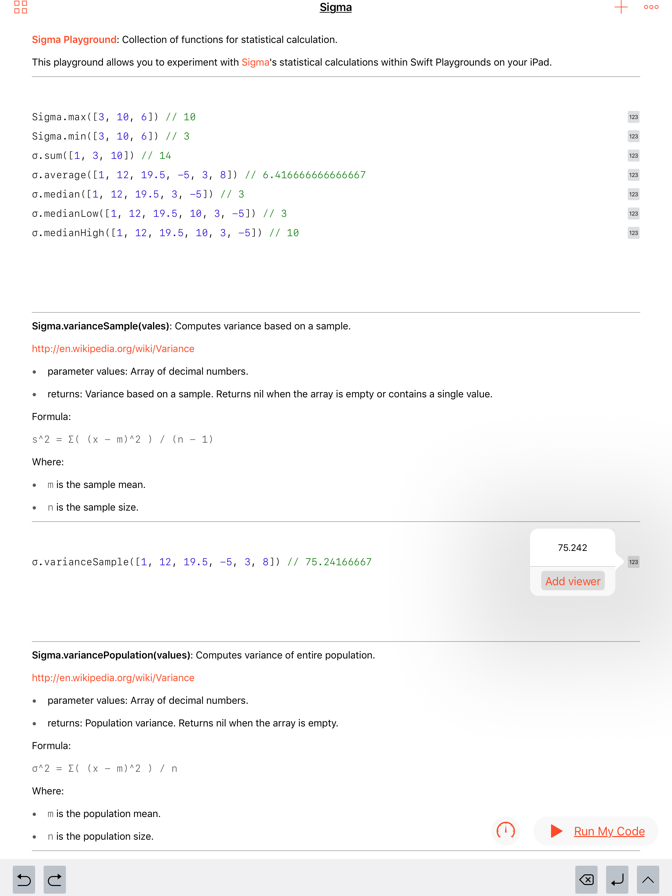
The Sigma Playground can be downloaded here:
This screencast demonstrates how to install the Sigma Playground on your iPad:
The sources for the Sigma Playground are available on GitHub.

-
2016 MacBook Pro's 16GB RAM Limit
A lot has been written about how Apple’s new MacBook Pro maxes out at 16GB of RAM. Some argue that 16GB is enough for almost anyone, and therefore it is not a real problem. I disagree.
Back when I bought my 2012 MacBook Pro Retina, I maxed out its memory and got 16GB RAM. This was a huge extravagance and at the time. It was hard to use more than 8-10GB of RAM. However, as the years passed, the macOS has used more resources and so has Xcode. Now, almost 5 years later, my machine fully utilizes that 16GB of RAM.
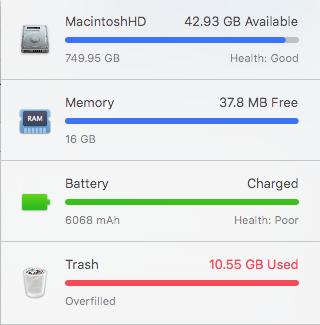
Given what these new machines cost, I expect to be using it for several years. I anticipate that 2-3 years from now, 16GB RAM is going to feel very cramped. At that point, the only option will be a new machine.
I’m torn. My current MacBook Pro Retina is the best Apple laptop I’ve ever owned. I like it a lot. I really want to move to a retina (5K) external monitor except that my current machine’s Thunderbolt 1 ports are unable to do this. The new MacBook Pro solves this problem, but the memory issue gives me pause. I may just have the battery replaced and sit on my hands for another year to see what happens.
-
iPad Pro & Apple Pencil for the non-artist
I have to say that I’m really liking the iPad Pro. Apart from times when I have to code and when I need Lightroom (Lightroom on the iPad is useless for the work I want to do), it is the machine I take with me in my backpack.
I like to make rough sketches of software UI ideas as I work. I’ve tried several styli over the years and never been totally happy. I have been using a 53 Pencil which I liked quite a lot, but then I got an Apple Pencil. Its clearly nicer and the closest yet to drawing in my paper journal. I’m no artist at all, but these tools let me quickly capture what I’m imagining as I work. As I get older, I find that getting ideas out of my head and capturing them in some form becomes more and more critical to my work process.
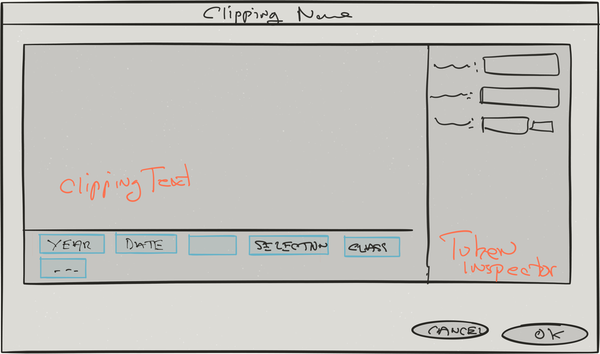
Drawing with the Apple Pencil is faster and more responsive, and while its not in evidence in this example, pressure sensitivity helps. However, I do miss the eraser on the 53 Pencil a lot.
I used to make these sketches in my paper journal (which I still carry with me) but being able to make a quick sketch like this and attach it to an item in my bug database is better.
Tools used:
-
Inspirational Software
I’ve been building software since grade 9 in high school (~40 years), and I find it hard sometimes to get excited about new possibilities in software development. But some days I see something done so well that it makes me want to drop everything and start a new project that tries to match it.
The last time this happened to me was when a video of StaffPad for the Microsoft Surface was circulating. My musical skills are limited to beginning piano but this thing immediately left me wanting to try it and, for once, wishing I had a Microsoft Surface machine.
Today, Apple did it to me. The release of Music Memos and the new GarageBand are, to me, examples of Apple at is very best. Apple’s OS releases have been problematic of late, but these apps are wonderful. I happen to have an iPad Pro and I just wasted a whole morning playing with the new GarageBand.
GarageBand on the iPad Pro confirms for me my belief that the iPad Pro hardware is spot on. It just needs good software to make it really compelling. Not stripped down mobile versions of apps, but fully featured, inventively designed apps that take full advantage of the nature of a large touch screen device.
-
MacBook Pro Retina Followup
Looking back through my blog I found this post from 2012 describing my feelings about my new MacBook Pro Retina. This was the first of the MacBook Pro Retina machines and it represented some radical departures from the past at that time.
I’m here to report that I’m still using this machine as my main development system. I think this is now my favourite Mac laptop ever, displacing the Titanium PowerBook which held that spot for a long, long time. Its still fast, its still thin, it still has a great screen, and from what I can tell it has a better keyboard than current MacBook Pro Retinas.
I maxed the machine out at the time (16GB RAM, 720GB SSD, whatever the fastest processor was), and this machine has remained totally usable in the face of new versions of Mac OS X and Xcode over almost 4 years. That’s not bad as I typically start feeling like my machines are getting slow at the 2 year point.
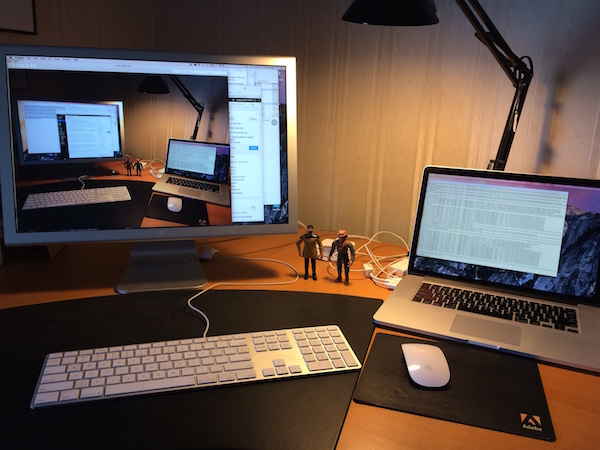
My only sadness with the thing is that it does not appear able to drive a retina external monitor. I have an old Apple Cinema Display which I thought was gorgeous to look at until I got the MacBook Pro Retina. Text on the Cinema Display is hard to read in comparison to the MacBook Pro Retina. Also, a larger SSD may be in my future.


-
TextKit - Line Numbers
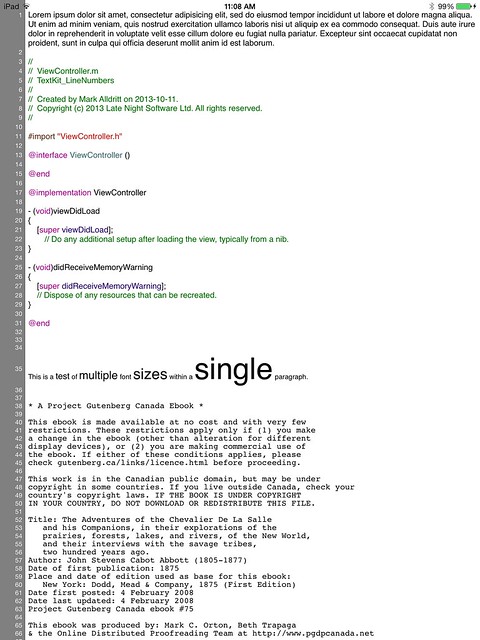
This sample code demonstrates one way of displaying line numbers in an iOS7 UITextView. This sample makes use of iOS7’s Text Kit classes and can accomodate texts with varying fonts from one paragraph to another.
-
My First iPhone App
Now that Script Debugger 5 has been released, and most of the fires have been put out, I am turning my attention to new projects. As part of this I have been doing a lot of reading and experimenting with Android and iOS development. I realize I’m late to the party with iOS/Android development, but Mac OS work has kept my busy.
I finally decided to get my feet out of the mud and build something useful. I chose as my first significant iPhone app a client for the Victoria Virtual Tennis Club. This is a PHP/MySQL based web site which I developed to help this organization host Tennis matches in the Victoria B.C. area.
Like most desktop developers moving to mobile, I’m struggling to keep things simple on iOS and adopt the UI idioms users have come to expect and understand. I’m sure I’ll find ways to simply this app after I’ve had time to play with it.
This is a standard master-detail app which lists a calendar of upcoming VVTC events:
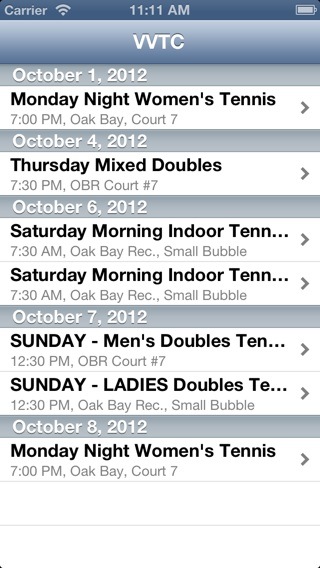
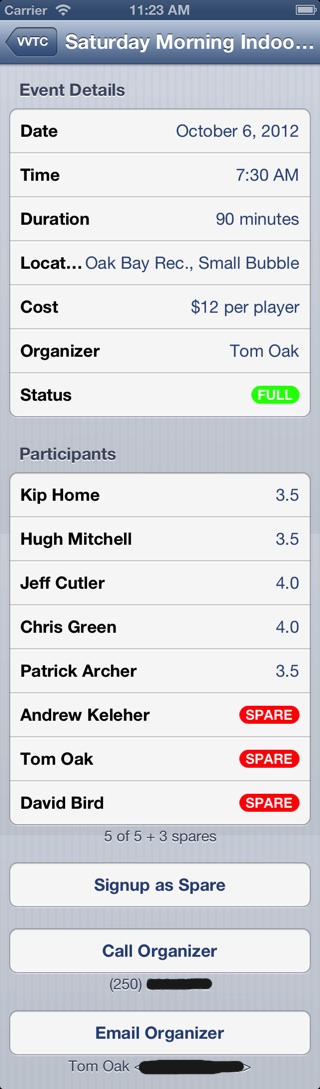
Taping on an event in the master screen takes you to a detail screen where you can see event details, a list of participants and then sign up for the event if you want to.
Behind the scenes, this involved adding a simple REST service to the VVTC web site to get the current calendar information, and to request signup. This data is returned as a JSON structure.
I decided to avoid the various iOS REST frameworks I found, and simply roll my own since I only have two URLs (get calendar, request signup). This decision may haunt me in the future, but for now things are working and I can understand what’s going on. The new NSJSONSerialization class worked flawlessly with the data returned by PHP’s json_encode function. Dealing with dates was a bit of an issue, but I finally settled on the ISO 6801 date format and that problem was solved.
Going forward, I want to add a Month view that mimics Apple’s Calendar application using the Kal project as an alternative to the list view I currently have.
I want to give full credit to the following resources that made this whole exercise possible within the 2 days I gave myself:
-
Matt Neuburg’s new “Programming iOS 5” book. This book explained lots of things for me, but most importantly it allowed me to adopt ARC along with a lot of Objective-C 2 features in my iPhone app. After many years of doing manual memory management in Script Debugger, it took a lot to let go of the rains and trust this to the compiler. This exercise has kind of spoiled me for dealing with my old code.
I read the first edition of Matt’s book cover-to-cover a few years ago and that gave me my basic understanding of the iOS SDK. A lot has changed over the years, and the new version of the book was great at reacquainting me with the iOS SDK.
-
Erica Sadun’s “The iOS Developer’s Cookbook”. Lifting pieces of Erica’s code out of her examples saved me a bunch of time.
-
The QuickDialog project. I used this to build all the detail views in my app and it saved me a mountain of time.
-
There are many web sites offing directories of reusable iOS (and Mac OS) UI components, but I recently found Cocoa Controls. This site led me to stumble upon QuickDialog and a number of other useful things.
UPDATE: I am missing Cocoa Bindings under iOS. I know that iOS provides Key Value Observing, but Bindings are missing. How are others dealing with this omission?
-
-
Re: The Skeuomorphism Rift Within Apple
I came across Austin Carr’s piece (via Daring Fireball) discussing a struggle within Apple regarding the use of Faux-Real UIs for many of its applications. Some of the example applications cited include the fake leather Calendar and iBooks' shelves.
A recent addition that stuck in my mind was the new Podcasts app which uses the metaphor of a reel-to-reel tape recorder as a background while playing podcasts.
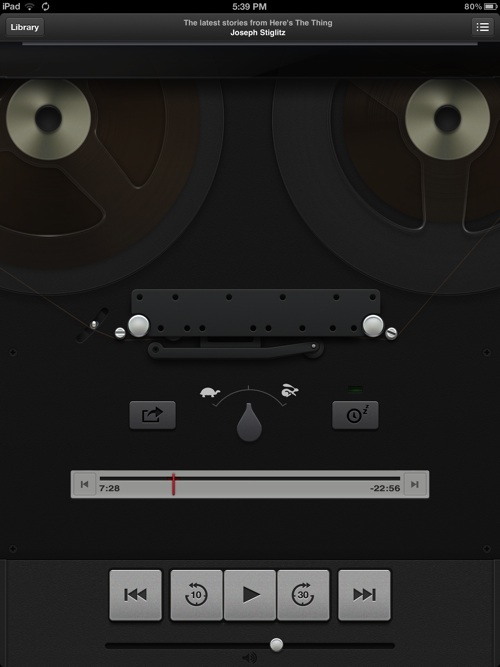
At first I thought this was clever, but than I realized that (a) most iOS device users are too young to have any memory of these machines, and (b) Apple has gone to extreme lengths to create this fiction. The tape moves from one spinning reel to the other as a podcast plays, just as it did on the real machine. When you pause or play a podcast, the tape tensioner moves to take up the slack in the virtual tape traveling over the playback heads.
The programmer in me is impressed by this attention to detail, but as a customer I’m left wondering how much useful functionality was dropped from the product to make time for this kind of “play” in the UI.


-
Impression of the new Retina MacBook Pro
Marco Arment recently wrote a Retina MacBook Pro review (via Daring Fireball) which I found helpful in making my decision to purchase one of these machines for my development work.
I’ll add a few additional observations after having used my new machine for about a week:
-
It is fast! I’ve not had a desktop Mac for many years so I cannot compare this MacBook Pro to a Mac Pro or iMac, but this is the first time I’ve gotten a new Mac laptop that was dramatically faster than my previous machine. The combination of solid-state disk, lots of RAM and a fast CPU make the machine very responsive. Building my Script Debugger 5 product from scratch went from ~4m30s down to ~1m15s.
-
Like Marco, I’m running my display in scaled mode because the standard video mode does not provide enough space for my needs. In this mode, the GPU isn’t strong enough to keep up with some operations. Examples include swiping between spaces causes a noticeable lag and some scrolling operations are a little slow. But Xcode works just fine, as do all the other development tools I use.
-
iPhoto and iMovie are revelations. All my images look so much better on the retina display. I shoot a lot of images of sculptures and finally these images are starting to carry the same impact on the retina display as they do when printed. The awful flatness of older displays is gone. We are finally beginning to get back some of the power of slide film.
This change is more noticable on the retina MacBook Pro than it is on the retina iPad (which is very good). This may simply be a consequence of the MacBook’s display being bigger than the iPads.
-
You are going to use more disk space. For example, iPhoto and iMovie will generate higher fidelity thumbnail images which are going to take more space on your disk. If you have a large iPhoto library, this could mean a few more GB lost to thumbnails.
-
Surprisingly, Terminal really benefits from the retina display. Small font sizes are easily readable making it possible to show more lines and columns in a Terminal window.
-
If you like to rip CDs in iTunes, you’ll need to buy Apple’s external USB CD/DVD drive as the Remote CD/DVD drive sharing system does not allow this kind of operation (You also cannot use HandBrake to rip DVDs). I get the DVD limitation because DVDs are copy protected, but CDs are not and its a drag to buy yet another accessory (you will probably have already bought the Gigabit Ethernat to Thunderbolt adapter).
-
I have 50 year old eyes and eye strain seems to be reduced.
-
I’m waiting to see if this display improves my ability to catch errors when proof reading. In the past I found I have to print out my copy to properly proof read it. We’ll see if a higher quality display improves legibility and comprehension.
-
The machine runs much cooler than my old MacBook Pro. The silence of the thing is eery. I have to push the machine fairly hard (long Xcode compile) to get the fans to spin up.
-
The heartbeat pulsating light on the front edge of the body is gone. As a result, there is no visible clue when the lid is closed that the machine is sleeping vs powered down. The battery level indicator lights are also gone so you have to wake the machine to see where your battery is at.
-
Safari finally feels fast. I’ve always found Safari to be slow when loading PHP and Rails pages hosted on my own machine, but now it loads without any noticable delay.
Overall, I’m very happy with the machine.
New Machine: Mid-2012 2.7Ghz Core i7 Retina MacBook Pro, 8GB RAM
Old Machine: Mid-2010 2.66Ghz Core i7 MacBook Pro with Hi-Res Display, 8GB RAM
-
-
Script Debugger 5.0 Released
I’m pleased to announce that I have finally completed Script Debugger 5.0. After an extremely long development period, it is finally done and I can take a breath.
-
iPhone Price Drop
I find the reaction to the $200 drop in the price of the Apple iPhone fascinating. Lots has been written on the subject, so I won’t rehash the details.
I think there are two key issues that made this such a big deal:
-
The press is itching to find bad iPhone news to report, especially when they were criticized for giving Apple so much free press leading up to the iPhone’s release. It all sounds like a tempest in a teapot.
-
The simple price drop is very much unlike Apple’s MO. Apple normally discounts its products by removing lower end products, and adding higher end/speed bumped products. The originally high end product simply becomes the low end product with a lower price.
In this case, Apple simply dropped the low-end iPhone and dropped the price. Apple did this, rather than introducing a 16GB iPhone at the same price as the 8GB iPhone, in an attempt to change the public’s perception of the iPhone as an expensive product.
So I guess the old saw in product pricing that “you can always lower your price, but you can never raise it” isn’t always true.
-
-
We Need a Scripting User Interface Evangelist
I had an epiphany at this year’s WWDC while listening to John Geleynse’s User Interface design talk. We need someone to evangelize Scripting Interface Design with the same passion and clarity that John Geleynse brings to Graphical User Interface design on the Macintosh.
During the course of his talk John gave a compelling series of examples, tips and references that left me believing that I could improve the UI of my products, despite the small size of my organization. Even more importantly, he clearly demonstrated the difference between a good and a bad graphical user interface, and the consequences of bad User Interface design for the user.
Because this year’s WWDC was largely a repeat of last year, I spent more time in the introductory AppleScript, Automator and Cocoa Scripting sessions than I normally would. I left these sessions with the impression that developing a scripting interface was a difficult and error prone exercise. The Q&A questions at the end of these sessions confirmed for me that the audience was not clear on how to proceed. Everything that was said in these presentations was technically accurate, but I came away uninspired.
Interestingly, I believe that the issues John Geleynse so ably discussed (user centered design, identifying objects and tasks that matter to the user, knowing when to use certain widgets, etc.) are the very same issues that a Scripting User Interface designer must consider.
Several years ago, Cal Simone tried to fill this role. Cal and I differed on the specifics, but it has to be said that he was effective at motivating developers to “do the right thing”, and at keeping Apple focused on the problem. Since Cal left the scene, Apple has been left to do this for itself and it has not really risen to the challenge.
Scripting User Interface design is not about Cocoa, Cocoa Scripting, Objective-C, or even AppleScript. It’s about designing a programatic interface for an application that mirrors the user’s view of the application’s data model and functionality. Very often the user’s view of the application is not the same as how the application works internally.
There are features of Leopard that are going to make each application’s scripting user interface much more prominent (my NDA with Apple prevents me from giving specifics), and so this issue is going to become more important as time goes on.
Developing a Scripting User Interface is not that hard. I’ve built some large scripting interfaces over the years (Illustrator 7/8, Visualizer, Script Debugger 3, and now FaceSpan 5), and there is a method to it. But you need to approach it with as much care and forethought as you do with your Graphical User Interface design.
Apple’s Tech Note 2106 is a start, but it does not go far enough. This document is too much about code and not enough about process. For instance, It does not give a methodology for developing a scripting user interface.
Somehow developers need to be made to understand the why and the how of designing and implementing a compelling Scripting User Interface. As Brent Simmons once said, designing User Interfaces for the Mac is the “The Show”. If you are going to play, do it well.
Finally, I think Scripting User Interface design should be considered when scoring entrants in Apple’s Software Design Awards.
-
WWDC 2007
I’m back from another Apple Worldwide Developers Conference. Here’s my take on this years event.
Bigger - This year was busier than any previous year, and a dramatic change from the years when Apple was in trouble where you could throw a bowling ball down the corridors of the San Jose Convention Center without fear of hitting anyone. Many sessions were standing room only - and the ushers were much nicer than years past as they went about their task of getting as many people as they could into the rooms.
Not As Much Fun - The Apple Bash is still there, Stump the Experts is still there, and a few other nice elements of the conference continue to exist. However, the formality of the conference is increasing. This has been happening incrementally over the years since the Next acquisition of Apple.
The jugglers are largely gone. Movie night is gone. The lunchtime food is terrible. The tables of junk food in the afternoon are gone. I even saw some attendees in suits (presumably newbie IT folks).
Content Was Stale - Since I attended last years WWDC and heard all the Leopard feature announcements at that time, this year’s Keynote and the presentations were for the most part a repeat of last year. There were a few more details, but nothing dramatic.
Labs, Labs, Labs - For the last couple of years, the Labs have become a key element of the conference for me. This year I had a gnarly C++/STL compiler/linker issue. An hour in the Mac OS X Lab got the issue sorted.
Similarly, time spent with the Apple engineers responsible for specific parts of Cocoa provided answers for difficult to describe problems.
The labs, for me, are the most valuable part of the conference. The labs combined with one-to-one marketing and networking opportunities justify the cost of conference.
If you are thinking of attending next year, here are my tips:
-
Bring a laptop with all of your source code
-
Have a disk partition (or external drive) ready to receive the OS beta that will be released at the conference
-
Plan to eat lunch out
-
Carbon is dead - morn it and move on (for the folks from the Classic Mac OS days)
-
Start planning your Stump the Experts question now
-
Link up with the many informal get togethers (Cocoa, Indie Developers, etc.)
-
Plan to attend John Geleynse’s User Interface design talk
-
Organize all your issues ahead of time to maximize your Lab time - prepare solid test cases to present to the engineers
-
-
iPhone lust
I am ceaselessly amazed at how Steve Jobs and company can create techno lust in me. This time around it was both AppleTV and the iPhone.
Now that I’ve had 24 hours and a little bit of perspective has set it, its clear that the iPhone is very cool but that are so many unanswered questions.
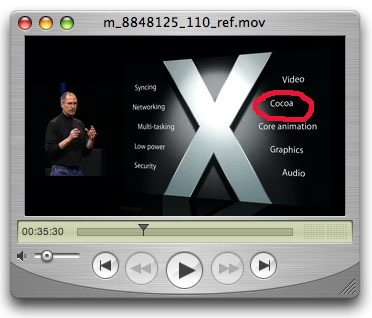
The biggest question for me is will I be able to install Mac OS X applications onto the iPhone? When I watched the Keynote and I saw Cocoa listed among the OS technologies I thought that the iPhone would be a perfect place for FaceSpan-developed applications to be deployed.

Just like Apple’s DashCode, FaceSpan-built applets would be perfect for this kind of device. Just think of all the stuff you could do with AppleScript on a device with the kind of networking and web capabilities the iPhone possesses! I imagined adding iPhone widgets to the FaceSpan palette and extending the FaceSpan scripting interface with iPhone/synching tools.
The sobering part of this of course is that, while the device may have the full Cocoa toolset, it may not be possible to install anything on the device. I’ll just have to wait and see (And, living in Canada, it will take extra time for the iPhone to be available here).
This still leaves me with the pressing problem that I need to replace my broken iPod now.
subscribe via RSS