-
Posting to a Discourse forum from iOS Shortcuts
I’ve been experimenting with iOS Shortcuts and I have to say I really like it. I was a fan of the Workflow app on which Shortcuts is based. While Shortcuts uses a visual programming model similar to macOS’s Automator, I find Shortcuts somehow much more usable.
This post on the Script Debugger Support Forum demonstrates how to post a new topic to a Discourse forum using the Discourse API with Shortcuts.
I had worked out the Discourse API issues previously when writing some AppleScript code to post a new topic so the task was simply a matter of figuring out how to accomplish the task in Shortcuts.
-
MacScripter.net
I’m excited to announce that I have become the new host of the MacScripter.net discussion forum. MacScripter has been a long standing resource for information concerning macOS automation using technologies such as AppleScript, Automator, and JavaScript For Automation.
Ray Barber established the site many many years ago and has grown it to the point where it is today with almost 30,000 members and an archive of 175,000 posts. MacScripter is a core piece of the AppleScript and macOS automation landscape. Links to MacScripter articles appear almost everywhere macOS automation is discussed. This is all a testament to Ray’s vision in creating MacScripter.net and to his support of the site over the years. Ray has decided to step down and I’m really pleased to be able to provide the resources needed to keep MacScripter.net going in the future.
I sense we are at a point where automation of Apple products is seeing a resurgence. The release of Shortcuts in iOS 12 suggests that Apple has become serious about automation on its mobile devices. I feel this change will spur people to look for more opportunities to automate their Macs as well. All of this represents a great opportunity for MacScripter to grow and become relevant to a new audience.
MacScripter will remain more or less as it is. It will continue to be a place to discuss topics related to macOS and iOS automation in a technology and product agnostic environment.
-
2018 MacBook Pro?!?!
Over the years, I’ve been excited when the time came to replace my Mac laptop. There was a sense that the new laptop would be vastly better that the old one. New ports, more memory, faster, better display, better battery life. The pinnacle for me has been the 2012 MacBook Pro Retina that I’m about to replace. I splurged and maxed the thing out and it has been amazing.
This was the first SSD MacBook Pro, and its been a fabulous machine - apart from the difficulty of getting its battery replaced. Only now, 6 years later, it is starting to feel slow. 16GB of memory just does not cut it when running Slack or doing Swift development in Xcode. I also desperately want to run a 4/5K external monitor for my old man eyes.
I decided to pass on the 2017 MacBook Pros because of their 16GB memory limit. The keyboard issues that surfaced confirmed for me this was the right call.
I was going to go with a iMac Pro, but now the 2018 MacBook Pro has arrived and most of the concerns seem to have been addressed. But the keyboard - I tried one in the store yesterday and it sucks compared to the one on my 2012 machine. It is really awful to type on. How is this progress? I use my mac ~10h each day and typing comfort is huge. And then there is the loss of all the built in ports. I use the CF card reader regularly. Like everyone, I have a mountain of USA-A devices. Its a mess. The 2012 MacBook was thin enough for my needs. I want a flexible and capable machine, not a thinner machine.
I have to carry all kinds of crap around with me for my iPad Pro (keyboard, HDMI cables, card reader, etc) and it sucks (though I love the Apple Pencil). Forget one of these adapters and you are sunk. The thought of having to remember to carry all the different Mac adapters I may need with me is depressing. Sure, USB-C is the future, but its not compelling right now.
So here I am about to spend >CDN$6K on a machine that feels like a total compromise. I need the speed and the memory and the ability to drive a 5K monitor but almost everything else about it feels like a step backward.
Apple in 2018 is not delivering a compelling mac laptop in way it did 5 years ago.
And here’s another change. In the distant past, the price of “pro” Mac laptops always seemed to be about the same ~CDN$3K. Each time you got more, but the price stayed roughly the same. My 2012 MacBook was CDN$4K which I thought was extreme, but its lasted longer than any mac laptop I had before it. But recently, the prices have gone crazy. The 2TB, 32GB, i9 machine I’m considering is over CDN$6K! And all this for a machine that I’m not terribly excited to own.
Switching to Windows isn’t an option because my work is revolves around Apple, and I’m sure I would hate Windows, but looking over the fence at all the things happening in that hardware space, the MacBook Pro appears to be behind.
-
RegEx Knife 2.0.1 Is Coming
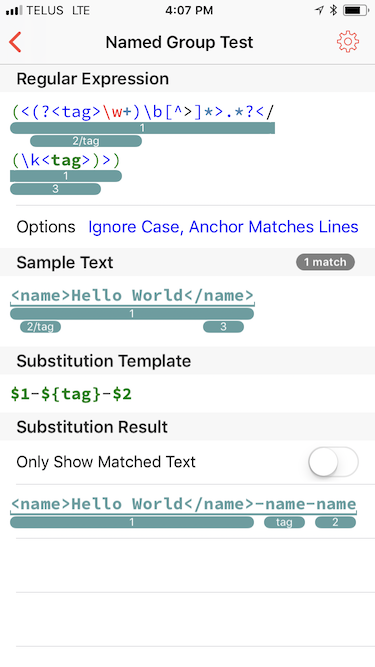
I’m working on the next RegEx Knife 2 maintenance release, version 2.0.1. This release addresses a series of iOS 11 compatibility issues and adds support for named capture groups.
iOS 11’s regular expression engine handles named capture groups in the following ways:
Regex:
(?<name>pattern)Substitutions:
${name}Here’s how named capture groups are displayed in RegEx Knife:
If you are want to help out by testing RegEx Knife, please get in tough with me via email or Twitter.
subscribe via RSS