-
The iOS On-Screen Keyboard Is A Problem
I’ve been working on iOS versions of some of my development tools, and I have been struggling to figure out why touch UIs are so poor for this kind of application.
A huge problem is that the bottom half of the screen is a dead zone due to the appearance of the on-screen keyboard. Anything displayed where the on-screen keyboard will appear has to be sacrificial and not critical to the task at hand. For instance, in the case of tools that edit text this means you have to be able to view the text around the insertion point and any important context in roughly half the screen. For programming tools where context is very important this is a big problem. This problem is at its worst when the device is in landscape mode.
As a user, you are forced to keep scrolling around in anticipation of the appearance of the on-screen keyboard so you don’t loose the passage text that interests you.
On the iPad Pro this is a little less of an issue as you have more screen space to work with, especially in portrait mode, but its still a challenge. Obviously, a hardware keyboard is one way to solve this problem, but you cannot count on the user having one at hand all the time.
-
Re: What if JavaScript had persistent globals?
In a recent piece on his blog Dave Winer imagines what might have been had his ideas for persistent global variables in his Frontier development environment been copied into JavaScript. I find this a fascinating thought. It could have radically changed the way the local web app development evolved.
For me, Frontier’s Object Database was the most compelling of all the things in Frontier. I never really go into the language or the outliner parts of his work, but the Object Database was clearly a good idea. So much so that I’ve been trying to figure out ways of incorporating it into AppleScript ever since. Products like ScriptBase tried, but none of us have been able to achieve the integration that Dave did.
The closest I came was with FaceSpan 5 where the entire UI and application were entries in a hierarchical object database, and event handling flowed up through the object tree from the source (e.g. a button) to the root (the application). Everything was mutable and persistent which made for a hugely powerful tool, much as Frontier had demonstrated many years before. Sadly, FaceSpan 5 was never finished.
-
Re: On Apps that Get Acquired
On his blog Innesential Brent Simmons makes some good points regarding the today’s announcement by Dropbox that it is returning some applications.
I’ll add that when deciding to use an application, you need to ask a few questions:
-
If the application is free, who is the real customer (probably not you)? For instance, Safari is core to Apple’s business because it makes Macs saleable, but Mailbox is not core to Dropbox.
-
How do the economics of the application work? Is the developer charging enough money to sustain themselves and have sufficient resources to improve the product over time?
-
How hard is it to transition your data to an alternative application should the one you are using be withdrawn?
-
Does the developer have a history you can look at (Omni: yes, Bare Bones Software: yes, Apple: yes, Google: yes). A developer’s past actions give good clues to what they may do in the future (e.g. Apple & Google have pulled beloved apps many times).
-
-
Powering Chromecast
We got a shiny new Google Chromecast yesterday. Physically, this is a beautifully designed device, save for one thing: its power source. The device is designed to hang off one of your TV’s HDMI ports, but you’ll soon discover that you need to provide power via a separate cable. The Chromecast box provides a wall wart and cable that plugs into the bottom of the Chromecast.
My heart sank. I only have one power outlet near the TV, and both plugs were already in use for the TV and cable box. I set about finding some sort of adapter that would give me more plugs.
But there is something cool about the Chromecast wall wart: the wall wart is actually a USB power adapter and the Chromecast power cable is actually a USB cable. If you have a powered USB port on your TV, you can plug the Chromcast’s power cord into it and power the Chromecast directly from your TV! I was saved as my SONY TV has a USB media port right next to the HDMI port I am using - problem solved, nicely hidden behind my TV.
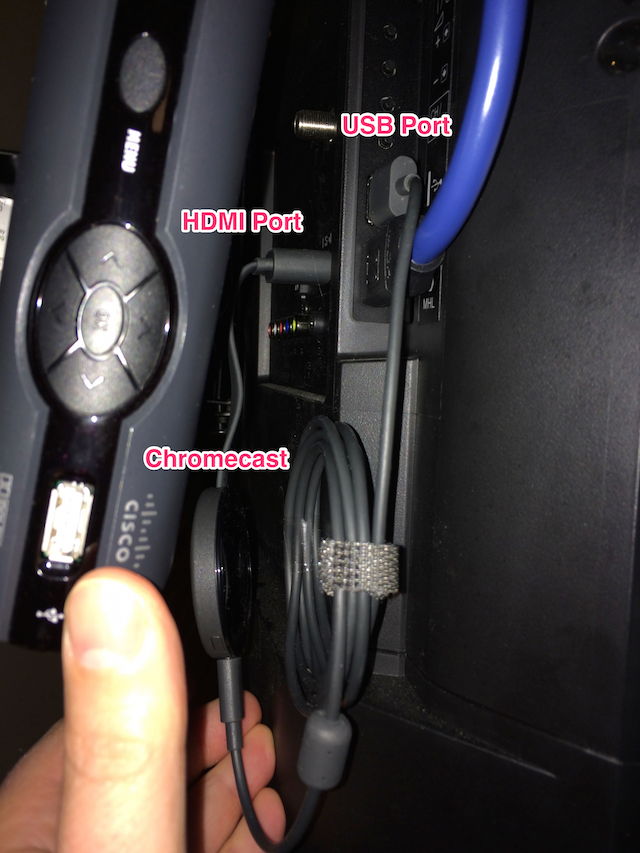
I just have to sort out one problem: turning on the TV powers the USB port which powers the Chromecast, and the Chromecast forces the TV to switch to Chromecast’s HDMI port when it turns on - kind of irritating.
-
MacBook Pro Retina Followup
Looking back through my blog I found this post from 2012 describing my feelings about my new MacBook Pro Retina. This was the first of the MacBook Pro Retina machines and it represented some radical departures from the past at that time.
I’m here to report that I’m still using this machine as my main development system. I think this is now my favourite Mac laptop ever, displacing the Titanium PowerBook which held that spot for a long, long time. Its still fast, its still thin, it still has a great screen, and from what I can tell it has a better keyboard than current MacBook Pro Retinas.
I maxed the machine out at the time (16GB RAM, 720GB SSD, whatever the fastest processor was), and this machine has remained totally usable in the face of new versions of Mac OS X and Xcode over almost 4 years. That’s not bad as I typically start feeling like my machines are getting slow at the 2 year point.
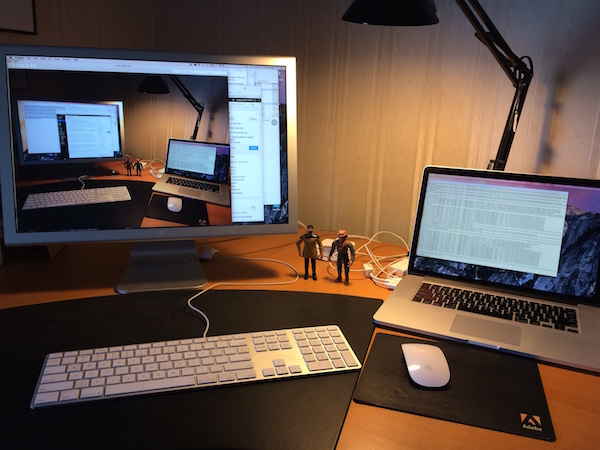
My only sadness with the thing is that it does not appear able to drive a retina external monitor. I have an old Apple Cinema Display which I thought was gorgeous to look at until I got the MacBook Pro Retina. Text on the Cinema Display is hard to read in comparison to the MacBook Pro Retina. Also, a larger SSD may be in my future.


-
When Open Does Not Return An Object Reference
There is a long standing bug in Cocoa Scripting, the technology Apple provides to developers to help make their applications scriptable, where the Open, Move and Copy commands do not return a reference to the newly created or moved object. This makes scripting these applications difficult.
I frequently get requests from Script Debugger customers for help solving this problem. I see people resorting to UI Scripting and many other techniques to address this problem.
The code below shows one way of working around the problem of the Open command not returning a reference to the newly opened document. I use the Preview application in my code, but this technique works equally well with other applications which fail to return a document reference from their Open commands. This technique fails is the file is already open.
set theFile to choose file -- pick a file to open
tell application "Preview"
set theOldOpenFiles to path of documents -- sample the existing open documents
open theFile -- no new document reference returned - sigh
set theOpenFiles to path of documents -- sample the new list of open documents
end tell
-- Find the item in the list of new open documents that is not present in the old list of
-- open documents.
set theNewFiles to finddifference of theOpenFiles against theOldOpenFiles
tell application "Preview"
-- recover the reference to the newly opened document
set theOpenedDocument to first document where path is (item 1 of theNewFiles)
tell theOpenedDocument
-- your code targetting the newly opened document goes here...
set theDocumentName to name
end tell
end tell
to finddifference of listA against listB
-- This handler computes the 'difference' between the contents of two lists
local newList
set newList to {}
repeat with a in listA
set a to contents of a -- dereference implicit loop reference
if {a} is not in listB then set end of newList to a
end repeat
newList
end finddifference
-
RegEx Knife 1.0.5 Released
RegEx Knife version 1.0.5 is available in the App Store. This version fixes a crashing bug that occurs when working with Regular Expressions containing 10 or more capture groups.
RegEx Knife has had 622 downloads so far (~60/month) - still hardly a rush. Clearly the iPad isn’t the best place to be doing RegEx development, but its handy when you need it.
-
RegEx Knife 1.0.4 Released
RegEx Knife version 1.0.4 is available in the App Store. This version fixes bugs that escaped my notice when developing RegEx Knife 1.0.3. Lets hope I’ve finally sorted everything out.
RegEx Knife has had almost 450 downloads so far - hardly a rush. Clearly, the iPad isn’t the place where one would think of trying to develop Regular Expressions. However, I’ve begun to get a few emails requesting features and reporting bugs which is encouraging.
subscribe via RSS