-
Script Debugger Pricing
A comment appeared on my Script Debugger 20th Anniversary post asking a question that has arisen many times over the years:
I don’t know how many times I’ve downloaded demos of SD over the years, but I’ve never actually jumped the hurdle of that $199 price tag to purchase it. I wouldn’t hesitate to pay $50 or so, and even with AppleScript getting less attention these days, I can’t believe I’m alone.

I’m not (just) complaining here, I’m really interested in your thinking in setting such a high price point. It’s hard to believe you wouldn’t have made more money over time if you were willing to target more casual scripters. Did you make a deliberate choice to cater only to the most hardcore and/or professional users, or was it really a profit-maximizing decision based on real market analysis? Or am I missing something? (Of course I understand that you put a lot of work into it and that the scripter universe is a relatively small market overall.)
I have resisted answering this type of question publicly because it seems like a no-win for me. Yes, Script Debugger is expensive. Yes, I could have lowered the price but I have not. Am I missing an opportunity - maybe - we’ll never know. I thought I would turn my response to this question into a post so it won’t be overlooked.
I see Script Debugger as a tool that makes professional developers money by saving them a lot of time. Those that really need Script Debugger know it and would pay much more because of this simple equation. In fact, if I had more courage I would raise the price even further.
The problem with the make-it-up-on-volume model is that the market for AppleScript tools (development tools in general) is very small and fragmented. I don’t believe that simply lowering the price by 3/4 on its own would generate 4x+ sales volume because I don’t think 4x+ customers ready to buy at $50 exist. I would have to market more to reach those customers that do exist and that costs. I would have to become involved in justifying and marketing AppleScript (as I once was) to create new customers which costs. Then there are the added costs of supporting a 4x+ user community. And finally, it lowers the perceived value of my software. I have developed many spreadsheets trying to model this over the years.
There is presently a rant raging on the AppleScript User’s mailing list regarding AppleScript’s future. It is clear that for those that have discovered AppleScript and tamed it, it is powerful weapon. However, the days of AppleScript being the only game in town (as it was before Mac OS X) are long gone. Many alternatives exist that better AppleScript in lots of ways. AppleScript remains the best tool for controlling scriptable Mac applications, but its a bear to master – hence the need for Script Debugger. Apple’s moves to improve AppleScrpt in Mavericks and Yosemite are somewhat encouraging. However, any marketing effort I might mount is never going to move the needle on AppleScript’s presence in the automation market place and Apple’s view of it. Apple’s priorities lie elsewhere so I’m not likely to get any cover from them.
As for maximizing profit, no. I’ve made a living over the years from Script Debugger, but its a base-hit at best. It makes enough money to keep me working on it, but not enough for me to retire or even hire any help. I could have earned more money from consulting but I enjoy being an indie developer and accept the financial consequences.
Back in the 1.0 days, we aggressively pursued sales volume. We had a lower price then, and signed up as many sales channels as we could. We purchased ads in MacTech and MacWorld. Our sales volume steadily rose, but our net revenue started to fall.
-
OSAID Leaks Cause Crashes
As a followup to my Getting Yosemite AppleScript Progress Information post I would like to offer this PSA.
There an AppleScript crashing bug that you may encounter when using the
OSAGetProperty()call.If you fail to call
OSADispose()to release the OSAID values you receive fromOSAGetProperty()you have an OSAID leak. If you begin to see difficult to reproduce crashes that look like this then you have an OSAID leak in your application:#0 0x00007fff97a6a827 in CFRelease () #1 0x00000001054fb6b6 in UASMakeIDTable(unsigned long) () #2 0x00000001054fb81b in UASNewID(TUASScript*) () #3 0x00000001054c0f9d in ASGetPropertyLocal(int, unsigned int, AEDesc const*, unsigned int*) () #4 0x00000001054b7aad in AppleScriptComponent () #5 0x00007fff95704b73 in OSAGetProperty ()I filed a Radar bug with Apple over 10 years ago but the issue appears to have gone unresolved. It seems to me that when the available OSAIDs have been exhausted,
OSAGetProperty()(and all other OSA calls) should return some sort of error instead of crashing.UPDATE
If, like me, you wrap your OSAIDs in an Objective-C object, make sure your autorelease pool(s) drain properly. You’re call to
OSADispose()probably happens when your object is dealloced and that may not happen when you expect. -
Script Debugger's 20th Anniversary
While I was distracted with my late wife’s illness, Script Debugger’s 20th anniversary came and went.
Script Debugger 1
Development on Script Debugger 1.0 started in 1993. Version 1.0 was released in late 1994 and was introduced publicly at MacWorld in San Francisco in January 1995. We shared a booth with FrontMost (later renamed FaceSpan) by Software Designs Unlimited.
Here’s how Script Debugger looked back then.
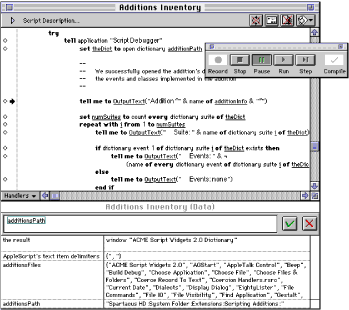
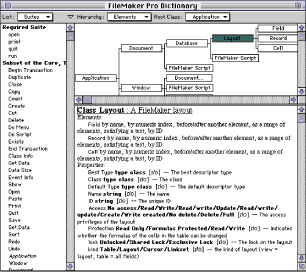
Interestingly, Script Debugger 1 may never have been a product. I was very uncertain about how to market and sell what was really a $129 piece of shareware. BBEdit was the only model of how this could be done by an independent developer. Remember, the Internet was not as it is today. Software was shrink wrapped in boxes containing floppy disks and printed manuals. It took serious cash to produce product. I had 2000 copies made at a cost of CDN$20,000 (1994 $s). The packing boxes filled an entire room in my basement. Software was sold through mail order outlets (MacTech, Apple’s Developer Central, and others) and trade shows like MacWorld and WWDC. The Mac had no presence in computer stores at that time.
I vividly recall standing outside the MacTech booth at WWDC 1995 in San Jose watching people walk up and purchase Script Debugger. I just could’t believe it was actually happening after all the work that had gone into getting those shrink-wrapped packages onto the MacTech shelves. I developed such an appreciation for how things as mundane as a can of soup get onto a store shelf.
Our daughter was born in 1995, and Gerry left her job to work full time with me. We were so naive. We had no idea what we were signing up for.
Script Debugger 2
Script Debugger 2.0 was introduced in 2000, and went on to win the Mac World Eddy for best development tool (we were up against BBEdit that year - I think Rich and the guys promised Gerry a bottle of champaign - I was at home looking after our 4 year old daughter). I was bummed because I later discovered the presenter that year was John de Lancie who played one of my favourite Star Trek Next Generation characters “Q”.

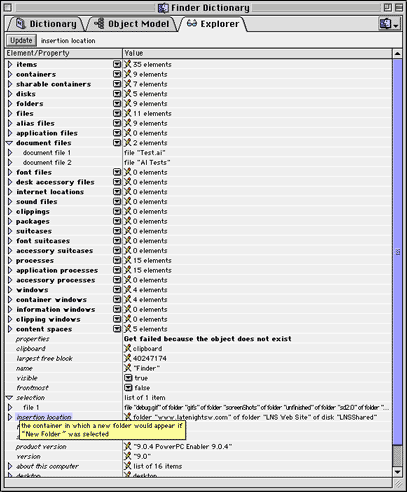
Here’s a little of how Script Debugger 2 looked at the time:
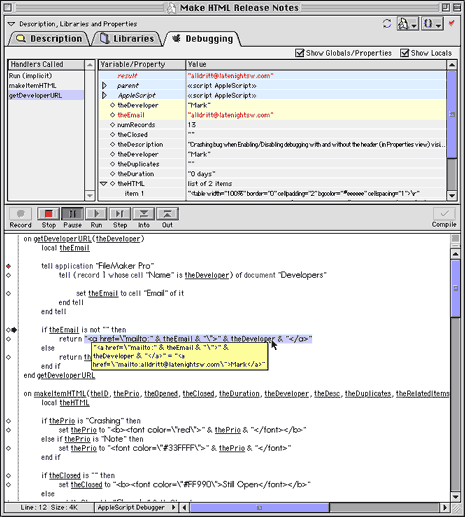
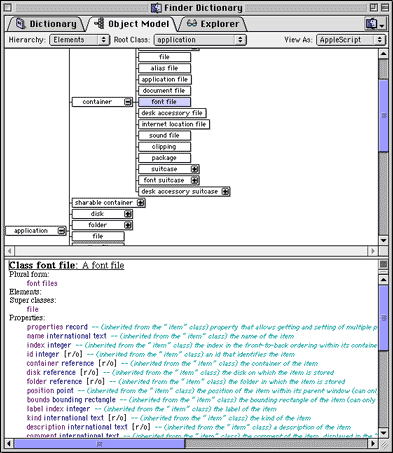
The big advancement in Script Debugger 2 was the object model explorer which let you see an application’s live scripting interface. This was huge at the time, and to this day, sets Script Debugger apart.
After Script Debugger 2 was released, Apple had its near death experience and our business simply stopped (literally went to zero) in the space of 3 weeks.
During the period that followed, we developed an Adobe Illustrator plugin that made Illustrator scriptable from the Mac with AppleScript and from Windows with Visual Basic. Adobe later purchased this code from us and this went on to form the genesis for the scriptability found in Illustrator, PhotoShop and Acrobat (InDesign had its own killer scripting implementation before we arrived on the scene). The product, named ScripZ, was demoed by Sal Soghoian at that year’s MacWorld Jobs led keynote. We were in meetings with Adobe to conclude the sale of the software right behind the black curtain beside the stage as the keynote was taking place - crazy.
Script Debugger 3
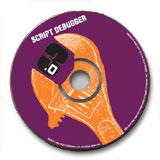
In 2002 we released Script Debugger 3.0. Script Debugger 3 had pretty much the same look and feel as 2.0. We went on to be the runner up for that years MacWorld Eddy for best development tool (I think CodeWarrior got it that year).
The big news for Script Debugger 3 was native Mac OS X support and the integration of our JavaScript scripting system into the product.
Script Debugger 4
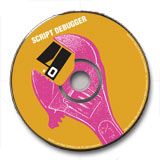
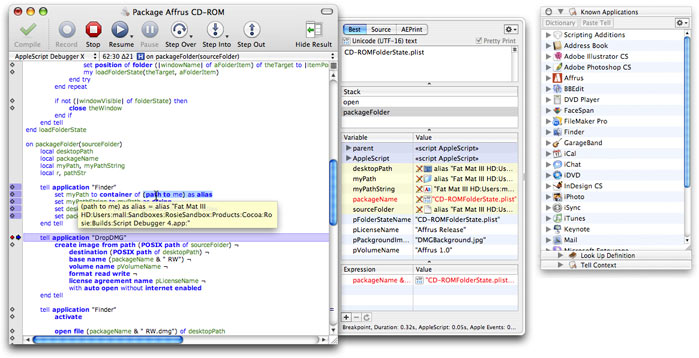
In 2006, Script Debugger 4.0 was released. Script Debugger 4 became a Cocoa/Objective-C/C++ application (previously it was a THINK Class Library/C++ application) and received a UI overhaul which adopted the Mac OS X look and feel, and introduced concurrent script execution where scripts open in different windows could be debugged at the same time.
Script Debugger 4.5
Then in 2009 we released Script Debugger 4.5. Like Script Debugger 3, this was an evolutionary released which built on Script Debugger 4.
Script Debugger 5
And finally, in 2012 we released Script Debugger 5.0. Yet another UI overhaul. JavaScript was dropped (irony). Tabbed windows were introduced. Yet another rewrite of many internal components to make the product more maintainable and drop legacy Mac OS stuff, much dating back to the Classic Mac OS days.
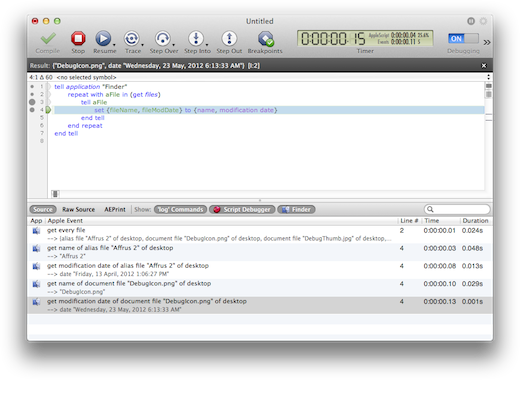
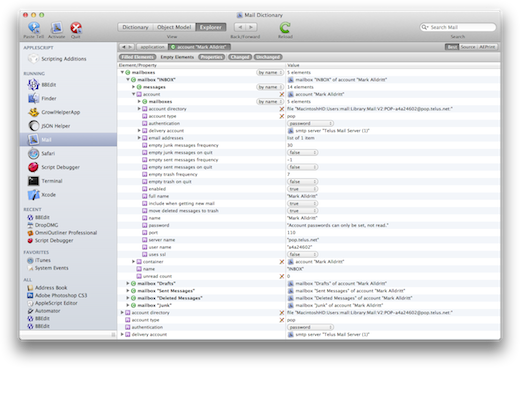
Along the way there were other products: ScripZ (the Adobe Illustrator scriptability plugin acquired by Adobe), TagOn (an Adobe InDesign plugin for importing QuarkXPress documents), Affrus (A Perl IDE/Debugger) and of course the ill-fated FaceSpan 5. Then there were the freeware items: XML Tools, XSLT Tools, Plist Tools, Record and List Tools, JavaScript OSA and others I cant remember. All in all there have been more than 40 Script Debugger releases (major and maintenance releases).
While I did all the development on Script Debugger, it was not me alone. Gerry was there throughout the ups and downs running the business, executing the marketing and sales plans. She and I worked together in the same office for most of these 20 years. Matt Neuburg has been there throughout producing all our documentation (amazingly taking over from our first tech writer and creating the SD1 manual in 3 weeks!) and serving as my sounding board for so many years. Other lesser known individuals include Frances Hunter (she produced the original Script Debugger 1.0 printed manual), Lorin Rivers doing marketing and Bryan Bell did all the icons starting with Script Debugger 3. Adrian Ruigrok developed much of FaceSpan 5 and went on to work for Apple on some of the cool iThingies we all love today. And of course the invaluable support of other developers like Rich Siegel, Jon Pugh, Stephan Somogyi and many many others.
And finally, there are all the relationships that developed with customers through all these years, many dating back to the initial release of Script Debugger 1 (Shane, Ray, Jon, Chuck).
Wow, 20 years of my life involved in developing Script Debugger. My daughter is 19 now and attending college.
I hope I have all these dates more or less correct.
P.S. Here are some interesting facts:
- The impetus for Script Debugger came from difficulty I experienced trying to automate Claris FileMaker and Claris MacProject Pro using Apple’s Script Editor. Oddly, these two Claris applications were very scriptable at that time.
- Script Debugger 1.0 was developed on a Mac SE/30 with 4MB RAM using Think C
- Script Debugger 1.0 easily fit on 1 800K floppy disk. Script Debugger 5 is a 14MB download.
- Script Debugger was ported from Think C/TCL/C++/Classic Mac OS Toolbox to Symantec C++, then to CodeWarrior, then to Carbon on Mac OS X, then to Cocoa/Objective-C using Project Builder and now Xcode. Along the way, the TCL (Think Class Library) had to be ported to Carbon. Parts of the TCL are still in use in Script Debugger 5 (CFile/CResFile/CDataFile).
- Script Debugger has out lived several of the products used to build it (THINK C, Symantec C++ and CodeWarrior). Only BBEdit continues to flourish.


-
Getting Yosemite AppleScript Progress Information
Yosemite (Mac OS X 10.10) introduced 4 new properties scripts can set to report progress information:
progress total steps(an integer)
progress completed steps(an integer)
progress description(text)
progress additional description(text)See the Yosemite AppleScript Release Notes for full details.
What is not explained is how a host application can access this information and display a script’s progress in its own UI. Here’s how you do it.
At intervals the script will call the OSAActiveProc. Within this callback function you can make OSA calls that access the running script’s state. You start by getting a reference to the ‘AppleScript’ object. From there you can read the value of the four progress properties. The following code uses my own OSAID wrapper object (RKOSAID - don’t ask, Script Debugger is 20 year old code). You can use whichever OSA API you are most familiar with.
-- Provisional property ID constants until Apple puts them into a public API #define pASProgressTotalSteps_LNS 'ppgt' #define pASProgressStepsCompleted_LNS 'ppgc' #define pASProgressDescription_LNS 'ppgd' #define pASProgressAdditionalDescription_LNS 'ppga' @interface RKOSAID (AppleScriptProgress) - (NSDictionary*) appleScriptProgress; @end @implementation RKOSAID (AppleScriptProgress) - (NSDictionary*) appleScriptProgress { // Get a reference to the 'AppleScript' object RKOSAID* as = [self propertyForPropertyID:pASTopLevelScript]; // Extract the progress properties RKOSAID* totalSteps = [as propertyForPropertyID:pASProgressTotalSteps_LNS]; RKOSAID* steps = [as propertyForPropertyID:pASProgressStepsCompleted_LNS]; RKOSAID* description = [as propertyForPropertyID:pASProgressDescription_LNS]; RKOSAID* addnlDescription = [as propertyForPropertyID:pASProgressAdditionalDescription_LNS]; // Convert into Cocoa objects and return return @{@"totalSteps": @(totalSteps.descriptor.int32Value), @"steps": @(steps.descriptor.int32Value), @"description" : description.descriptor.stringValue, @"additionalDescription" : addnlDescription.descriptor.stringValue}; } @endNOTE: My -[RKOSAID propertyForPropertyID:] call wraps the OSAGetProperty() call defined in ASDebugging.h.
SEE ALSO: OSAID Leaks Cause Crashes.
-
RegEx Knife 1.0.3 Released
RegEx Knife version 1.0.3 is available in the App Store. This version fixes a series of bugs (one quite serious) that escaped my notice when developing RegEx Knife 1.0.2.
See RegEx Knife in the App Store.
It is emberassing to have these kinds of middle-of-the-road bugs remain in a product. This experience has reminded me why I need to recruit more testers for my iOS work, as I have always done for my Mac OS work. Going forward, RegEx Knife will have higher quality.
-
RegEx Knife 1.0.2 Released
RegEx Knife version 1.0.2 is available in the App Store. This version fixes some more iOS 8 compatibility issues and addresses a few bugs that escaped my notice in the 1.0.1 release.
See RegEx Knife in the App Store.
UPDATE: RegEx Knife 1.0.3 Released.
-
RegEx Knife 1.0.1 Released
RegEx Knife version 1.0.1 is available in the App Store. This version fixes some iOS 8 compatibility issues and addresses a few bugs that came to light following the 1.0 release.
UPDATE: RegEx Knife 1.0.2 Released.
-
RegEx Knife 1.0 Released
My first iPad app has hit the App Store!
If you know what a Regular Expression is, then head on over and take a look - its free. Thanks to Bryan Bell for contributing the lovely icon.
RegEx Knife builds upon the Regular Expression tester found in betas of my Affrus 2 product to offer a unique way of visualizing Regular Expression capture groups.
As a 1.0 release it is pretty minimal. There are several things I want to improve as time goes on.
UPDATE: RegEx Knife 1.0.1 Released.
-
LNSYearView
I’ve always quite liked how GitHub displays a summary of ones activity over the past year.
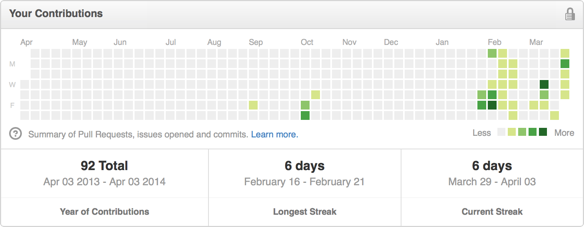
I have been working on a side project for the last while which needs a view like this so I decided to create my own. I ended up spending a lot of time in the NSCalendar and NSDateComponents classes which I had never used before. Here’s how it turned out:
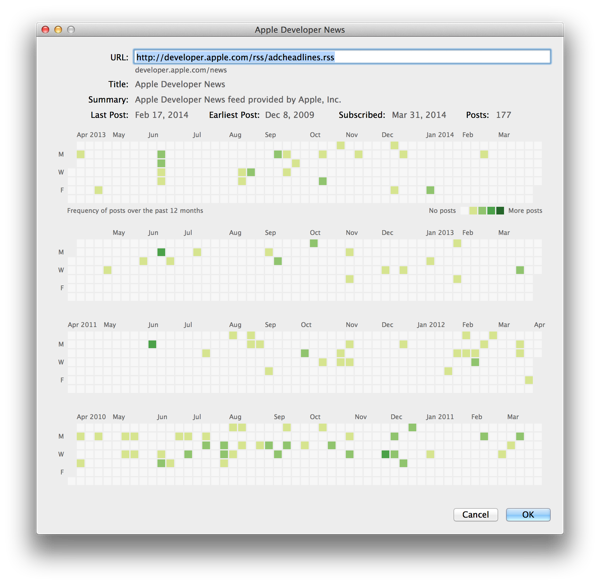
The code is available here.


-
Robotron 2084
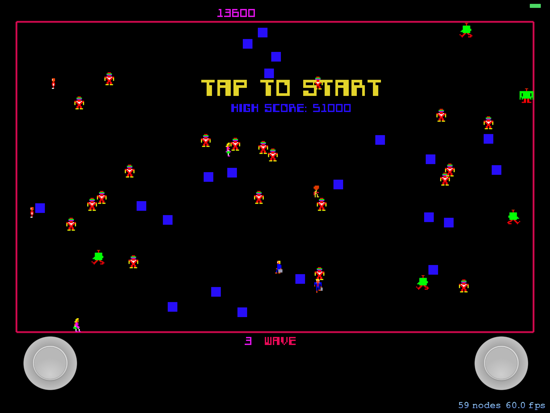
For personal reasons, I have not been particularly productive over the last couple of years. This has been deeply frustrating to me, and at the suggestion of my friend Matt Neuburg I have started a series of fun development projects. The idea being to build things that I never plan to sell. Along the way, break the “writers block” I have been experiencing and learn some new stuff.
One of these projects has been an implementation of the classic Robotron 2084 video game from the 1980s for the iPad. I spent a lot of time as a youth playing this game, along with another Williams classic: Stargate, in local arcades. We became so good that we could play for hours on a single quarter, despite the game being incredibly hard.
Game Controllers
One of the key elements of Robotron was its use of two joysticks. One joystick controlled movement while the other controlled firing. I needed an analog to this for the iPad. I wanted to get as close as I could to that experience with my version of the game. After a lot of hunting, I finally found JSController project through the wonderful Cocoa Controls web site.
Initially I had no intention of creating a Mac version of the game, but when SpriteKit appeared in iOS 7 and Mac OS X Mavericks I had the opportunity to create Mac and iPad versions of the game. For this to work, I needed to get physical joysticks. I had an old LogiTech “Dual Action” USB game controller, so I set about trying to get that working. Mavericks introduced GameController.framework, but sadly that framework does not work with legacy USB controllers so I ended up turning to Dave Dribin’s DDHidLib.
SpriteKit
When I began this project, we had iOS 6. I was hunting for a simple 2D graphics framework on which to build my game. Cocos2D for iPhone seemed like the most mature of the free offerings, but somehow its complexity kept me at bay. I did a few experiments with it, but in the end it didn’t take hold.
Time passed and with the release of iOS 7, Apple introduced SpriteKit. It took me a while to notice SpriteKit, but I finally began working with it, and was successful in bringing up a few quick proof-of-concept tests. SpriteKit had the advantage of supporting both iOS and Mac OS X (much as Cocos2D does), so the idea of creating a Mac version of my game began to work in my brain.
Its been many years since I’ve written a game, so I won’t pretend that I can judge game frameworks in any meaningful way. However, I must say that SpriteKit was perfect for what I was trying to do. Getting 2D sprites onto the screen, moving them around, and playing sounds is trivial. I was on my way.
Reconstructing an Old Game
It turns out that a lot of people have spent a lot of time trying to reconstruct the Robotron game logic. They have gone so far as decompiling the original ROM code hoping to figure out exactly why the various enemies move the way they do.
For my attempt, I downloaded a couple of videos of people playing the game from YouTube, and set about reconstructing the logic as best I could. This is tough because there is a lot going on in Robotron that appears to be fairly random, but there are patterns if you watch long enough. However, with the videos and my memories of playing the game, I was able to recreate the game logic for several of the enemies.
The web also provided a lot of resources for reconstructing the sprite images used in the game. I’m sure I’m breaking copyright rules by using this imagery, but since its a personal project I decided to go ahead anyway. For game sounds, I extracted audio from the YouTube videos I downloaded using iMovie and Audacity.
Conclusion
While the project is still very much a work in progress, it is playable through to level 5 and incredibly hard. Its fun, and I’ve learned a lot along the way. It has been nice to be able to create new code with relative ease after such a long time of feeling blocked.
Along the way, Ive discovered some non-obvious things about SpriteKit which I hope to write about in future blog posts.
I have to thank Matt again for encouraging me to move forward with projects like this. It has been a real help to me as I persevere with a difficult period in my life.
Download
If you want to give the game a go and you are handy with Xcode, you can download the source code for the game from GitHub:

subscribe via RSS