-
Script Debugger 4.5.7
I’m pleased to announce the release of Script Debugger 4.5.7. Script Debugger 4.5.7 is a free maintenance release that addresses a series of issues that came to light following the release of Script Debugger 4.5.
Among the changes in the Script Debugger 4.5.7 maintenance release is a fix for crashing bug when opening or creating documents on Mac OS X 10.7 (Lion).
A big thank you to all the folks who downloaded the various Script Debugger 4.5.7 Beta builds. I really appreciate all the great feedback and bug reports I received.
-
Script Debugger 4.5.7b4
I am preparing another Script Debugger 4.5 maintenance release.
UPDATE: Script Debugger 4.5.7 has been released.
As was the case with Script Debugger 4.5.5 and 4.5.6, I am struggling to resolve some stability problems that appeared following the release of Mac OS X 10.6 (Snow Leopard). Resolving these issues has been very difficult as I am not been able to reproduce the crashes on my own systems.
To help me determine if I’ve resolved the stability issues (or at least improved things), please allow Script Debugger to submit ALL crash reports. I know that this may slow you down a little, but it will help me as I work to resolve the stability problems.
##Requirements
- A Script Debugger 4.5 registration number
- Intel or PowerPC Macintosh
- Mac OS X 10.6, 10.5, 10.4
##Download
Script Debugger 4.5.7b4 (12MB)
##Installation
- Quit Script Debugger if it is running
- Mount the ScriptDebugger4.5.7 disk image
- Copy the Script Debugger 4.5 application from the disk image to your Applications folder (or any other place on your disk)
- Restart your Macintosh to ensure all caches are flushed
I recommend keeping your copy of Script Debugger 4.5.6 around in case you need to revert to that build. Note also that this BETA build expires on October 1, 2011.
##Script Debugger 4.5.7b4 Changes
- 15112 [Crash] Script Debugger co-exists with installations of the forthcoming Script Debugger 5.0.
- 15101 [Crash] Script Debugger no longer crashes when creating new documents on Lion (Mac OS X 10.7).
##Script Debugger 4.5.7b3 Changes
- 15108 Addressed a problem where the Dictionary/Explorer control in the Dictionary window was not updated to ‘Dictionary’ following a search.
- 14862 Added support for ASObjC scripts by allowing ‘class “ClassName”’ constructs to compile.
-
Script Debugger 4.5.7b2
I am preparing another Script Debugger 4.5 maintenance release.
UPDATE: Script Debugger 4.5.7 has been released.
As was the case with Script Debugger 4.5.5 and 4.5.6, I am struggling to resolve some stability problems that appeared following the release of Mac OS X 10.6 (Snow Leopard). Resolving these issues has been very difficult as I am not been able to reproduce the crashes on my own systems. The Script Debugger 4.5.7b2 build addresses some additional problems that I hope will further improve stability.
To help me determine if I’ve resolved the stability issues (or at least improved things), please allow Script Debugger to submit ALL crash reports. I know that this may slow you down a little, but it will help me as I work to finally resolve the stability problems.
##Requirements
- A Script Debugger 4.5 registration number
- Intel or PowerPC Macintosh
- Mac OS X 10.6, 10.5, 10.4
##Download
Script Debugger 4.5.7b2 (12MB)
##Installation
- Quit Script Debugger if it is running
- Mount the ScriptDebugger4.5.7 disk image
- Copy the Script Debugger 4.5 application from the disk image to your Applications folder (or any other place on your disk)
- Restart your Macintosh to ensure all caches are flushed
I recommend keeping your copy of Script Debugger 4.5.6 around in case you need to revert to that build. Note also that this BETA build expires on July 1, 2011.
##Script Debugger 4.5.7b2 Changes
- 15107 Script Debugger no longer attempts to compile scripts when saving changes to an existing Text (.applescript) document.
- 15106 Script Debugger no longer causes AppleScript to convert “reference” to “specifier” when compiling scripts.
- 14862 Added support for ASObjC scripts by allowing ‘class “ClassName”’ constructs to compile.
-
Script Debugger 4.5.7b1
I am preparing another Script Debugger 4.5 maintenance release.
UPDATE: Script Debugger 4.5.7 has been released.
As was the case with Script Debugger 4.5.5 and 4.5.6, I am struggling to resolve some stability problems that appeared following the release of Mac OS X 10.6 (Snow Leopard). Resolving these issues has been very difficult as I am not been able to reproduce the crashes on my own systems. The Script Debugger 4.5.7b1 build addresses some additional problems that I hope will further improve stability.
To help me determine if I’ve resolved the stability issues (or at least improved things), please allow Script Debugger to submit ALL crash reports. I know that this may slow you down a little, but it will help me as I work to finally resolve the stability problems.
##Requirements
- A Script Debugger 4.5 registration number
- Intel or PowerPC Macintosh
- Mac OS X 10.6, 10.5, 10.4
##Download
##Installation
- Quit Script Debugger if it is running
- Mount the ScriptDebugger4.5.7 disk image
- Copy the Script Debugger 4.5 application from the disk image to your Applications folder (or any other place on your disk)
- Restart your Macintosh to ensure all caches are flushed
I recommend keeping your copy of Script Debugger 4.5.6 around in case you need to revert to that build. Note also that this BETA build expires on May 1, 2011.
##Script Debugger 4.5.7b1 Changes
- 15090 [CRASH] Resolved a bug in the Balance command that could result in crashes if compound AppleScript statements (tell x to y, if x then y) appear within a block style comment.
- 15094 [CRASH] Another attempt to resolve the intermittent crashes which began with the release of Mac OS X 10.6 (Snow Leopard).
- 15093 Resolved a problem where the Dictionary window fails to display dictionary descriptions for multiple items selected from the browser.
- 15092 Resolved a problem where application bundles saved as 32-bit appear as PowerPC applications in the Finder.
- 15091 Fixed a typo in the property definition clipping.
-
AppleScriptObjC Explored 2.0
Shane Stanley has just released version 2 of AppleScriptObjC Explored, his book documenting Apple’s AppleScriptObjC (the successor to AppleScript Studio).
Shane’s book has become the most comprehensive documentation for AppleScriptObjC available. If you are attempting to use AppleScriptObjC to put a User Interface around your AppleScript code, this is a resource you must look into.
-
NSBrowser, NSTreeController, bindings, and displaying images
After much searching in Google, I found that there was no obvious solution to displaying images along with text in an NSBrowser when you are using NSTreeController and bindings to populate the browser.
Part of the problem is that you cannot easily use an NSBrowser delegate if you are also using bindings and an NSTreeController to drive the browser (at least on Mac OS X 10.6). For instance, you are prevented from using the
-[NSBrowser browser:willDisplayCell:atRow:row column:column]delegate method to customize the cell presentation as you might do in an NSTableView or NSOutlineView.I worked around this problem using a custome cell approach. When you bind the Browser’s Content Values binding to the NSTreeController, NSTreeController calls the browser cell’s setObjectValue: method. If you subclass NSBrowserCell and override setObjectValue:, you can assign the cell’s text and image. Here’s my NSBrowserCell subclass:
@interface MyBrowserCell : NSBrowserCell { }

- (void) setObjectValue:(id) value;

@end

@implementation MyBrowserCell

- (void) setObjectValue:(id) value {
    if ([value isKindOfClass:[NSDictionary class]]) {
        [self setStringValue:[value valueForKey:@"name"]];
        [self setImage:[value valueForKey:@"image"]];
    }
    else
        [super setObjectValue:value];
}

@end
Next, you need to configure the NSBrowser to use this cell. The simplest way to accomplish this is with NSBrowser’s setCellClass: method:
[browserView setCellClass:[MyBrowserCell class]];Finally, you need to make your bindings model return a value that’s appropriate for MyBrowserCell. Here’s my nodel’s value getter method which is bound to the NSBrowser Content Values binding:
- (id) browserValue {
    return [NSDictionary dictionaryWithObjectsAndKeys:
                            [self browserName], @"name",
                            [self browserImage], @"image",
                            nil];
}
Note that you’ll need to make sure that will/didChangeValueForKey messages are sent for browserValue when browserName or browserImage change.
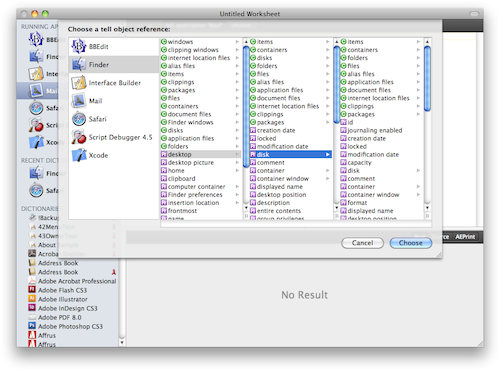
Here’s the result in my application:

subscribe via RSS