-
A Better Text Find & Replace User Interface
I have never been happy with the Text Find & Replace panel in my applications (Script Debugger and Affrus). I started with a version of the Find panel that first appeared in Apple’s Text Edit and many other early Mac OS X applications. Here’s an example from the currently shipping version of Script Debugger 4.5:
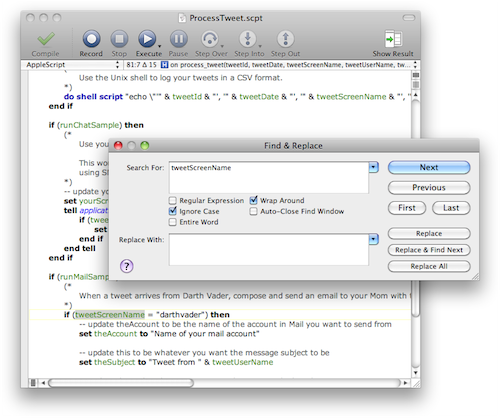
The problem here is that the user has to switch their focus away from the text they are editing to the Find & Replace panel. They have to manage the Find panel window by summoning it, closing it, and moving it out of the way if the text they search for lies behind the window.
Then, Xcode came along with its Find & Replace panel integrated directly into the text editor window (similar to how Safari integrated its text search directly into the web browser window):
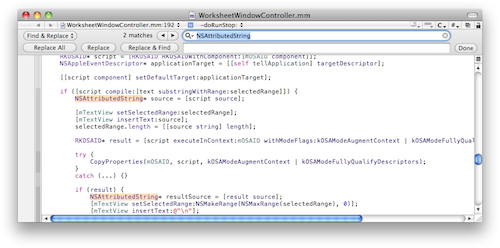
I came to admire this UI in my day-to-day development and copied it for Affrus 2. However, very quickly my Tech Writer and collaborator Matt Neuburg complained that he didn’t like it because he could not easily see or control the find options (Regular Expressions, Match Words, Ignore Case, etc.). I had a search field popup menu that provided access to these features, but it was not obvious and was clumsy to use. To solve this problem I expanded the inline find panel a little to make these options visible and easily changed. Here’s how this appears in Affrus 2 Alpha:
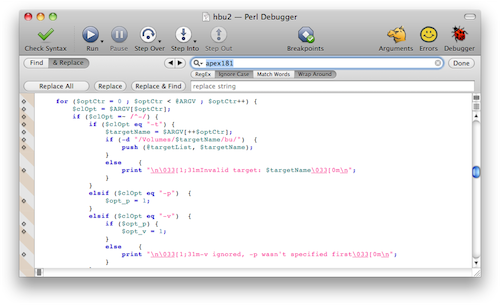
The problem here is that the inline Find & Replace panel is starting to use up too much valuable vertical space in the window and there are a lot of tightly packed small controls that are difficult to use.
As I was working on a related problem in Script Debugger 5, I came across an idea. Script Debugger 4.5’s dictionary window has a search field in its toolbar. This search field includes a popup menu where the user can control the scope of the search:
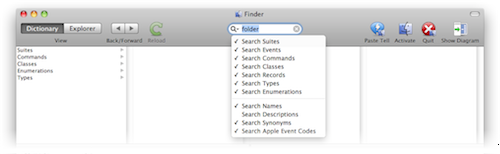
This UI was a total failure. The users who were lucky enough to discover these search options found the menu difficult to use as they had to make several trips through the menu to configure the search.
I came across Matt Gemmell’s MAAttachedWindow NSWindow implementation which gave me the idea of placing the search options in a window that only appears when keyboard focus is in the search field:
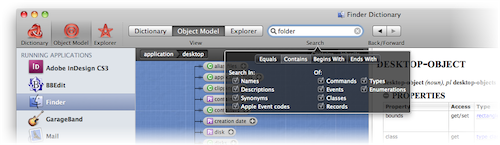
While I still am not totally happy with the popup window’s appearance and reability, its functionally is dramatically better than the Script Debugger 4.5 approach. The problem of users failing to discover these options totally goes away.
Applying this design to the inline Text Find & Replace, I came up with this:
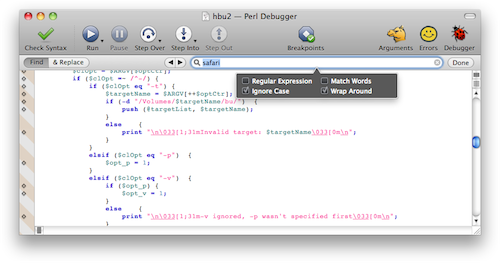
This design seems to allow one to have a minimalist Find & Replace panel within an editing window while still offering a usable and discoverable range of search options to the user.


-
Script Debugger 5: Dictionary Redesign Prototype
I have been plugging away at a redesign of the Script Debugger 5 dictionary window, and by extension the value viewer that appears throughout the Script Debugger user interface.
The focus of the redesign is to remove the need for multiple windows unless you want them, to simplify navigation between dictionaries and through large dictionaries/object models, and to take better advantage of wide-screen displays. I’ve also tried to modernize Script Debugger’s appearance and make the presentation of dictionary information more consistent.
Rather than say too much more I’ll leave you to check out the screencast and just say that this is a very rough cut at what may or may not appear in Script Debugger 5. All icons are placeholders, etc, etc.
Best viewed full-screen at 720p
I realize that you may not be able to say too much without being able to actually use the software, but I’m very interested in feedback on the changes. In particular, are there obvious omissions/problems? Am I heading in the right direction or is this the wrong thing.
-
SourceListView II
Some time ago I published sample code illustrating how to implement a Source List view that mimicked the Source List displays found in iTunes and the Finder. I was surprised to discover how widely my sample code was linked to by others.
With the release of Leopard, Apple has added the ability to build Source List displays directly into NSTableView/NSOutlineView. I have updated my sample code to take advantage of the changes Apple has made. This reduces the amount of work I have to do and allows the sample code to adopt any cosmetic changes Apple may introduce in the future.
Download SourceListII Sample Code

I hope you find this code useful.
-
Affrus 2.0 Alpha
I’m pleased to announce that the first Affrus 2.0 Alpha build is ready for testing. For those unfamiliar with this software, Affrus 2.0 is an editing and debugging environment that makes Perl and Ruby script development productive by keeping things simple.
In recognition of your patience and invaluable input, Affrus 2.0 Alpha builds are initially available only to our existing Affrus 1.0 customers. In order to join the Affrus 2.0 testing program you will need an Affrus 1.0 registration number and a Macintosh that runs Mac OS X 10.6 or later. Affrus 2.0 presently supports Perl versions 5.8.9 and 5.10.0, as shipped by Apple with Mac OS X 10.6. To join the Affrus 2.0 testing program, send your request, along with your Affrus 1.0 registration number, to support@latenightsw.com.
While I set out on this journey to primarily make Affrus 2.0 compatible with Snow Leopard, I could not resist adding a whole host of new features to really take things up a few notches. Some of these include:
- Fully native Mac OS X user interface
- Many Script Debugger 4.5 derived text editor features
- Split pane editing
- Viewing options
- Editing aids
- Simplified debugger window layout (less wasted space)
- Edit while debugging
- Inline Find/Replace with Regular Expression support
- Debugger Console accepts user input (In Affrus 1.0, the Console could only display script output; in Affrus 2.0 you can type into the Console when a script requests input.)
- Debugger Console can appear in a separate window (frequent Affrus 1.0 feature request)
- Regular Expression Tester window
- Multi-languages including Perl, Ruby, and others in future (frequent Affrus 1.0 feature request)
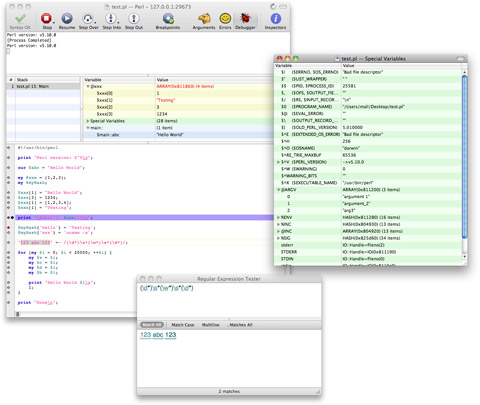
Keep in mind that this is an Alpha build so while it’s certainly functional, it’s not complete. Expect bugs and missing features. I ask that you decide if you can cope with the inevitable inconveniences that using an Alpha build presents before you download it. You may also notice that certain Affrus 1.0 features are missing. This is temporary. Missing features will be added back as I work towards a Beta version of Affrus 2.0. In exchange for this inconvenience, you get a chance to influence Affrus 2.0 as it nears completion.
I really appreciate the support you’ve all shown during the development of this new version of Affrus. I’ve always been focused on the needs of my fellow developers and strive to make the best tools possible. I believe that Affrus 2.0, when complete, will not disappoint.

-
Script Debugger 4.5.6
UPDATE: I have released Script Debugger 4.5.6 which resolves a license limit exceeded error that effected some users. In all other ways, 4.5.6 is identical to 4.5.5.
I’m pleased to announce the release of Script Debugger 4.5.5. Script Debugger 4.5.5 is a free maintenance release that addresses a series of issues that came to light following the release of Script Debugger 4.5.
This maintenance release attempts to resolve the stability problems that some Script Debugger users have experienced on Snow Leopard. While I have made progress improving stability, there is still more to be done. This maintenance release addresses a number of other important issues so I decided to make these fixes available now rather than hold the release back while I continue resolving the stability problems.
A big thank you to all the folks who downloaded the various Script Debugger 4.5.5 Beta builds. I really appreciate all the great feedback and bug reports I received.
-
Scripting Additions Updated
After an extremely long gestation in Beta I’ve released 64-Bit Intel compatible versions of the following Scripting Additions:
-
Script Debugger 4.5.5b6
UPDATE: Script Debugger 4.5.5 has been released.
I am preparing another Script Debugger 4.5 maintenance release.
I have been struggling to resolve some stability problems ever since the release of Script Debugger 4.5. Resolving these issues has been very difficult as I’ve not been able to reproduce several of the crashes on my own systems. The Script Debugger 4.5.5b3, b4 and b5 releases have resolved several crashes, but some problems remain. The Script Debugger 4.5.5b6 build addresses some additional problems that I hope will further improve stability.
To help me determine if I’ve resolved the stability issues (or at least improved things), please allow Script Debugger to submit ALL crash reports. I know that this may slow you down a little, but it will help me as I work to finally resolve the stability problems.
##Requirements
- A Script Debugger 4.5 registration number
- Intel or PowerPC Macintosh
- Mac OS X 10.6, 10.5, 10.4
##Download
Script Debugger 4.5.5b6 (11.4MB)
##Installation
- Quit Script Debugger if it is running
- Mount the SD4.5.5 disk image
- Copy the Script Debugger 4.5 application from the disk image to your Applications folder (or any other place on your disk)
- Restart your Macintosh to ensure all caches are flushed
I recommend keeping your copy of Script Debugger 4.5.4 around in case you need to revert to that build. Note also that this BETA build expires on September 1, 2010.
##Script Debugger 4.5.5b6 Changes
- 14907 [Crash] Improved the Explorer to protect against some more instances where the UI thread may be accessing data while background threads are altering the data.
- 14927 The Script Debugger 4.0 OSA component is removed if it is still present to avoid the possibility of memory corruptions that might destabilize Script Debugger 4.5.
- 14928 Script Debugger auto-saves documents each time they are compiled. This may slow things down slightly, but it will improve Script Debugger’s ability to recover the contents of open documents in the event of a crash. Previously, Script Debugger auto-saved only before a document was executed.
- 14926 When exporting a Run-Only script over an existing file, Script Debugger ensures that pre-eisting recovery and QuickLook preview data is removed.
- 14925 This change addresses a regression in bug 14881. Script Debugger no longer reports 32-bit scripting addition warnings for StandardAdditions.osax when saving on 32-bit machines as StandardAdditions.osax will always be fully compatible with the host hardware. Script Debugger now only does 32-bit scripting addition checking when running on Mac OS X 10.6 or later.
- 14885 FontSyncScripting.app is no longer mistaken as a Scripting Addition.
-
Script Debugger 4.5.5b5
UPDATE: Script Debugger 4.5.5b6 has been released.
I am preparing another Script Debugger 4.5 maintenance release.
I have been struggling to resolve some stability problems ever since the release of Script Debugger 4.5. Resolving these issues has been very difficult as I’ve not been able to reproduce several of the crashes on my own systems so I’m debugging in the blind. The Script Debugger 4.5.5b3 and b4 releases have resolved several crashes, but some problems remain. The Script Debugger 4.5.5b5 build addresses two additional crashes.
To help me determine if I’ve resolved the stability issues (or at least improved things), please allow Script Debugger to submit ALL crash reports. I know that this may slow you down a little, but it will help me as I work to finally resolve the stability problems.
##Requirements
- A Script Debugger 4.5 registration number
- Intel or PowerPC Macintosh
- Mac OS X 10.6, 10.5, 10.4
##Download
Script Debugger 4.5.5b5 (11.4MB)
##Installation
- Quit Script Debugger if it is running
- IMPORTANT Delete all copies of Script Debugger.component and Script Debugger 4.5.component from your ~/Library/Components folder
- Mount the SD4.5.5 disk image
- Copy the Script Debugger 4.5 application from the disk image to your Applications folder (or any other place on your disk)
- Restart your Macintosh to ensure all caches are flushed
I recommend keeping your copy of Script Debugger 4.5.4 around in case you need to revert to that build. Note also that this BETA build expires on September 1, 2010.
##Script Debugger 4.5.5b5 Changes
- 14907 [Crash] Improved the Explorer to protect against some more instances where the UI thread may be accessing data while background threads are altering the data.
- 14899 [Crash] Resolved a bug that caused Script Debugger to crash when AppleScript reports error text ranges that lie beyond the end of the script. This happens most commonly when you have an unclosed quoted string within a block comment.
-
Script Debugger 4.5.5b4
UPDATE: Script Debugger 4.5.5b5 has been released.
I am preparing another Script Debugger 4.5 maintenance release.
I have been struggling to resolve some stability problems ever since the release of Script Debugger 4.5. The rate of crash reports has diminished significantly with the Script Debugger 4.5.5b3 beta build, but I’m still getting a few crashes. This new beta build contains fixes for a few more instances where AppleScript may be causing crashes.
To help me determine if I’ve actually solved the stability issues (or at least improved things), please allow Script Debugger to submit all crash reports. I know that this may slow you down a little, but it will help us all as I work to finally resolve the stability problems.
##Requirements
- A Script Debugger 4.5 registration number
- Intel or PowerPC Macintosh
- Mac OS X 10.6, 10.5, 10.4
##Download
Script Debugger 4.5.5b4 (11.4MB)
##Installation
- Quit Script Debugger if it is running
- IMPORTANT Delete all copies of Script Debugger.component and Script Debugger 4.5.component from your ~/Library/Components folder
- Mount the SD4.5.5 disk image
- Copy the Script Debugger 4.5 application from the disk image to your Applications folder (or any other place on your disk)
I recommend keeping your copy of Script Debugger 4.5.4 around in case you need to revert to that build. Note also that this BETA build expires on September 1, 2010.
##Script Debugger 4.5.5b4 Changes
- 14898 More changes that attempt to resolve Script Debugger’s stability issues (Please ensure you have deleted all old copies of Script Debugger.component and Script Debugger 4.5.component from your ~/Library/Components folder).
-
Affrus 2.0 Status Update
The release of Mac OS X 10.6 (Snow Leopard) has rendered Affrus 1.0 unusable. Over the last few years I’ve done little with the Affrus Perl debugger and I get regular queries about what is happening with the product.
After several attempts to make Affrus 1.0 work on later Snow Leopard, I gave up. Affrus 1 was built using CodeWarrior and Carbon and the transition to Xcode and modern versions of Carbon proved too difficult. However, I can report that over the last few months, work has resumed on Affrus 2.0 which is a re-implementation of Affrus using Xcode and Cocoa.
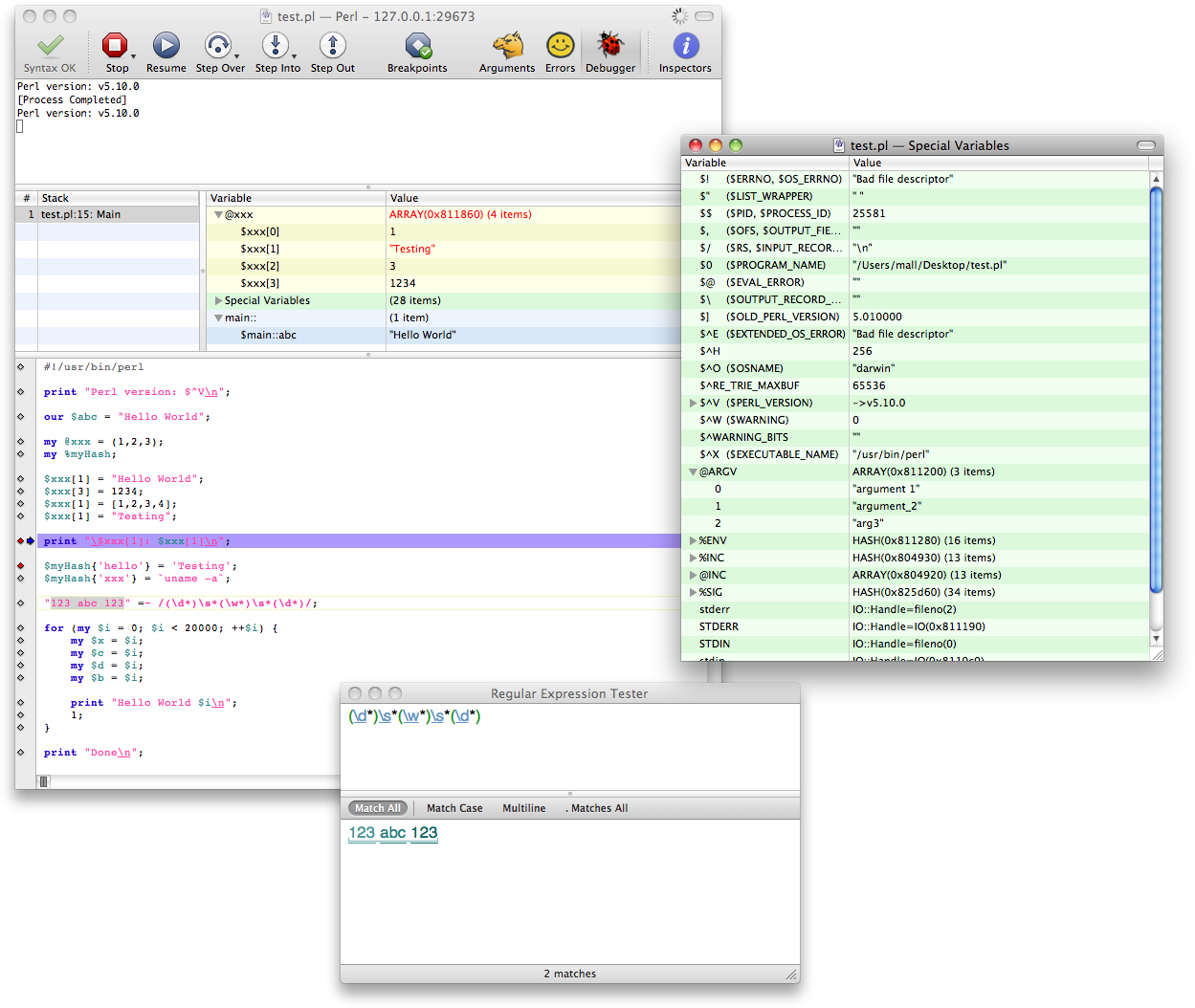
Here’s a screenshot of the work to date running on Snow Leopard:
I am being deliberately circumspect about describing the product’s features and system requirements to avoid breaking any promises when the product is finally released.
I am not yet at a point where I feel comfortable inviting Beta testers to use the product, but it won’t been too much longer.
UPDATE: Affrus 2.0 has gone Alpha


-
Script Debugger 4.5.5b3
UPDATE: Script Debugger 4.5.5b4 has been released.
I am preparing another Script Debugger 4.5 maintenance release.
I have been struggling to resolve some stability problems ever since the release of Script Debugger 4.5. I thought I had these problems resolved a couple of times, but they persist. With the release of Mac OS X 10.6 they seem to have gotten worse.
For the Script Debugger 4.5.5 maintenance release I want to try and resolve these stability issues once and for all. The difficulty is that I cannot reproduce any of these crashes here on my systems, and the crash reports that I receive don’t point to any obvious causes.
I had a bit of luck and was able to find and resolve some memory management errors in Script Debugger which may have contributed to the problem. I’ve also identified a problem in AppleScript that may also be contributing to the stability issues.
To help me determine if I’ve actually solved the stability issues (or at least improved things), please allow Script Debugger to submit all crash reports. I know that this may slow you down a little, but it will help us all as I work to finally resolve the stability problems.
##Requirements
- A Script Debugger 4.5 registration number
- Intel or PowerPC Macintosh
- Mac OS X 10.6, 10.5, 10.4
##Download
Script Debugger 4.5.5b3 (11.4MB)
##Installation
- Quit Script Debugger if it is running
- IMPORTANT Delete all copies of Script Debugger.component and Script Debugger 4.5.component from your ~/Library/Components folder
- Mount the SD4.5.5 disk image
- Copy the Script Debugger 4.5 application from the disk image to your Applications folder (or any other place on your disk)
I recommend keeping your copy of Script Debugger 4.5.4 around in case you need to revert to that build. Note also that this BETA build expires on September 1, 2010.
##Script Debugger 4.5.5b3 Changes
- 14898 Several changes that attempt to resolve Script Debugger’s stability issues and reduce memory leakage when closing documents (Please ensure you have deleted all old copies of Script Debugger.component and Script Debugger 4.5.component from your ~/Library/Components folder).
- 14886, 14151 Corrected a series of issues that prevented the Manifest command from properly detecting AppleEvents sent to applications. Note that these fixes also restore Script Debugger’s ability to detect which applications will be launched when opening scripts.
- 14885 FontSyncScripting.app is no longer mistaken as a Scripting Addition.
- 14884 Script Debugger’s logic for opening scripts with incorrect filename extensions has been improved. For instance, compiled scripts carrying a ‘.applescript’ extension will open correctly (.applescript normally indicates a plain text file).
- 14881 A new 32-Bit Only option has been added to the Save As panel allowing you to create 32-Bit applets directly from Script Debugger (this avoids having to visit the Finder’s Get Info window to select the 32-Bit Only execution option).
- 14853 Script Debugger can now open the iCal dictionary and any other application dictionaries which make use of xinclude directives.
- 14883 Script Debugger now reports error information in the AppleEvent Log window.
-
Script Debugger 4.5.4
I’m pleased to announce the release of Script Debugger 4.5.4. Script Debugger 4.5.4 is a free maintenance release that addresses a series of issues that came to light following the release of Script Debugger 4.5.
subscribe via RSS